
Introduction
This manual provides essential instructions for the safe installation, operation, and maintenance of your Aurabeam XL-5200 replacement projector lamp. This lamp is designed for use with compatible Sony KDS-series rear projection televisions. Please read this manual thoroughly before proceeding with installation or maintenance.
Safety Information
- Power Disconnection: Always disconnect the television from the power outlet before attempting any installation or maintenance.
- Cooling Period: Allow the television and the old lamp to cool down completely (at least 30 minutes) before handling. Lamps operate at high temperatures and can cause burns.
- Handle with Care: Projector lamps contain glass components. Handle the lamp module carefully to avoid breakage. Do not touch the bare bulb glass with your fingers, as oils can reduce lamp life.
- Proper Disposal: Dispose of the old lamp according to local regulations. Some lamps may contain mercury.
- Ventilation: Ensure the television's ventilation openings are not blocked to prevent overheating, which can shorten lamp life.
Setup: Lamp Installation
Follow these steps to replace the projector lamp in your compatible Sony KDS-series television. Refer to your television's original user manual for specific details regarding the lamp compartment location and removal procedures.
- Prepare the TV: Turn off the television and unplug it from the power outlet. Allow the TV and the old lamp to cool down for at least 30 minutes.
- Locate Lamp Compartment: Identify the lamp access panel on your television. This is typically located on the back or side of the TV.
- Remove Access Panel: Unscrew and remove the lamp access panel cover. Set the screws aside in a safe place.
- Remove Old Lamp: Carefully unlatch or unscrew the old lamp module from its housing. Gently pull the old lamp module straight out. Avoid forcing it.
- Insert New Lamp: Unpack the new Aurabeam XL-5200 lamp module. Hold it by its plastic housing and carefully slide it into the lamp compartment until it is firmly seated. Ensure it clicks into place or is secured by its screws.
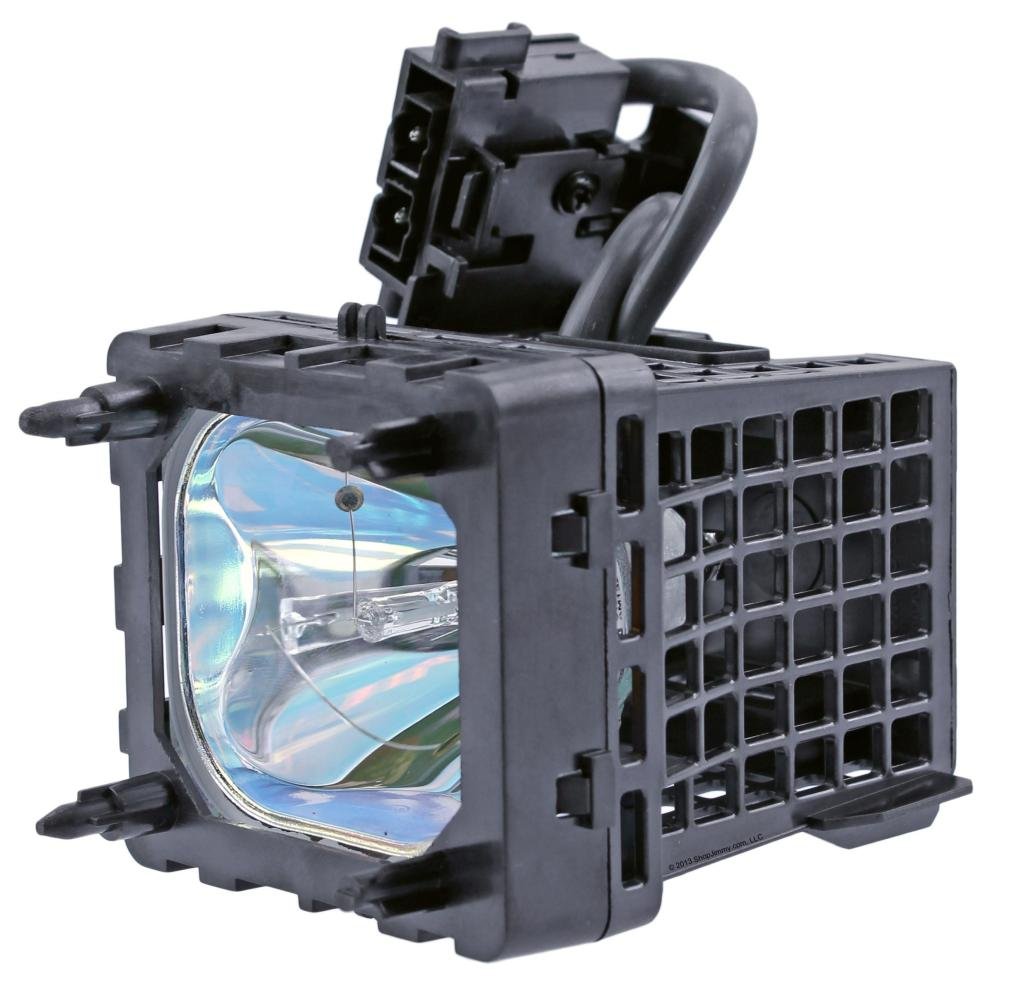
Image: Aurabeam XL-5200 Replacement Projector Lamp Module. This image shows the complete lamp module with its housing and electrical connector.
- Secure and Close: Re-secure any latches or screws holding the new lamp module. Replace the lamp access panel cover and fasten its screws.
- Reconnect Power: Plug the television back into the power outlet.
Operating: Resetting the Lamp Timer
After installing a new lamp, it is crucial to reset the lamp timer in your television's menu. This ensures accurate tracking of lamp usage and prevents premature warnings or shutdowns. Consult your Sony KDS-series TV's original user manual for the exact steps to access and reset the lamp timer, as this procedure varies by model. Typically, this is found in the 'Picture Settings', 'Setup', or 'Maintenance' menu.
Maintenance
- Dust Removal: Periodically clean the air vents and the area around the lamp compartment using a vacuum cleaner with a brush attachment. This helps maintain proper airflow and prevents dust buildup, which can affect lamp performance and lifespan. Do not use compressed air inside the TV, as this can push dust further into optical components.
- Avoid Touching Bulb: Do not touch the glass part of the lamp with bare hands. If accidental contact occurs, gently wipe the bulb with a clean, lint-free cloth moistened with isopropyl alcohol.
- Ventilation: Ensure the television has adequate space around it for proper ventilation. Do not block air intake or exhaust vents.
Troubleshooting
- No Picture or Dim Picture:
- Verify the lamp module is fully seated and secured in its compartment.
- Ensure the lamp access panel is correctly closed and screwed in.
- Confirm the lamp timer has been reset in the TV's menu.
- Check all power connections to the television.
- Lamp Indicator Light Flashing: This typically indicates that the lamp is nearing the end of its life or there is an issue with the lamp or its installation. If a new lamp is installed, recheck installation steps and ensure the lamp timer is reset. If the issue persists, consult your TV's manual for specific error codes.
- Unusual Noise: If you hear unusual noises after lamp replacement, power off the TV immediately and recheck the lamp installation. Ensure no wires are pinched and the lamp module is securely fastened.
For further troubleshooting, refer to your Sony KDS-series television's original user manual or contact customer support.
Specifications
| Brand | Aurabeam |
| Model Number | XL-5200 |
| Compatible TV Models | Sony KDS-50A2000, KDS-50A2020, KDS-50A3000, KDS-55A2000, KDS-55A2020, KDS-55A3000, KDS-60A2000, KDS-60A2020, KDS-60A3000 |
| Wattage | 40 watts |
| Voltage | 240 Volts |
| Light Source Type | Projector lamps |
| Product Dimensions | 6 x 6 x 6 inches |
| Item Weight | 8 ounces |
| UPC | 712407543850 |
| Date First Available | March 5, 2015 |
Warranty
This Aurabeam XL-5200 replacement projector lamp comes with a 150-day warranty from the date of purchase. This warranty covers manufacturing defects. Please retain your proof of purchase for warranty claims. For specific terms and conditions, refer to the warranty information provided at the time of purchase or contact the retailer.
Support
If you encounter any issues not covered in this manual or require further assistance, please contact the retailer where you purchased the lamp or visit the official Aurabeam website for support resources. When contacting support, please have your product model number (XL-5200) and television model number readily available.