
Introduction
This manual provides instructions for the setup, operation, and maintenance of your Sunsonny SM-8610-6D Wired USB Optical Gaming Mouse. Please read this manual thoroughly before using the product to ensure proper functionality and longevity.
The Sunsonny SM-8610-6D is a high-performance wired optical mouse designed for desktop and laptop users. It features adjustable DPI settings, multiple programmable buttons, and an ergonomic design for comfortable long-term use.
Package Contents
- 1 x Sunsonny SM-8610-6D Wired USB Optical Gaming Mouse
- 1 x Mousepad (included as gift)
Product Overview
The Sunsonny SM-8610-6D mouse features a streamlined appearance with cool colorful LED lighting. Its surface combines stoving varnish, metallic texture, and skin-friendly technology for excellent tracking and comfortable grip.

Figure 1: Angled view of the Sunsonny SM-8610-6D mouse, highlighting its golden and red color scheme and illuminated details.

Figure 2: Front view of the Sunsonny SM-8610-6D mouse, displaying the central scroll wheel and the DPI adjustment button.
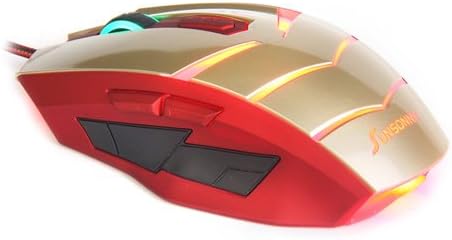
Figure 3: Side view of the Sunsonny SM-8610-6D mouse, illustrating the placement of the two side buttons for enhanced control.
Key Features:
- High Resolution: Up to 1800 DPI, with adjustable settings (600/1200/1800 DPI).
- 6 Buttons: Includes left, right, scroll wheel, DPI switch, and two side buttons.
- Ergonomic Design: Engineered for comfortable long-term use without fatigue.
- Plug and Play: Intelligent connectivity, no driver installation required.
- Durable Construction: Mouse shell made of high-density ABS material, resistant to pressure, drops, abrasion, and corrosion.
- Long Switch Life: Rated for 5 million cycles.
Setup
- Unpack the Mouse: Carefully remove the Sunsonny SM-8610-6D mouse and the included mousepad from their packaging.
- Connect to Computer: Locate an available USB port on your desktop or laptop computer.
Insert the USB connector of the mouse firmly into the USB port.

Figure 4: The USB connector of the Sunsonny SM-8610-6D mouse.
- Automatic Driver Installation: The mouse is plug-and-play. Your operating system (Windows XP, Vista, 7, 8, ME, 2000, Mac OS, etc.) will automatically detect and install the necessary drivers. This process may take a few moments.
- Placement: Place the mouse on the included mousepad or a smooth, flat surface for optimal tracking performance.
No additional software or drivers are typically required for basic functionality.
Operating Instructions
Basic Mouse Functions:
- Left Click: Primary action, typically used for selecting items or opening links.
- Right Click: Opens context menus or secondary functions.
- Scroll Wheel: Used for scrolling up and down documents or web pages. Can also be clicked for middle-click functionality (application dependent).
Adjusting DPI (Sensitivity):
The Sunsonny SM-8610-6D mouse features a dedicated DPI switch button, usually located behind the scroll wheel. Press this button to cycle through the available DPI settings:
- 600 DPI: Lower sensitivity, suitable for precise movements.
- 1200 DPI: Medium sensitivity, general use.
- 1800 DPI: High sensitivity, ideal for fast-paced gaming or quick navigation.
The LED lighting on the mouse may change color or intensity to indicate the current DPI setting, though this is not explicitly stated in the product description.
Using Side Buttons:
The mouse is equipped with two side buttons, typically located on the left side for right-handed users. These buttons are commonly used for "Forward" and "Backward" navigation in web browsers or file explorers. Their functionality can often be customized through operating system settings or third-party software, if desired.
Maintenance
Proper maintenance ensures the longevity and optimal performance of your Sunsonny SM-8610-6D mouse.
- Cleaning:
- Use a soft, dry, lint-free cloth to wipe the surface of the mouse.
- For stubborn dirt, slightly dampen the cloth with water or a mild, non-abrasive cleaner. Avoid excessive moisture.
- Do not use harsh chemicals, solvents, or abrasive materials, as these can damage the mouse's finish.
- Periodically clean the optical sensor on the underside of the mouse with a cotton swab to ensure accurate tracking.
- Cable Care:
- Avoid sharp bends or kinks in the USB cable.
- Do not pull the mouse by its cable when disconnecting it from the computer; always grasp the USB connector.
- Storage: When not in use, store the mouse in a clean, dry environment away from extreme temperatures and direct sunlight.
Troubleshooting
| Problem | Possible Cause | Solution |
|---|---|---|
| Mouse not responding | Loose USB connection | Ensure the USB connector is fully inserted into the port. Try a different USB port. |
| Mouse not responding | Driver issue | Restart your computer. The operating system should re-detect and reinstall the drivers. |
| Erratic cursor movement | Dirty optical sensor or unsuitable surface | Clean the optical sensor on the underside of the mouse. Use the included mousepad or a clean, non-reflective surface. |
| DPI button not changing sensitivity | Software conflict or button malfunction | Ensure no other software is interfering with mouse settings. Restart the computer. If the issue persists, the button may be faulty. |
If you encounter issues not listed here, please refer to your computer's operating system help or contact customer support.
Specifications
| Feature | Detail |
|---|---|
| Model | SM-8610-6D |
| Connectivity | Wired USB |
| Movement Detection | Optical |
| DPI Settings | 600 / 1200 / 1800 DPI (Adjustable) |
| Buttons | 6 (Left, Right, Scroll Wheel, DPI Switch, 2 Side Buttons) |
| Switch Life | 5 million cycles |
| Dimensions (L x W x H) | 120 x 65 x 32 mm (approx. 4.72 x 2.56 x 1.26 inches) |
| Weight | 125g (approx. 4.41 oz) |
| Color | Golden + Red |
| Compatibility | Windows XP, Vista, 7, 8, ME, 2000, Mac OS, etc. |
Warranty and Support
For warranty information or technical support, please refer to the retailer or manufacturer's official website where the product was purchased. Keep your purchase receipt as proof of purchase.
For general inquiries or further assistance, you may also visit the Sunsonny brand page on Amazon.