
1. Introduction
The Maclean MCE34 Twilight Sensor is an advanced device designed to automatically control electrical loads, primarily lighting, based on the ambient light level. It features an external sensor, allowing for flexible installation where the main unit can be protected while the sensor is exposed to light. This manual provides essential information for the safe and effective installation, operation, and maintenance of your MCE34 Twilight Sensor.
2. Safety Information
WARNING: Risk of Electric Shock. Installation must be performed by a qualified electrician or competent person in accordance with all local electrical codes and regulations. Always disconnect power at the circuit breaker before installation or servicing.
- Ensure the power supply is disconnected before any installation, wiring, or maintenance work.
- Do not exceed the maximum load capacity of 2300W (10A).
- The main unit should be protected from humidity if the external sensor is used outdoors. The external sensor is rated IP54, providing protection against dust and splashing water.
- Do not immerse the device or its components in water.
- Keep out of reach of children.
3. Package Contents
Please check the package for the following items:
- Maclean MCE34 Twilight Sensor Unit with integrated external sensor cable
- Mounting screws and wall plugs (typically included)

Figure 3.1: Typical mounting screws and wall plugs provided with the sensor.
4. Product Features
- Automatic light control: Turns connected lighting on at dusk and off at dawn.
- Adjustable light intensity: Sensitivity can be set between <5-50 lux.
- External sensor: Allows flexible placement of the light-sensing element.
- High power capacity: Supports loads up to 2300W (10A).
- Durable design: External sensor rated IP54 for outdoor use.
- Versatile application: Ideal for street lights, garden lights, corridor lighting, and other electrical appliances.
5. Specifications
| Parameter | Value |
|---|---|
| Power Source | 220-240 V/AC |
| Power Frequency | 50 Hz |
| Max Load Current | 10 A |
| Max Load Power | 2300 W |
| Light Intensity (Adjustable) | <5-50 lux |
| Operating Temperature | -20°C to +40°C |
| Operating Humidity | <93% RH |
| Protection Rating (External Sensor) | IP54 |
| Dimensions (Main Unit) | 8 x 6 x 3 cm |
| Weight | 60 grams |

Figure 5.1: Detailed dimensions of the MCE34 Twilight Sensor unit and its external sensor cable.
6. Setup and Installation
Follow these steps carefully for proper installation:
- Disconnect Power: Before starting any electrical work, ensure the main power supply to the circuit is turned off at the circuit breaker or fuse box. Verify with a voltage tester.
- Choose Mounting Location: Select a suitable location for the main sensor unit. If the external sensor is to be placed outdoors, ensure the main unit is installed in a dry, protected area, such as an electrical box or inside a building. The external sensor should be placed where it can accurately detect ambient light without being obstructed by shadows or direct artificial light sources.
- Mount the Unit: Use the provided screws and wall plugs to securely mount the main sensor unit to a stable surface.
- Wiring Connections: Refer to the wiring diagram below. Connect the wires as follows:
- Brown Wire (Input Live): Connect to the Live (L) terminal of your power supply (220-240V AC).
- Blue Wire (Input Neutral): Connect to the Neutral (N) terminal of your power supply. This wire also serves as the Neutral for the load.
- Red Wire (Output Load): Connect to the Live input of your lighting fixture or other electrical load. The Neutral for the load will connect directly to the main Neutral (Blue wire).
- Secure Connections: Ensure all wire connections are tight and properly insulated.
- Position External Sensor: Route the external sensor cable to its desired outdoor or indoor location. Ensure the sensor head is exposed to natural light.
- Restore Power: Once all connections are secure and verified, restore power to the circuit.
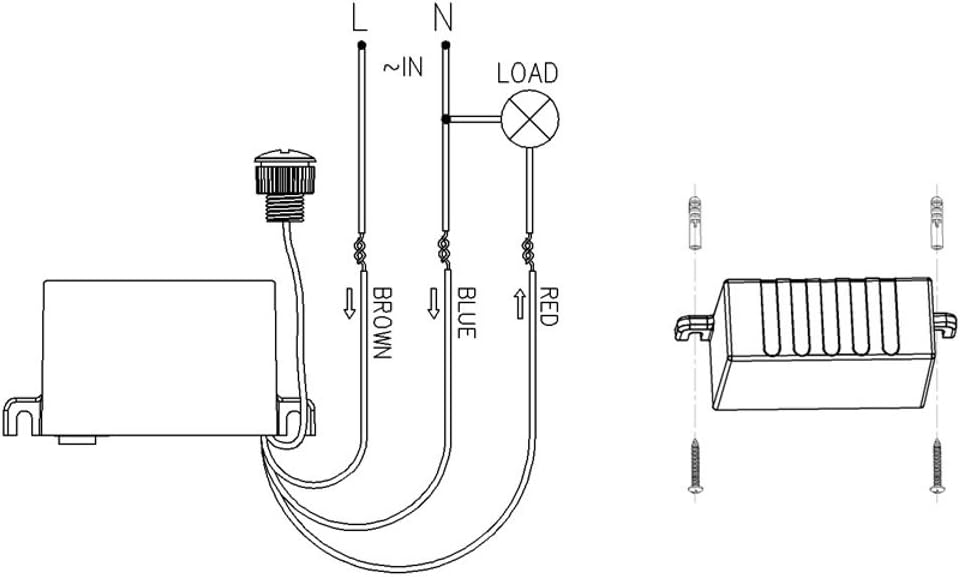
Figure 6.1: Wiring diagram showing connections for Live (Brown), Neutral (Blue), and Load (Red), along with mounting points.

Figure 6.2: Front view of the Maclean MCE34 Twilight Sensor, showing the main unit and the external light sensor.
7. Operating Instructions
The Maclean MCE34 Twilight Sensor operates automatically once installed and powered. Its primary function is to switch a connected load (e.g., lights) on or off based on the ambient light level detected by its external sensor.
7.1. Light Intensity Adjustment (LUX Setting)
The sensor features an adjustable LUX setting, typically a small knob or dial on the main unit. This allows you to set the specific light level at which the sensor will activate the connected load.

Figure 7.1: Side view of the sensor unit, highlighting the adjustable LUX knob.
- To Adjust: Use a small screwdriver or your finger to turn the knob.
- "+" (Plus) Direction: Turning towards the '+' symbol (or sun icon) increases the LUX threshold, meaning the lights will turn on when it's brighter (or turn off when it's darker). This makes the sensor less sensitive to light.
- "-" (Minus) Direction: Turning towards the '-' symbol (or moon icon) decreases the LUX threshold, meaning the lights will turn on when it's darker (or turn off when it's brighter). This makes the sensor more sensitive to light.
- Testing: After adjustment, observe the sensor's behavior over a day/night cycle to ensure it activates at your desired light level. You can simulate darkness by covering the external sensor.
The sensor is designed to be unaffected by temperature and humidity, ensuring consistent performance.
8. Maintenance
The Maclean MCE34 Twilight Sensor requires minimal maintenance. Regular checks can help ensure its longevity and optimal performance:
- Cleaning: Periodically clean the external light sensor with a soft, damp cloth to remove dust, dirt, or debris that might obstruct light detection. Do not use abrasive cleaners or solvents.
- Inspect Wiring: Annually, or if issues arise, visually inspect the wiring connections for any signs of wear, corrosion, or loosening. Ensure all connections remain secure.
- Environmental Check: Ensure the external sensor remains unobstructed and is not accidentally covered by foliage, snow, or other objects. Verify the main unit remains protected from moisture.
9. Troubleshooting
If you encounter issues with your Maclean MCE34 Twilight Sensor, refer to the following common problems and solutions:
| Problem | Possible Cause | Solution |
|---|---|---|
| Lights do not turn on at dusk. | 1. Insufficient darkness detected. 2. LUX setting too high. 3. Power supply issue. 4. Faulty wiring. 5. External sensor obstructed. | 1. Wait for darker conditions or test by covering the sensor. 2. Adjust LUX knob towards the '-' (moon) symbol. 3. Check circuit breaker and power connections. 4. Verify all wiring connections are correct and secure (refer to Section 6). 5. Clear any obstructions from the external sensor. |
| Lights do not turn off at dawn. | 1. Insufficient light detected. 2. LUX setting too low. 3. External sensor obstructed or exposed to artificial light at night. | 1. Wait for brighter conditions. 2. Adjust LUX knob towards the '+' (sun) symbol. 3. Ensure the external sensor is not covered and is not receiving light from streetlights or other artificial sources at night. Reposition if necessary. |
| Lights flicker or turn on/off erratically. | 1. Unstable power supply. 2. External sensor exposed to intermittent light/shadows. 3. Load exceeds maximum capacity. | 1. Consult an electrician to check power stability. 2. Reposition the external sensor to an area with consistent light exposure. 3. Ensure the connected load does not exceed 2300W. |
| Device is completely unresponsive. | 1. No power. 2. Incorrect wiring. 3. Internal fault. | 1. Check power supply, circuit breaker, and main connections. 2. Double-check all wiring against the diagram in Section 6. 3. If all else fails, the unit may be faulty. Contact customer support. |
10. Warranty and Support
For warranty information and technical support, please refer to the documentation provided with your purchase or contact your retailer or the manufacturer directly. Keep your proof of purchase for warranty claims.
Maclean is committed to providing high-quality products. If you have any questions or require assistance, please reach out to their customer service channels.