
Pyle PDWM2135
Pyle Dual Channel Wireless Microphone System
User Manual - Model: PDWM2135
Introduction
Thank you for purchasing the Pyle Dual Channel Wireless Microphone System. This system is designed to provide clear, reliable audio for various applications, including PA systems, karaoke, DJ parties, and presentations. With its dual-channel VHF fixed frequency design, it offers a broad audio response range and low distortion, ensuring high-quality sound performance. Please read this manual thoroughly before operating the unit to ensure proper use and to maximize its performance.
What's in the Box
Carefully unpack the contents and ensure all items are present and in good condition:
- Receiver Base
- (2) Wireless Handheld Microphones

Image showing the contents of the Pyle PDWM2135 package: the receiver base, two handheld microphones, and AA batteries.
Features
The Pyle PDWM2135 system offers a range of features for optimal performance:
- Dual Channel Operation: Allows for simultaneous use of two microphones.
- VHF Fixed Frequency: Provides stable signal transmission with broad audio response.
- Low Distortion: Ensures clear and high-quality audio output.
- Independent Mic Volume Control: Each microphone has its own volume knob on the receiver for balanced audio mixing.
- Convenient Power Switch: Both receiver and microphones feature ON/OFF switches.
- LED Status Indicators: Receiver includes LED lights for power and RF signal status.
- Dual Independent Antennas: For enhanced signal reception.
- 1/4" Mono Cable Output: Easy connection to mixers, amplifiers, or speakers.
- Portable Design: Suitable for both indoor and outdoor use.

Front view of the Pyle PDWM2135 Dual Channel Wireless Microphone System, showing the receiver base with two microphones.
Setup
Follow these steps to set up your wireless microphone system:
- Install Batteries: Open the battery compartment of each handheld microphone and insert two 'AA' batteries, ensuring correct polarity.
- Power the Receiver: Connect the receiver base to a standard AC power outlet using the integrated power cable. The Power LED on the receiver should illuminate.
- Connect to Audio System: Use a 1/4" mono cable (included) to connect the 'AUDIO OUT' jack on the back of the receiver to the microphone input of your mixer, amplifier, or powered speaker.
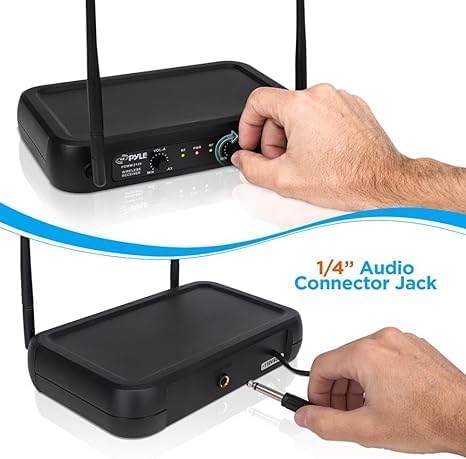
A hand connecting a 1/4-inch audio connector jack to the back of the Pyle wireless receiver.

Diagram illustrating compatibility with various devices such as PA systems, amplifiers, mixers, and karaoke machines.
Operating
Once setup is complete, you can begin using your microphone system:
- Power On Microphones: Slide the power switch on each handheld microphone to the 'ON' position. The microphone's indicator light should illuminate.
- Check Signal: The RF (Radio Frequency) indicator lights on the receiver will illuminate when a signal is received from the corresponding microphone (VOL-A or VOL-B).
- Adjust Volume: Use the 'VOL-A' and 'VOL-B' knobs on the receiver's front panel to adjust the individual volume levels of each microphone. Start with the volume low and gradually increase it to a comfortable listening level.
- Optimal Range: The system operates effectively up to 165 feet (50 meters) in open areas. Maintain a clear line of sight between the microphones and the receiver for best performance.
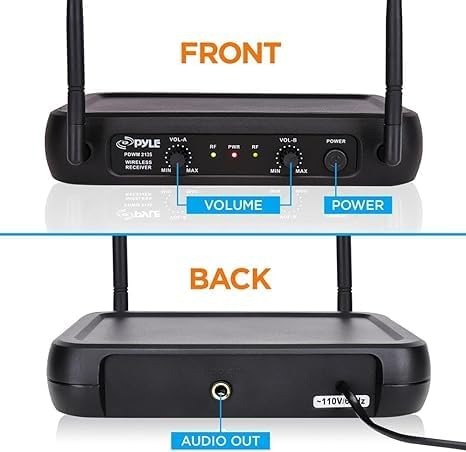
Detailed view of the Pyle wireless receiver's front panel showing volume controls and power button, and the back panel with the audio output.

Image depicting the wireless range of up to 165 feet between the microphone and the receiver.
Maintenance
To ensure the longevity and optimal performance of your Pyle wireless microphone system, follow these maintenance guidelines:
- Cleaning: Use a soft, dry cloth to clean the receiver and microphones. Do not use abrasive cleaners, waxes, or solvents.
- Storage: When not in use for extended periods, store the system in a cool, dry place away from direct sunlight and extreme temperatures.
- Battery Replacement: Replace microphone batteries when the audio quality degrades or the microphone indicator light dims. Always use fresh 'AA' batteries. Remove batteries if the microphones will not be used for a long time to prevent leakage.
- Handle with Care: Avoid dropping the microphones or receiver, as this can cause internal damage.
Troubleshooting
If you encounter any issues with your system, refer to the following table for common problems and solutions:
| Problem | Possible Cause | Solution |
|---|---|---|
| No sound from microphone | Microphone or receiver not powered on Low or dead batteries in microphone Receiver not connected to audio system Volume levels too low | Ensure both microphone and receiver are switched ON Replace batteries in microphone Check 1/4" audio cable connection to mixer/amplifier Increase volume on receiver and connected audio system |
| Interference or poor sound quality | Microphone too far from receiver Obstructions between microphone and receiver Other electronic devices causing interference | Reduce distance between microphone and receiver Ensure clear line of sight Move system away from other electronic devices (e.g., Wi-Fi routers, cordless phones) |
| Microphone cuts out intermittently | Low microphone battery Operating beyond effective range | Replace microphone batteries Stay within the recommended operating range (up to 165 ft) |
Specifications
Detailed technical specifications for the Pyle PDWM2135:
| Feature | Specification |
|---|---|
| Model Number | PDWM2135 |
| Microphone Form Factor | Microphone System |
| Item Dimensions (L x W x H) | 10.75 x 3 x 12.75 inches |
| Item Weight | 1.8 Pounds |
| Power Source | Battery Powered (Microphones) |
| Number of Batteries Required | 4 AA batteries (2 per microphone) |
| Material | Plastic |
| Signal-to-Noise Ratio | 70 dB |
| Hardware Platform | Karaoke Machine |
| Number of Channels | 2 |
| Frequency Response | 174~216 MHz (VHF) |
| Noise Level | 70 dB |
| Connectivity Technology | Wireless |
| Connector Type | 6.35 mm Jack |
| Special Feature | Volume Control |
| Compatible Devices | Radio, Amplifier, Speaker |
| Color | Black |
| Polar Pattern | Unidirectional |

Image showing the dimensions of the Pyle wireless receiver base.
Warranty and Support
Pyle products are designed and manufactured to the highest standards. This product is covered by a standard manufacturer's warranty against defects in materials and workmanship. For specific warranty terms and conditions, please refer to the warranty card included with your product or visit the official Pyle website.
For technical support, troubleshooting assistance, or to inquire about replacement parts, please visit the Pyle USA website or contact their customer service department. Contact information can typically be found on the product packaging or the official brand website.
Online Resources:
- Pyle USA Official Website: Visit the Pyle Store on Amazon
- User Manual (PDF): Download PDF Manual
Related documentsPDWM2135


Ask a question about this manual
Ask about setup, troubleshooting, compatibility, parts, safety, or missing instructions. Manuals+ will review the question and use this page’s manual context to help answer it.