
Intel SSDSC2BA800G4
Intel DC S3710 800 GB 2.5" Internal Solid State Drive User Manual
Introduction
This manual provides comprehensive instructions for the installation, operation, maintenance, and troubleshooting of your Intel DC S3710 800 GB 2.5" Internal Solid State Drive. Please read this manual thoroughly before using the product to ensure optimal performance and longevity.
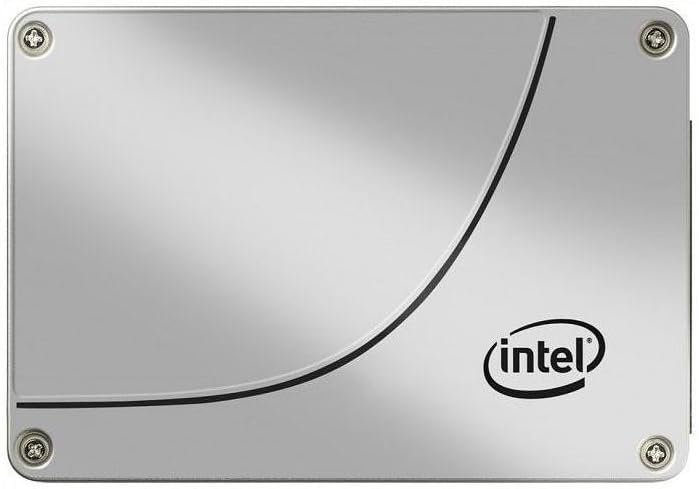
Figure 1: Front view of the Intel DC S3710 800 GB 2.5" Internal Solid State Drive, showcasing its metallic silver casing with the Intel logo and a distinctive curved line design.
Setup and Installation
The Intel DC S3710 SSD is designed for internal installation in desktop computers. Ensure your system is powered off and disconnected from the power source before proceeding.
Requirements:
- Desktop computer with an available 2.5-inch drive bay.
- SATA data cable.
- SATA power cable from your power supply unit (PSU).
- Screwdriver (Phillips head recommended).
Installation Steps:
- Prepare your computer: Power down your desktop computer and unplug all cables. Open the computer case.
- Locate a drive bay: Identify an available 2.5-inch drive bay. Some cases may require a 3.5-inch to 2.5-inch adapter bracket (not included).
- Mount the SSD: Secure the SSD into the drive bay using screws. Ensure it is firmly seated to prevent movement.
- Connect data cable: Connect one end of the SATA data cable to the SSD's SATA data port and the other end to an available SATA port on your motherboard.
- Connect power cable: Connect a SATA power cable from your PSU to the SSD's SATA power port.
- Close the case: Once all connections are secure, close your computer case and reconnect all cables.
- Power on: Power on your computer. The system should detect the new SSD.
Operating Instructions
After physical installation, the SSD needs to be initialized and formatted before use. If you plan to install an operating system, refer to your operating system's installation guide.
Initializing and Formatting (Windows 10 Example):
- Open Disk Management: Right-click the Start button and select "Disk Management".
- Initialize Disk: A pop-up window may appear prompting you to initialize the new disk. Select MBR (Master Boot Record) or GPT (GUID Partition Table) based on your system's requirements (GPT is recommended for modern systems and drives larger than 2TB, though this drive is 800GB). Click OK.
- Create New Simple Volume: Locate the unallocated space on your new SSD. Right-click it and select "New Simple Volume...".
- Follow Wizard: Follow the New Simple Volume Wizard to specify the volume size, assign a drive letter, and format the partition (NTFS file system is standard for Windows).
- Complete: Once the wizard completes, your SSD will be ready for use.
Data Transfer:
You can transfer files to and from the SSD like any other storage drive. For optimal performance, ensure your motherboard's SATA ports are configured for AHCI mode in the BIOS/UEFI settings.
Maintenance
Solid State Drives generally require less maintenance than traditional Hard Disk Drives. However, following these practices can help maintain performance and extend lifespan:
- Enable TRIM: Ensure TRIM is enabled in your operating system. TRIM helps the SSD manage data more efficiently, preventing performance degradation over time. Most modern operating systems (Windows 7+, macOS, Linux) enable TRIM by default.
- Avoid Defragmentation: Do not defragment an SSD. Defragmentation is designed for HDDs and can reduce the lifespan of an SSD by causing unnecessary write cycles.
- Maintain Free Space: Try to keep at least 10-15% of the SSD's capacity free. This allows the SSD's wear-leveling algorithms to function optimally.
- Firmware Updates: Periodically check Intel's official website for firmware updates for your SSD model. Firmware updates can improve performance, stability, and address known issues.
- Proper Shutdowns: Always shut down your computer properly. Abrupt power loss can potentially lead to data corruption or drive issues.
Troubleshooting
If you encounter issues with your Intel DC S3710 SSD, refer to the following common problems and solutions:
| Problem | Possible Cause | Solution |
|---|---|---|
| SSD not detected by BIOS/OS. | Loose cables, incorrect BIOS settings, faulty port. |
|
| Slow performance. | TRIM not enabled, nearly full drive, outdated firmware. |
|
| Operating system not booting from SSD. | Incorrect boot order, corrupted OS installation. |
|
Specifications
| Feature | Detail |
|---|---|
| Brand | Intel |
| Model Series | SSDSC2BA800G4 |
| Storage Capacity | 800 GB |
| Form Factor | 2.5 Inches |
| Interface | SATA 6Gb/s |
| Installation Type | Internal Hard Drive |
| Compatible Devices | Desktop |
| Item Weight | 2.53 ounces |
| Product Dimensions (LxWxH) | 4.1 x 2.7 x 0.3 inches |
| Manufacturer | Intel Corporation |
| First Available Date | February 16, 2015 |
Warranty and Support
For warranty information and technical support, please refer to Intel's official website or contact their customer service. Keep your purchase receipt as proof of purchase for warranty claims.
Intel may offer various support resources including:
- Online knowledge base and FAQs.
- Driver and firmware downloads.
- Community forums.
- Direct customer support via phone or email.
Consider purchasing additional data recovery plans for enhanced protection of your valuable data. Options such as 2-Year or 3-Year Data Recovery Plans may be available from various retailers.
Ask a question about this manual
Ask about setup, troubleshooting, compatibility, parts, safety, or missing instructions. Manuals+ will review the question and use this page’s manual context to help answer it.