
1. Introduction
Thank you for purchasing the Tactic TTX810 8-Channel 2.4GHz SLT Computer Transmitter. This advanced radio system is designed for precise control of various RC models. The TTX810 operates on the 2.4GHz frequency band, utilizing SLT (Secure Link Technology) for a reliable and interference-free connection. Please note that this is a Mode 2 transmitter, meaning the throttle and rudder controls are on the left stick, and aileron and elevator controls are on the right stick. This package includes the transmitter only; a compatible receiver and servos are required and sold separately.
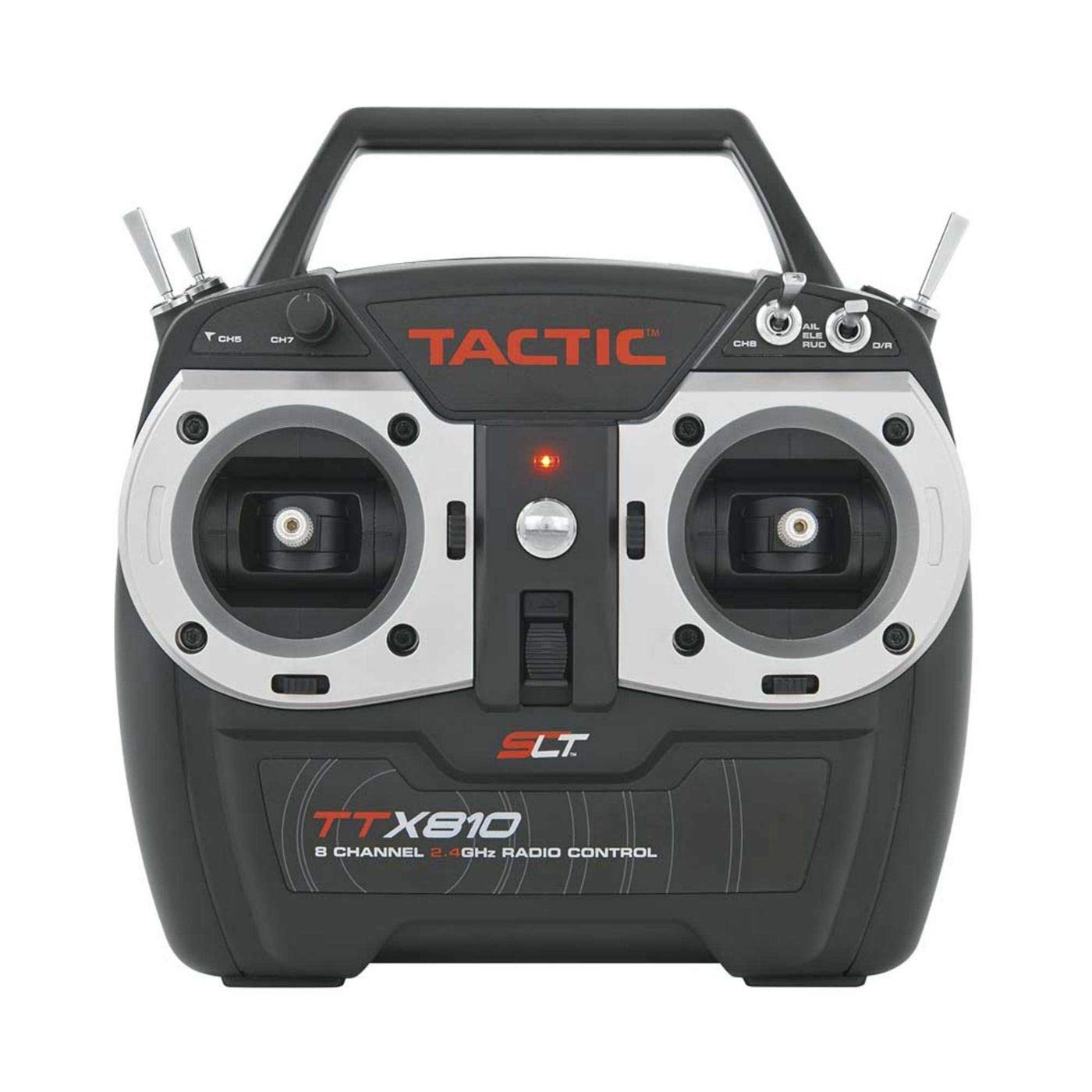
Image: The Tactic TTX810 8-Channel 2.4GHz SLT Computer Transmitter, shown in black with its control sticks and display screen.
2. Safety Precautions
Read and understand all instructions before operating your transmitter. Failure to do so can result in property damage or serious injury.
- Always operate your RC model in open areas, away from people, vehicles, and obstacles.
- Never operate your model near power lines, busy roads, or residential areas.
- Ensure all batteries are fully charged and properly installed before each use.
- Always turn on the transmitter first, then the receiver. When turning off, turn off the receiver first, then the transmitter.
- Keep the transmitter dry and away from extreme temperatures.
- Do not attempt to modify the transmitter. Unauthorized modifications can void your warranty and compromise safety.
3. Package Contents
Please inspect the package contents carefully. If any items are missing or damaged, contact your retailer immediately.
- Tactic TTX810 8-Channel 2.4GHz SLT Computer Transmitter (Mode 2)
- User Manual
Note: Receiver, servos, and model batteries are not included and must be purchased separately.
4. Setup
4.1 Battery Installation
- Open the battery compartment cover on the back of the transmitter.
- Insert the required batteries (typically 4x AA batteries, refer to the battery compartment label for exact type and polarity) ensuring correct polarity.
- Close the battery compartment cover securely.
4.2 Binding the Transmitter to a Receiver
To establish a secure link between your TTX810 transmitter and a compatible SLT receiver, follow these general binding steps:
- Ensure the transmitter batteries are installed and the transmitter is powered off.
- Connect the receiver to its power source (e.g., ESC with BEC, separate receiver battery).
- Activate the bind mode on your receiver (this usually involves pressing a bind button or inserting a bind plug, refer to your receiver's manual). The receiver's LED will typically flash.
- While holding down the bind button on the TTX810 transmitter (if applicable, refer to the transmitter's specific binding procedure), power on the transmitter.
- Release the bind button on the transmitter once the receiver's LED becomes solid, indicating a successful bind.
- Turn off both the receiver and transmitter, then power them on again (transmitter first, then receiver) to confirm the link.
4.3 Model Memory and Setup
The TTX810 features multiple model memories, allowing you to store settings for different RC models. Consult the on-screen menu and navigation buttons to:
- Select an empty model memory slot or an existing model.
- Configure channel assignments, servo reversing, sub-trims, and end-points for each of the 8 channels.
- Set up dual rates, exponential, and mixing functions as required by your model.
5. Operating
5.1 Basic Controls (Mode 2)
- Left Stick (Throttle/Rudder):
- Vertical movement: Controls throttle (up for more power, down for less).
- Horizontal movement: Controls rudder (left for left yaw, right for right yaw).
- Right Stick (Aileron/Elevator):
- Vertical movement: Controls elevator (up for nose up, down for nose down).
- Horizontal movement: Controls ailerons (left for left roll, right for right roll).
- Trims: Small levers or buttons near each stick to make fine adjustments to control surfaces.
- Switches: Assignable switches for functions like gear, flaps, flight modes, etc. Refer to your model setup for specific assignments.
5.2 Pre-Flight Checks
Before each flight or operation, perform the following checks:
- Verify transmitter and receiver battery levels.
- Confirm proper control surface movement in response to stick inputs.
- Perform a range check according to your receiver's instructions to ensure adequate signal strength.
- Check all connections and ensure no wires are loose.
6. Maintenance
- Cleaning: Use a soft, dry cloth to clean the transmitter. Avoid using solvents or harsh chemicals.
- Storage: Store the transmitter in a cool, dry place, away from direct sunlight and extreme temperatures. Remove batteries if storing for extended periods to prevent leakage.
- Battery Care: Always use the recommended battery type. Do not mix old and new batteries or different battery types. Dispose of depleted batteries responsibly.
7. Troubleshooting
| Problem | Possible Cause | Solution |
|---|---|---|
| Transmitter does not power on. | Dead or incorrectly installed batteries. | Replace batteries with fresh ones, ensuring correct polarity. |
| No control response from model. | Receiver not bound, receiver not powered, or range issue. | Perform binding procedure. Check receiver power. Perform range check. |
| Erratic control or interference. | Proximity to other 2.4GHz devices, damaged antenna, or low battery. | Move to a different location. Inspect antenna for damage. Check battery levels. |
| Controls reversed. | Servo reversing not set correctly. | Adjust servo reversing settings in the transmitter's menu. |
8. Specifications
- Model Number: TACJ2810
- Channels: 8
- Frequency: 2.4GHz SLT
- Operation Mode: Mode 2
- Power Source: Battery powered (typically 4x AA, not included)
- Color: Black
- Item Weight: Approximately 1.85 Pounds (0.84 kg)
- Item Dimensions: Approximately 26.4 x 26.4 x 12.1 Centimeters
- Manufacturer: Tactic
- UPC/GTIN: 707768128105
9. Warranty and Support
Tactic products are manufactured to high-quality standards. For specific warranty information, please refer to the documentation included with your purchase or visit the official Tactic website. For technical support, troubleshooting assistance, or spare parts, please contact your authorized Tactic dealer or the manufacturer's customer service department.
Keep your proof of purchase for warranty claims.


