
1. Introduction
This user manual provides comprehensive instructions for the Carson SkySeeker 15x-37.5x Newtonian Reflector Telescope and its Universal Smartphone Optics Digiscoping Adapter. Please read this manual carefully before using your telescope to ensure proper setup, operation, and maintenance. This will help you maximize your viewing experience and extend the life of your equipment.
2. Product Overview
The Carson SkySeeker is a Newtonian reflector telescope designed for beginner astronomers. It features precision 76mm optics and offers a magnification range of 15x to 37.5x. The telescope is mounted on a stable Dobsonian base, requiring no assembly out of the box. It is ideal for observing the Moon, planets, and bright deep-sky objects.
The bundled Universal Smartphone Optics Digiscoping Adapter allows you to connect your smartphone to the telescope's eyepiece, enabling you to capture images and videos of your observations. The adapter is compatible with most smartphones and fits optical eyepieces with an outer housing diameter between 20mm and 58mm.
Included Components:
- Carson SkySeeker Newtonian Reflector Telescope with Dobsonian Mount
- 8mm Huygenian Eyepiece
- 20mm Huygenian Eyepiece
- Universal Smartphone Optics Digiscoping Adapter

Image 2.1: The Carson SkySeeker Newtonian Reflector Telescope with the Universal Smartphone Optics Digiscoping Adapter attached.
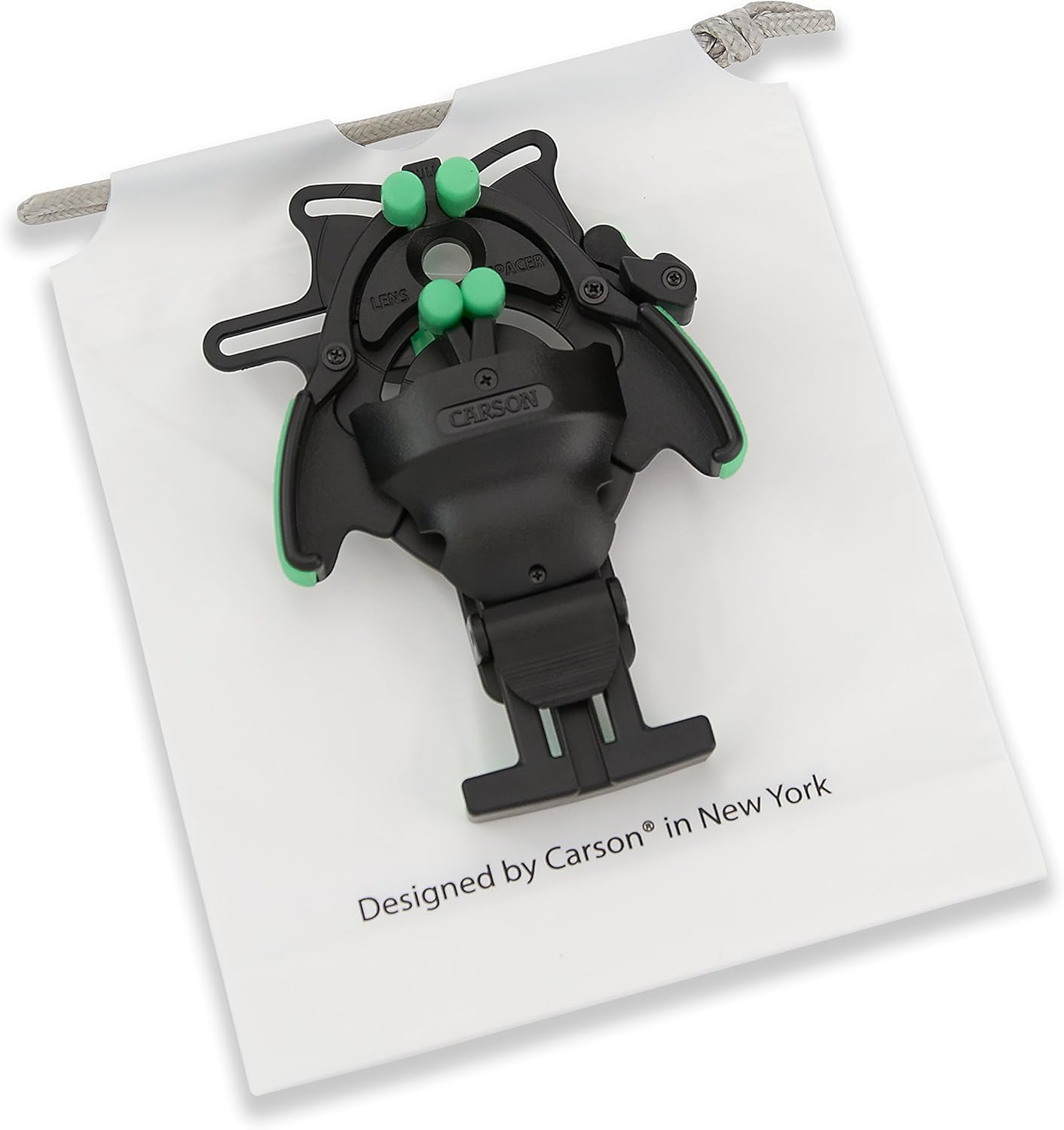
Image 2.2: The Universal Smartphone Optics Digiscoping Adapter, designed to connect smartphones to optical devices.

Image 2.3: The included 8mm and 20mm Huygenian eyepieces for varying magnification.
3. Setup
The Carson SkySeeker telescope requires no assembly and is ready for use directly out of the box. Follow these steps to prepare for observation:
- Placement: Place the telescope on a stable, level surface outdoors, away from bright lights. Ensure the viewing area is clear of obstructions.
- Eyepiece Insertion: Select either the 8mm or 20mm eyepiece. Gently insert the eyepiece into the focuser tube at the top of the telescope. Secure it by tightening the small thumbscrew on the side of the focuser.

Image 3.1: Close-up view of an eyepiece correctly inserted into the focuser tube.
4. Operating the Telescope
Operating your SkySeeker telescope involves aiming, focusing, and adjusting magnification.
4.1 Aiming the Telescope
- The Dobsonian mount allows for easy movement in both horizontal (azimuth) and vertical (altitude) directions.
- Gently grasp the telescope tube and pivot it to point towards your desired celestial object.
- Use the altitude adjustment knob (if present, refer to Image 4.1) to fine-tune the vertical position.

Image 4.1: Close-up of the altitude adjustment knob on the telescope mount.
4.2 Focusing
- Look through the eyepiece.
- Slowly turn the focuser knob (typically located near the eyepiece) until the image appears sharp and clear.
- For best results, focus on a bright, distant object during daylight hours to get accustomed to the focuser.
4.3 Changing Magnification
- The 20mm eyepiece provides lower magnification and a wider field of view, making it easier to locate objects.
- The 8mm eyepiece provides higher magnification for more detailed views of objects once they are centered in the field of view.
- To change eyepieces, loosen the thumbscrew on the focuser, carefully remove the current eyepiece, insert the new one, and retighten the thumbscrew. Refocus as needed.
5. Using the Smartphone Adapter
The Universal Smartphone Optics Digiscoping Adapter allows you to capture photos and videos through your telescope.
5.1 Attaching the Adapter to the Eyepiece
- Ensure the eyepiece is securely inserted into the telescope's focuser.
- Open the adapter's clamp and position it over the eyepiece. The adapter fits eyepieces with an outer diameter between 20mm and 58mm.
- Tighten the adapter's locking levers to secure it firmly to the eyepiece. Ensure it is centered and stable.
5.2 Mounting Your Smartphone
- Place your smartphone into the adapter's phone clamp. The adapter is compatible with most smartphones, with or without a case, up to 3.75 inches wide.
- Adjust the phone's position so that its camera lens is centered over the adapter's opening and aligned with the eyepiece. Use the adapter's fine-adjustment mechanisms for precise alignment.
- Once aligned, secure the phone in place using the adapter's locking mechanisms.
5.3 Capturing Images and Videos
- Open your smartphone's camera application.
- You should see the telescope's view on your phone screen. Adjust the telescope's focus for a clear image on your phone.
- Use your phone's camera controls to take photos or record videos. Consider using a timer or voice command to minimize camera shake.
Important Note: The Universal Smartphone Optics Digiscoping Adapter is NOT COMPATIBLE with riflescopes or phablets (e.g., Samsung Note series, iPhone 6 Plus, Nokia Lumia 920/1520).
6. Maintenance
Proper care and maintenance will ensure the longevity and performance of your telescope.
6.1 Cleaning Optics
- Use a soft, lint-free cloth or a specialized optical cleaning brush to gently remove dust from lenses and mirrors.
- For smudges or fingerprints, use a few drops of optical cleaning fluid on a clean optical cloth. Wipe gently in a circular motion from the center outwards.
- Avoid touching optical surfaces with your fingers.
- Never use abrasive materials or household cleaners.
6.2 Storage
- Store the telescope in a cool, dry place, away from direct sunlight and extreme temperatures.
- Keep dust caps on the focuser and objective lens when not in use.
- Store eyepieces in their protective cases.
7. Troubleshooting
If you encounter issues with your telescope, refer to the following common problems and solutions:
| Problem | Possible Cause | Solution |
|---|---|---|
| Image is blurry or out of focus | Incorrect focus setting | Adjust the focuser knob slowly until the image is sharp. |
| Cannot find objects | Telescope not aimed correctly; using too high magnification | Start with the 20mm eyepiece (lower magnification) for a wider field of view. Ensure the telescope is pointed at the desired object. |
| Dark image through smartphone adapter | Smartphone camera not aligned with eyepiece; insufficient light | Ensure the smartphone camera lens is perfectly centered over the eyepiece. Adjust phone camera settings for brightness/exposure. Observe brighter objects. |
| Smartphone not fitting adapter | Phone size exceeds adapter limits; incompatible model | Verify your phone's dimensions are within the adapter's specifications (up to 3.75 inches wide). Confirm it is not a phablet or riflescope. |
If you continue to experience issues, please contact Carson customer support for assistance.
8. Specifications
| Feature | Specification |
|---|---|
| Model Name | SkySeeker |
| Model Number | JC-200UN |
| Magnification | 15x - 37.5x |
| Aperture | 76mm (3.0 inch) |
| Focal Length | 300mm |
| Telescope Mount | Dobsonian (Altazimuth Mount) |
| Eyepieces Included | 8mm and 20mm Huygenian |
| Product Dimensions (D x W x H) | 8"D x 8"W x 14"H |
| Item Weight | 1.67 Kilograms (3.7 lbs) |
| Focus Type | Manual Focus |
| Compatible Devices (Adapter) | Smartphone (Eyepiece outer diameter 20mm-58mm) |
| Coating | Fully Coated |
9. Warranty and Support
9.1 Warranty Information
The Carson SkySeeker Telescope and Universal Smartphone Optics Digiscoping Adapter are backed by Carson's Limited Lifetime Warranty. This warranty covers defects in materials and workmanship for the lifetime of the product. Please retain your proof of purchase for warranty claims.
9.2 Customer Support
For technical assistance, warranty service, or any questions regarding your Carson SkySeeker telescope, please visit the official Carson website or contact their customer service department. Contact information can typically be found on the Carson website or product packaging.