
SUNPAK 5858d
SUNPAK 5858d Photo/Video Tripod Instruction Manual
Model: 620-585
Introduction
This manual provides detailed instructions for the proper setup, operation, and maintenance of your SUNPAK 5858d Photo/Video Tripod. Please read this manual thoroughly before using the tripod to ensure optimal performance and longevity.
Product Overview and Features
The SUNPAK 5858d is a versatile medium-duty tripod designed for both photo and video applications. It features a 3-way pan head and a quick-release plate for easy camera attachment and precise adjustments.
Key Features:
- Extends To 58 inches
- Supports Up To 8lbs
- Medium-duty Tripod For Photo & Video
- Contains 3-way Pan Head With Extra-long Pan Handle
- Quick-release Plate With Video Indexing Pin
Components:

Image 1: The 3-way pan head with the quick-release plate and pan handle. This allows for smooth horizontal and vertical camera movements.

Image 2: The tripod collar featuring an integrated bubble level for precise leveling of the tripod on uneven surfaces.

Image 3: A tripod leg showing the foam grip for comfortable handling and the leg angle adjustment lever.

Image 4: The leg brace connecting the tripod legs to the center column, providing stability.
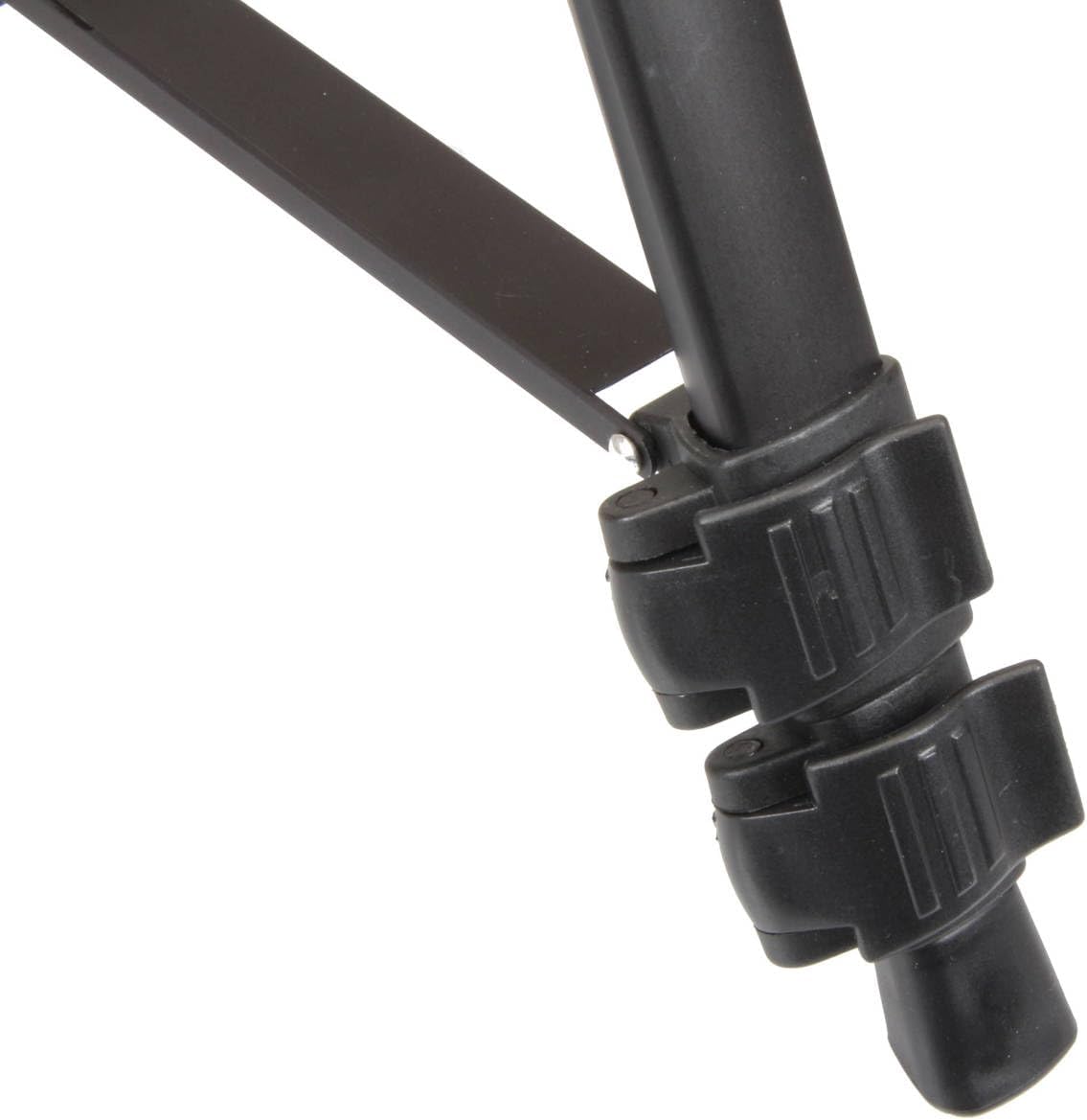
Image 5: Close-up of the leg section locks, used to extend and secure the tripod legs at desired heights.
Setup
- Extend Tripod Legs: Release the leg section locks (Image 5) on each leg. Extend the legs to the desired length and firmly close the locks to secure them.
- Adjust Leg Angle: Use the leg angle adjustment levers (Image 3) to spread the tripod legs for increased stability on various terrains.
- Level the Tripod: Refer to the integrated bubble level (Image 2) on the tripod collar. Adjust the leg lengths until the bubble is centered, indicating a level setup.
- Extend Center Column (Optional): For additional height, rotate the center column lock knob counter-clockwise, raise the center column to the desired height, and then rotate the knob clockwise to secure it.
- Attach Camera:
- Remove the quick-release plate from the pan head by disengaging its lock.
- Attach the quick-release plate to the bottom of your camera or video device using the mounting screw. Ensure it is securely tightened.
- Slide the camera with the attached quick-release plate back onto the pan head until it clicks into place. Engage the quick-release plate lock.
Video: Tripod Setup Demonstration
This video demonstrates the basic setup and adjustment of the tripod, including extending legs and adjusting the head. (Source: The Bellyitch by Jay Jay Ghatt Shop)
Operating Instructions
- Pan and Tilt Adjustments:
- The pan handle (Image 1) controls horizontal (pan) and vertical (tilt) movement. Loosen the corresponding lock knobs on the pan head to allow movement.
- Adjust the camera to the desired angle, then tighten the lock knobs to secure its position.
- Portrait/Landscape Orientation: The pan head allows for quick switching between portrait and landscape orientations. Loosen the side tilt lock, adjust the camera, and re-tighten.
Video: Pan Head Operation
This video demonstrates the functionality of the pan head for smooth camera adjustments. (Source: Austin Bushman)
Maintenance
- Cleaning: Wipe down the tripod with a soft, dry cloth after each use. For stubborn dirt, use a slightly damp cloth and mild soap, then dry thoroughly. Avoid harsh chemicals.
- Storage: Store the tripod in a dry, cool place, preferably in its carrying case, to protect it from dust and moisture.
- Inspection: Periodically check all screws, knobs, and leg locks to ensure they are tight and functioning correctly. Do not overtighten.
Troubleshooting
| Problem | Possible Cause | Solution |
|---|---|---|
| Tripod is unstable. | Leg locks are not fully engaged; legs are not spread wide enough; uneven surface. | Ensure all leg locks are securely fastened. Spread legs wider for a larger footprint. Adjust leg lengths using the bubble level to compensate for uneven ground. |
| Camera movement is not smooth. | Pan/tilt lock knobs are too tight or too loose; dirt in the head mechanism. | Adjust the pan and tilt lock knobs to the appropriate tension. Clean the pan head area if dirt is visible. |
| Quick-release plate does not secure camera. | Camera screw is loose; quick-release plate not fully engaged in head. | Ensure the camera mounting screw is tightly secured to the camera. Verify the quick-release plate is fully seated and its lock is engaged. |
Specifications
| Feature | Detail |
|---|---|
| Brand | SUNPAK |
| Model Name | 5858d Photo/Video Tripod |
| Model Number | 620-585 |
| Color | Black |
| Material | Aluminum |
| Maximum Height | 58 inches |
| Weight Limit | 8 pounds |
| Item Weight | 2.3 pounds |
| Tripod Head Type | Pan Heads |
| Special Features | Adjustable, Portable |
| Compatible Devices | Camera |
Warranty Information
This product comes with a standard manufacturer's warranty. For specific details regarding coverage, duration, and claims process, please refer to the warranty card included with your purchase or visit the official SUNPAK website. Keep your proof of purchase for warranty validation.
Support
For further assistance, technical support, or to inquire about replacement parts, please contact SUNPAK customer service through their official website or the contact information provided in your product packaging. You can also visit the SUNPAK Store on Amazon for additional product information.
Ask a question about this manual
Ask about setup, troubleshooting, compatibility, parts, safety, or missing instructions. Manuals+ will review the question and use this page’s manual context to help answer it.