
Introduction
This manual provides essential information for the safe and effective operation of your Insignia Wireless Shutter Control (Model NS-WSCN). This device is designed to remotely trigger the shutter of compatible Nikon digital SLR cameras, helping to minimize camera shake and improve image clarity, especially for long exposure photography or self-portraits.
Please read this manual thoroughly before using the product and retain it for future reference.
Safety Information
- Do not expose the device to water or excessive moisture.
- Avoid extreme temperatures.
- Do not attempt to disassemble or repair the device yourself. Refer all servicing to qualified personnel.
- Keep out of reach of children.
- Dispose of batteries properly according to local regulations.
Package Contents
- Insignia Wireless Shutter Control (NS-WSCN)
- User Manual (this document)
- Note: Batteries may or may not be included depending on the retail package. Check packaging for details.
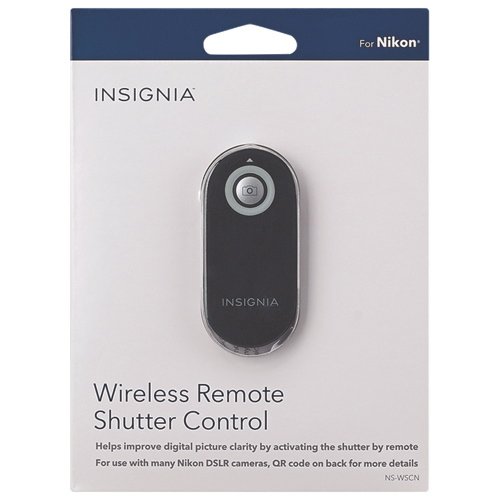
Image shows the Insignia Wireless Shutter Control device, a small black remote with a silver shutter button, displayed within its retail packaging. The packaging indicates compatibility with Nikon cameras.
Setup
1. Battery Installation
The Insignia Wireless Shutter Control typically uses a CR2025 lithium button cell battery. Locate the battery compartment on the back of the remote. Use a small coin or screwdriver to open the compartment. Insert the battery with the positive (+) side facing up, then close the compartment securely.
2. Camera Setup (Nikon DSLR)
To use the wireless remote, your Nikon DSLR camera must be set to remote control mode. The exact steps may vary slightly by camera model, but generally involve:
- Turn on your camera.
- Access the camera's menu or drive mode settings.
- Select the "Remote Control" or "Remote" option. This is often found under the "Release Mode" or "Drive Mode" settings. Some cameras may have a dedicated remote control icon.
- Ensure the camera's infrared receiver (usually on the front of the camera body) is unobstructed.
Refer to your camera's instruction manual for specific details on enabling remote control mode.
Operating Instructions
Taking a Photo
Once your camera is set to remote control mode:
- Point the Insignia Wireless Shutter Control towards the infrared receiver on your camera. The remote works best when pointed directly at the receiver within a range of approximately 5-10 meters (16-33 feet).
- Press the large circular button on the remote.
- The camera's shutter will activate, taking a photo.
For cameras with a delayed remote mode (e.g., 2-second delay), pressing the button once will trigger the delay, and the photo will be taken after the set time.
Maintenance
Cleaning
Wipe the remote control with a soft, dry cloth. Do not use liquid cleaners or abrasive materials.
Storage
Store the remote in a cool, dry place away from direct sunlight and extreme temperatures. If storing for an extended period, it is recommended to remove the battery to prevent leakage.
Troubleshooting
| Problem | Possible Cause | Solution |
|---|---|---|
| Remote does not trigger camera. |
|
|
| Intermittent operation. |
|
|
Specifications
| Feature | Detail |
|---|---|
| Model Number | NS-WSCN |
| Connectivity Technology | Wireless (Infrared) |
| Compatible Devices | Most Nikon Digital SLR Cameras |
| Max Number of Supported Devices | 1 (one camera at a time) |
| Power Source | Button Cell Battery (e.g., CR2025) |
| Dimensions (approx.) | 15.5 x 6.9 x 0.8 cm (6.1 x 2.7 x 0.3 inches) |
| Weight (approx.) | 5.67 g (0.2 oz) |
Warranty and Support
For warranty information or technical support, please refer to the warranty card included with your purchase or visit the official Insignia website. Keep your proof of purchase for warranty claims.
Note: Specific warranty terms and support contact details may vary by region and retailer.
Official Brand Website: www.insigniaproducts.com