
Introduction
The Uniden LRD750 is a high-performance laser radar detector designed to provide advanced warning of X, K, Ka, and Laser band signals. Featuring a clear dot matrix display and voice alert capabilities, this unit helps you stay informed about your driving environment. It includes selectable Highway and City modes to optimize detection and minimize false alerts.
Key features include:
- Long-range laser and radar detection
- Detection of X, K, and Ka radar bands
- POP mode and Laser alert alarms
- Selectable Highway and City operating modes
- Voice alert announcements for detected bands
- Easy-to-read dot matrix display
Package Contents
Verify that your package contains the following items:
- Uniden LRD750 Laser Radar Detector unit
- 12V DC Power Cord with fuse
- Windshield Mounting Bracket (with suction cups)
- Owner's Manual (this document)
Setup and Installation
Mounting the Detector
For optimal performance, mount the LRD750 in a location that provides a clear, unobstructed view of the road ahead and behind. Avoid areas blocked by windshield wipers, tinted areas, or other obstructions.
- Clean the windshield area where you intend to mount the detector.
- Attach the suction cups to the windshield mounting bracket.
- Press the suction cups firmly onto the windshield to secure the bracket.
- Slide the LRD750 unit onto the mounting bracket until it clicks into place. Ensure the unit is level.
Connecting Power
The LRD750 operates on 12V DC power from your vehicle's accessory outlet.
- Insert the small end of the 12V DC power cord into the power jack on the side of the LRD750 unit.
- Plug the larger end of the power cord into your vehicle's 12V accessory outlet (cigarette lighter socket).
- Ensure the power cord is routed safely and does not interfere with driving controls or airbags.
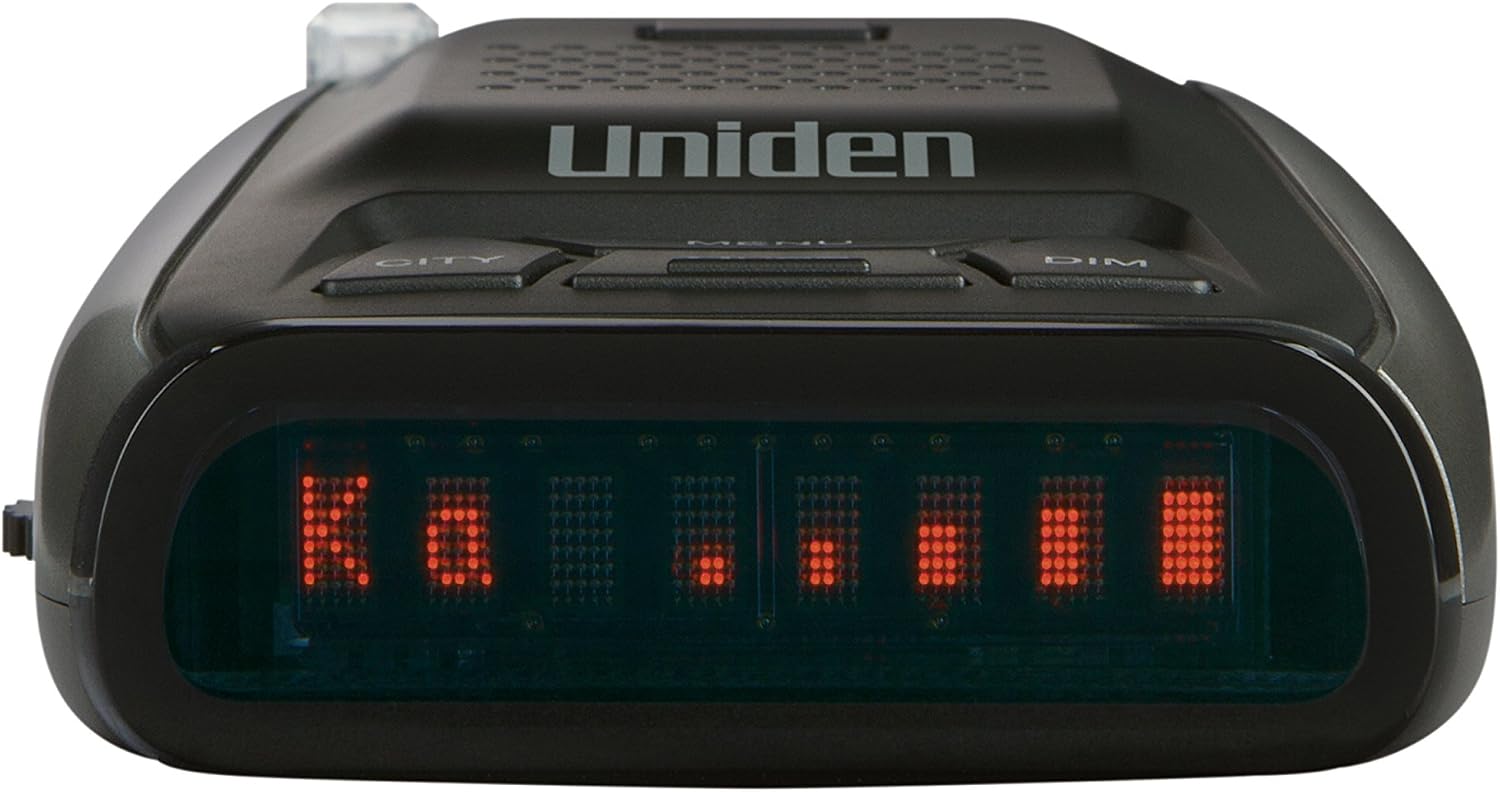
Figure 1: Side view of the Uniden LRD750, illustrating the power input and control buttons.
Operating the LRD750
Powering On/Off and Volume Control
Locate the Power/Volume switch on the left side of the unit. Rotate the switch clockwise to turn the unit on and increase the volume. Rotate counter-clockwise to decrease volume and turn the unit off.
Display and Voice Alerts
Upon power-on, the unit performs a self-test. When a radar or laser signal is detected, the dot matrix display will show the band type (e.g., X, K, Ka, Laser) and signal strength using a bar graph. The voice alert feature will announce the detected band, such as "K band."

Figure 2: Front view of the Uniden LRD750, showing the dot matrix display and primary control buttons.
Control Buttons
The LRD750 features several control buttons on its top panel:
- CITY: Toggles between City and Highway modes. City mode reduces sensitivity to X-band radar to minimize false alerts in urban areas.
- MENU: Accesses the unit's settings menu. Press and hold to enter, press repeatedly to cycle through options.
- MUTE: Silences the current audio alert. Press again to unmute.
- DIM: Adjusts the brightness of the dot matrix display. Cycle through brightness levels with repeated presses.
Understanding Alerts
The LRD750 detects the following signal types:
- X-Band: Older radar technology, often used for automatic door openers and some traffic signals.
- K-Band: Common radar band used by law enforcement.
- Ka-Band: Widely used advanced radar band by law enforcement.
- Laser: Detection of laser speed guns.
- POP: Detects brief bursts of radar signals.
When an alert occurs, the display will indicate the band, and a distinct audio tone will sound, accompanied by a voice announcement.
Maintenance
To ensure the longevity and optimal performance of your Uniden LRD750, follow these simple maintenance guidelines:
- Cleaning: Use a soft, damp cloth to clean the exterior of the unit. Do not use abrasive cleaners or solvents. Ensure the front lens (radar antenna) and rear lens (laser sensor) are kept clean and free of obstructions.
- Power Cord: Periodically check the 12V DC power cord for any signs of damage or fraying. Replace if necessary.
- Storage: When not in use for extended periods, store the unit in a cool, dry place, away from direct sunlight and extreme temperatures.
Troubleshooting
If you experience issues with your LRD750, refer to the following common problems and solutions:
| Problem | Possible Cause | Solution |
|---|---|---|
| Unit does not power on. | No power from vehicle outlet; faulty power cord; blown fuse in power cord. | Check vehicle's 12V outlet with another device. Ensure power cord is securely plugged in. Check and replace the fuse in the 12V power plug if necessary. |
| Frequent false alerts in urban areas. | Interference from automatic door openers, traffic flow sensors, or other radar-based systems. | Switch to City mode to reduce X-band sensitivity. |
| No radar/laser detection. | Unit is off; obstructed view; radar/laser source not present. | Ensure unit is powered on and volume is audible. Verify clear line of sight for both front and rear sensors. Confirm radar/laser source is active in the area. |
| Voice alerts are not heard. | Volume too low; voice alert feature disabled (if applicable). | Increase volume using the Power/Volume knob. Check menu settings to ensure voice alerts are enabled. |
If the problem persists after attempting these solutions, please contact Uniden customer support for further assistance.
Specifications
- Model: LRD750
- Brand: Uniden
- Detection Bands: X, K, Ka, Laser, POP
- Frequency Bands Supported: 10.525 GHz (X-band), 24.125 GHz (K-band), 34.7 GHz (Ka-band)
- Display Type: Dot Matrix LED
- Power Source: Vehicle 12V DC
- Manufacturer: Uniden
Warranty Information
The Uniden LRD750 Laser Radar Detector is covered by a limited manufacturer's warranty. Specific warranty terms, conditions, and duration may vary by region and purchase date. Please refer to the warranty card included with your product or visit the official Uniden website for detailed warranty information and registration procedures.
Customer Support
For technical assistance, product inquiries, or warranty claims, please contact Uniden customer support. Support contact information, including phone numbers and online resources, can typically be found on the official Uniden website or in the documentation provided with your product.