
1. Introduction and Overview
The Cobra MR F57B is a fixed-mount VHF marine radio designed for reliable communication and enhanced safety on the water. This device offers advanced features for both short and long-range communication, ensuring you stay connected and informed. It includes GPS capabilities for distress signaling, access to NOAA weather alerts, and a unique Rewind-Say-Again feature to prevent missed transmissions.
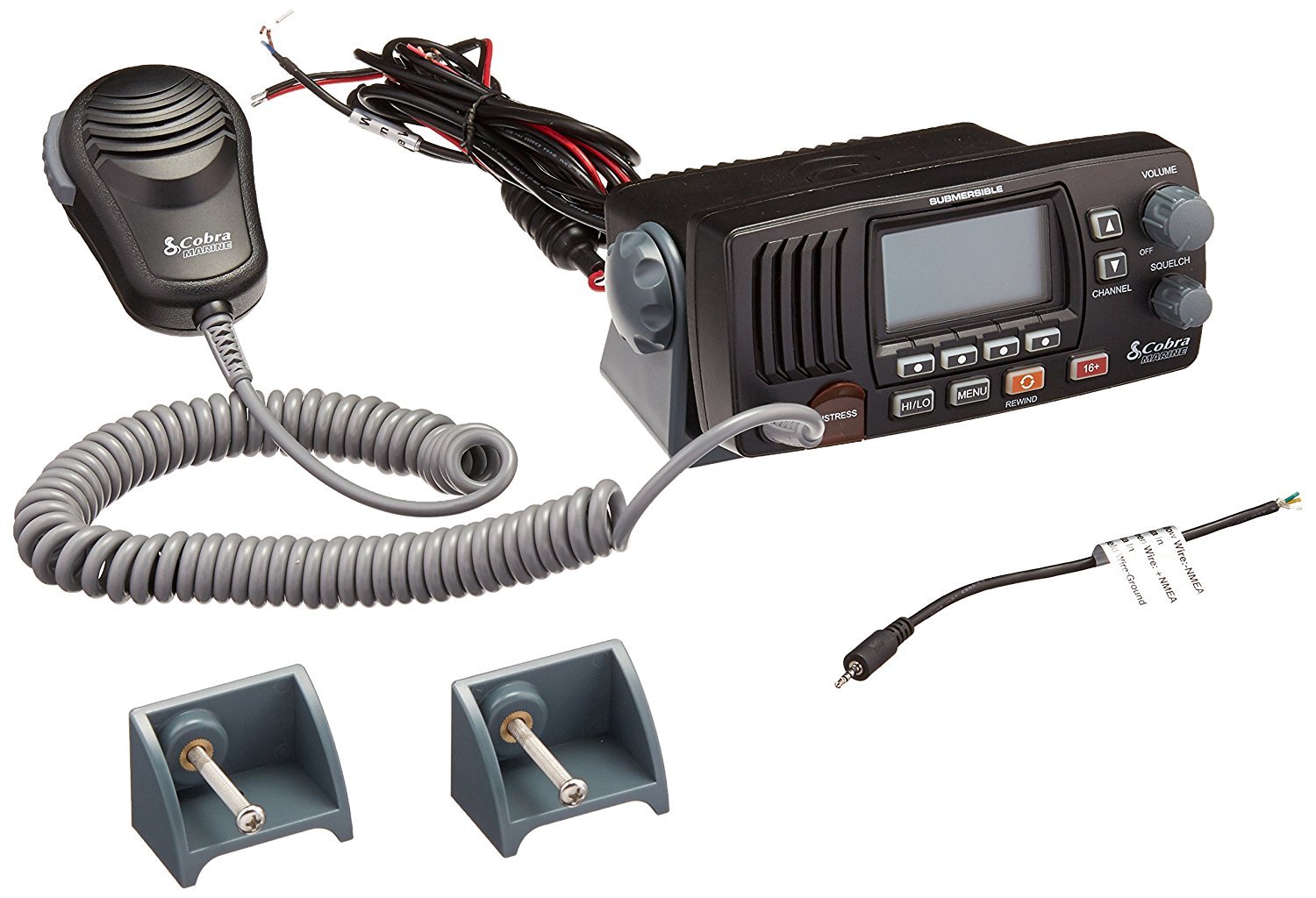
Image 1.1: The Cobra MR F57B Fixed Mount VHF Marine Radio, showing the main unit and attached noise-cancelling microphone.
2. Key Features
- Maximum Coverage: Operates on US, Canadian, and International channels at 1 or 25 watts for optimal short and long-range communication.
- Emergency Ready: GPS capabilities and Digital Selective Calling (DSC) allow for distress signals and position exchange. Instant access to channels 16 and 9 for immediate communications.
- Rewind-Say-Again: Automatically records the last 20 seconds of incoming transmissions, useful in noisy environments.
- Clear Communication: Features a Public Access external speaker function and a noise-cancelling microphone to reduce background interference.
- LCD Display: Large, illuminated LCD display with a Signal Strength Meter. Illuminated function keys for easy navigation. TriWatch function to scan three channels simultaneously.
- NOAA Weather Channels: Provides 24-hour access to NOAA weather alerts and emergency broadcasts.
- Submersible Design: Engineered to withstand marine environments.
3. What's in the Box
Upon unpacking, verify that all components are present:
- Cobra MR F57B VHF Radio Unit
- Flush & Surface Mount Kit
- GPS Interface Cable
- Owner's Manual (this document)
4. Setup and Installation
4.1 Mounting the Radio
The MR F57B can be installed using either the flush mount or surface mount method. Choose a location that is easily accessible, visible, and protected from direct impact. Ensure adequate ventilation around the unit.
- Surface Mount: Attach the included mounting bracket to a flat surface using the provided screws. Secure the radio to the bracket.
- Flush Mount: Cut an opening in the mounting surface according to the template provided in the separate installation guide. Insert the radio and secure it using the flush mount hardware.
4.2 Power Connection
Connect the radio's red wire to a 12V DC positive power source (typically the boat's battery) and the black wire to a negative ground. It is recommended to install an appropriate fuse (not included) in the positive line close to the power source.
4.3 Antenna Connection
Connect a marine VHF antenna (not included) to the antenna connector on the rear of the radio. Ensure a secure connection to maintain optimal signal transmission and reception.
4.4 GPS Connection (for DSC functionality)
For full Digital Selective Calling (DSC) functionality, connect the radio to an external GPS receiver (not included) using the supplied GPS interface cable. Refer to the GPS receiver's manual for specific wiring instructions. The radio requires NMEA 0183 data input for position information.
Image 4.1: The Cobra MR F57B radio shown with its mounting bracket, illustrating a typical installation setup.
5. Operating Instructions
5.1 Power On/Off and Volume
To power on the radio, rotate the VOLUME knob clockwise. Continue rotating to adjust the listening volume. To power off, rotate the VOLUME knob counter-clockwise until it clicks.
5.2 Squelch Adjustment
The SQUELCH control eliminates background noise when no signal is being received. Rotate the SQUELCH knob clockwise until the background noise disappears. For optimal reception, adjust it to the point where the noise just stops.
5.3 Channel Selection
Use the CHANNEL up/down buttons on the radio or microphone to select the desired channel. The selected channel will be displayed on the LCD.
5.4 Transmitting and Receiving
To transmit, press and hold the PTT (Push-To-Talk) button on the microphone. Speak clearly into the microphone. Release the PTT button to receive.
5.5 High/Low Power Selection
Press the HI/LO button to toggle between 25 watts (High power) and 1 watt (Low power). Use 1 watt for short-range communication to conserve power and reduce interference. Use 25 watts for maximum range.
5.6 Instant Channel 16/9
Press the 16+ button for immediate access to Channel 16 (distress and hailing). Press it again to switch to Channel 9 (secondary calling channel). Press a third time to return to the last selected working channel.

Image 5.1: Graphic illustrating the instant access feature for channels 16 and 9.
5.7 NOAA Weather Channels
Press the WX button to access NOAA weather channels. The radio will scan available weather channels and stop on the strongest signal. Press WX again to exit weather mode.

Image 5.2: Graphic illustrating the NOAA weather channel feature.
5.8 Rewind-Say-Again
To replay the last 20 seconds of an incoming transmission, press the REWIND button. This feature is particularly useful in noisy conditions or if you missed part of a message.
5.9 Digital Selective Calling (DSC)
The DISTRESS button initiates a DSC distress call. This feature requires a connected GPS receiver to transmit your vessel's position. Ensure your MMSI (Maritime Mobile Service Identity) number is programmed into the radio. Only use the DISTRESS button in genuine emergency situations.
6. Maintenance
Proper maintenance ensures the longevity and optimal performance of your Cobra MR F57B radio.
- Cleaning: Clean the radio's exterior with a soft, damp cloth. Avoid abrasive cleaners or solvents.
- Connections: Periodically check all cable connections (power, antenna, GPS) for corrosion or looseness. Clean and secure as necessary.
- Microphone: Keep the microphone clean and free of debris. Avoid submerging the microphone unless specifically designed for it.
- Storage: If storing the boat for an extended period, ensure the radio is powered off and disconnected from the power source.
7. Troubleshooting
| Problem | Possible Cause | Solution |
|---|---|---|
| No Power | Loose power connection, blown fuse, dead battery. | Check power cable connections. Inspect and replace fuse if blown. Verify boat battery charge. |
| No Reception / Poor Reception | Squelch set too high, antenna issue, low power setting. | Adjust squelch control. Check antenna connection and condition. Ensure radio is set to High power (25W) for distant signals. |
| Cannot Transmit | Microphone PTT button not pressed, antenna issue, power setting. | Ensure PTT button is fully pressed. Check antenna connection. Verify power setting. |
| GPS Data Not Displaying (for DSC) | GPS receiver not connected, incorrect wiring, GPS not acquiring signal. | Verify GPS interface cable connection. Check wiring against GPS manual. Ensure GPS receiver has a clear view of the sky. |
| Distress Call Not Sending | MMSI not programmed, no GPS position, button not held long enough. | Program MMSI number. Ensure GPS is connected and providing position data. Hold the DISTRESS button for the required duration. |
8. Specifications
| Feature | Detail |
|---|---|
| Model Number | MR F57B |
| Product Dimensions | 7.25 x 4.25 x 2.15 inches |
| Item Weight | 3.74 pounds (1.7 Kilograms) |
| Frequency Range | 156-162 MHz |
| Number of Channels | 16 (US, Canada, International) |
| Power Output | 1 Watt / 25 Watts (selectable) |
| Display Technology | LCD (Illuminated) |
| Water Resistance Level | IPX8 (Submersible) |
| Special Features | Automatic Radio Check, DSC, GPS Capability, Illuminated Keys, Memory Scan, NOAA Weather Channels, Noise Cancelling, PA Speaker, Rewind-Say-Again, Signal Strength Meter, Tri-Watch, Weather Alerts |
| Included Components | Flush & Surface Mount Kit, GPS Interface Cable |
9. Warranty and Support
9.1 Warranty Information
Cobra products are typically covered by a limited warranty against defects in materials and workmanship. The specific duration and terms of the warranty may vary. Please refer to the warranty card included with your product or visit the official Cobra website for detailed warranty information.
9.2 Customer Support
For technical assistance, troubleshooting beyond this manual, or warranty claims, please contact Cobra customer support. Contact information can usually be found on the Cobra website or in the product packaging. When contacting support, have your product model number (MR F57B) and purchase date available.


