1. Introduction
This manual provides essential information for the installation, operation, and maintenance of your Power Acoustik PD-624HB 6.2-inch Double-DIN In-Dash LCD Touchscreen DVD Receiver. Please read this manual thoroughly before using the product to ensure proper function and to prevent damage.
The PD-624HB is a versatile multimedia receiver designed for in-dash installation, featuring a 6.2-inch LCD touchscreen, DVD player, Bluetooth connectivity, and MHL MobileLink X1 compatibility.
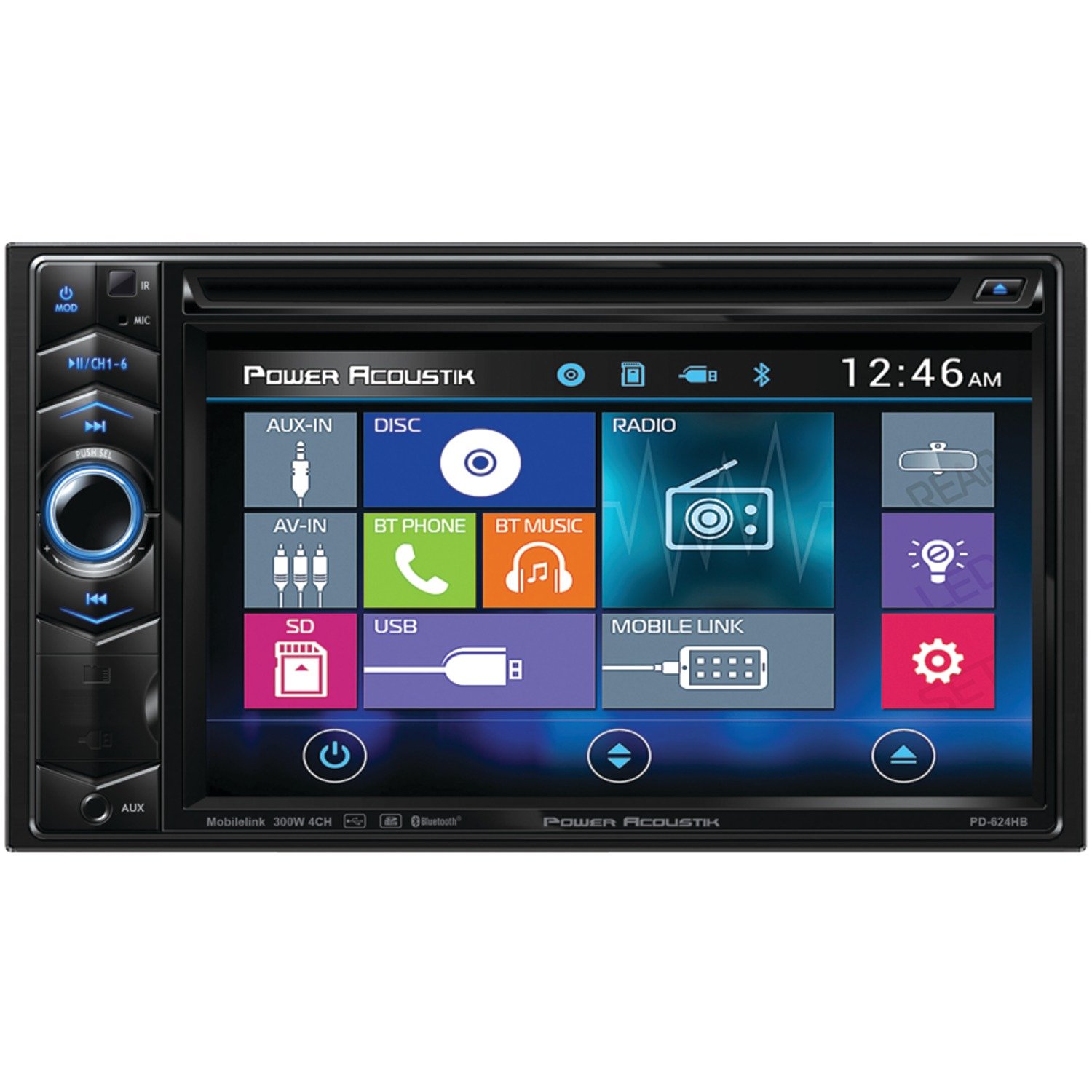
Image 1.1: Front view of the Power Acoustik PD-624HB receiver, showcasing its 6.2-inch LCD touchscreen and double-DIN form factor for in-dash installation.
2. Setup and Installation
Important: Due to the complexity of automotive electrical systems, professional installation by a qualified technician is highly recommended for this product. Incorrect wiring can lead to damage to the unit, vehicle, or personal injury.
2.1. Mounting
The PD-624HB is a double-DIN unit. Ensure your vehicle's dashboard opening is compatible with double-DIN dimensions. Secure the unit using the provided mounting hardware and brackets. Refer to your vehicle's specific installation guide for dashboard disassembly and reassembly procedures.
2.2. Wiring Connections
Connect the power, ground, speaker, and accessory wires according to the wiring diagram provided in the separate installation guide (not included in this user manual). Ensure all connections are secure and properly insulated to prevent short circuits.
- Power (Yellow): Connect to constant +12V supply.
- Accessory (Red): Connect to switched +12V supply (ignition).
- Ground (Black): Connect to a clean chassis ground point.
- Speaker Outputs: Connect to vehicle speakers, observing correct polarity.
- Antenna: Connect the vehicle's antenna cable.
- Parking Brake: Connect to the parking brake circuit for safety features (e.g., video playback).
2.3. Initial Power-On
After all connections are made, turn on your vehicle's ignition. The unit should power on and display the Power Acoustik logo. Follow any on-screen prompts for initial setup, such as language selection or clock settings.
3. Operating Instructions
3.1. Touchscreen Interface
The 6.2-inch LCD touchscreen is the primary interface for controlling the PD-624HB. Tap icons to select functions, swipe to navigate menus, and use on-screen buttons for playback control and settings adjustments.
3.2. DVD/CD Playback
Insert a DVD or CD into the disc slot. The unit will automatically detect the disc and begin playback. Use the on-screen controls for play, pause, skip, and menu navigation. Ensure discs are clean and free of scratches for optimal performance.
3.3. Bluetooth Connectivity
To pair a Bluetooth device:
- Enable Bluetooth on your mobile device.
- On the PD-624HB, navigate to the Bluetooth menu.
- Search for available devices and select "PD-624HB" (or similar name).
- Confirm the pairing code if prompted.
Once paired, you can stream audio from your device. Note: Song titles and artist information may not display on the unit's screen during Bluetooth audio streaming.
3.4. MHL MobileLink X1
Connect compatible MHL-enabled smartphones using an MHL cable (sold separately) to mirror your phone's screen on the PD-624HB display. This allows for control of certain phone applications directly from the receiver's touchscreen.
3.5. Radio Tuner
Select the Radio function to access AM/FM stations. Use the touchscreen to scan for stations, save presets, and switch between bands.
3.6. Audio Settings
Access the audio settings menu to adjust volume, balance, fader, and equalizer settings. Note: The equalizer functionality is limited to basic treble and bass adjustments. Mid-range or other advanced EQ controls are not available.
4. Maintenance
4.1. Cleaning the Screen
To clean the LCD touchscreen, gently wipe it with a soft, lint-free cloth. For stubborn smudges, slightly dampen the cloth with water or a screen-safe cleaning solution. Avoid using abrasive cleaners, solvents, or harsh chemicals, as these can damage the screen surface.
4.2. General Care
- Keep the unit free from dust and debris.
- Avoid exposing the unit to extreme temperatures or direct sunlight for prolonged periods.
- Do not insert foreign objects into the disc slot or any other openings.
- Ensure proper ventilation around the unit to prevent overheating.
5. Troubleshooting
If you encounter issues with your PD-624HB, refer to the following common problems and solutions:
| Problem | Possible Cause / Solution |
|---|---|
| No power / Unit does not turn on. | Check power and ground connections. Verify vehicle's ignition is on. Check fuses. |
| No sound. | Check speaker connections. Ensure volume is not muted or set to minimum. Verify fader/balance settings. |
| Bluetooth audio does not display song/artist information. | This unit may not support displaying full metadata (song title, artist) via Bluetooth A2DP for all devices or applications. This is a characteristic of the unit's design. |
| Equalizer only has Treble and Bass adjustments. | The PD-624HB's audio equalizer is designed with basic treble and bass controls only. Advanced multi-band EQ settings are not available. |
| CD/DVD disc does not insert fully or plays incorrectly. | Ensure the disc is inserted correctly with the label side up. Check for obstructions in the disc slot. Use clean, unscratched discs. Do not force the disc. |
| MHL MobileLink screen appears distorted or "goes crazy". | Ensure your smartphone is fully compatible with MHL MobileLink X1 and that the MHL cable is securely connected. Try restarting both the phone and the receiver. Compatibility issues with certain phone models or operating system versions may occur. |
| Touchscreen is unresponsive. | Perform a soft reset (refer to the separate installation guide for reset button location, usually a small pinhole). Ensure the screen is clean and free of debris. |
6. Specifications
| Feature | Detail |
|---|---|
| Model Number | PD-624HB |
| Display Type | LCD Touchscreen |
| Screen Size | 6.2 Inches |
| Resolution | 800 x 480 |
| Aspect Ratio | 16:9 |
| LED Brightness | 400 NIT |
| Media Type Support | CD, DVD, SD |
| Connectivity | Bluetooth, MHL MobileLink X1 |
| Product Dimensions | 6.2 x 9.1 x 9.5 inches |
| Item Weight | 2.6 pounds |
| Color | Black |
6.1. What's in the Box
- 6.2" Double-din In-dash Lcd Touchscreen Dvd Receiver With Bluetooth & Mhl Mobilelink X1
7. Warranty and Support
For warranty information, please refer to the warranty card included with your product or visit the official Power Acoustik website. For technical support, product inquiries, or service, please contact Power Acoustik customer service directly. Contact details are typically available on the manufacturer's website or in the product packaging.


