
1. Introduction and Overview
This manual provides comprehensive instructions for the installation, operation, and maintenance of your BOSS Audio Systems ATV30BRGB ATV Speaker System. This system is designed for all-terrain vehicles (ATVs) and utility task vehicles (UTVs), offering integrated audio and lighting features. Please read this manual thoroughly before using the product to ensure proper functionality and safety.

Figure 1: BOSS Audio Systems ATV30BRGB ATV Speaker System with included accessories.
2. What's in the Box
Verify that all components are present in the packaging before proceeding with installation.
- BOSS Audio Systems ATV30BRGB Speaker Unit
- Remote Control for LED Lights
- (4) Heavy Duty Straps with Velcro for Mounting
- Power Cable (12V cigarette lighter adapter)
- Auxiliary Input Cable
- Handlebar Controller
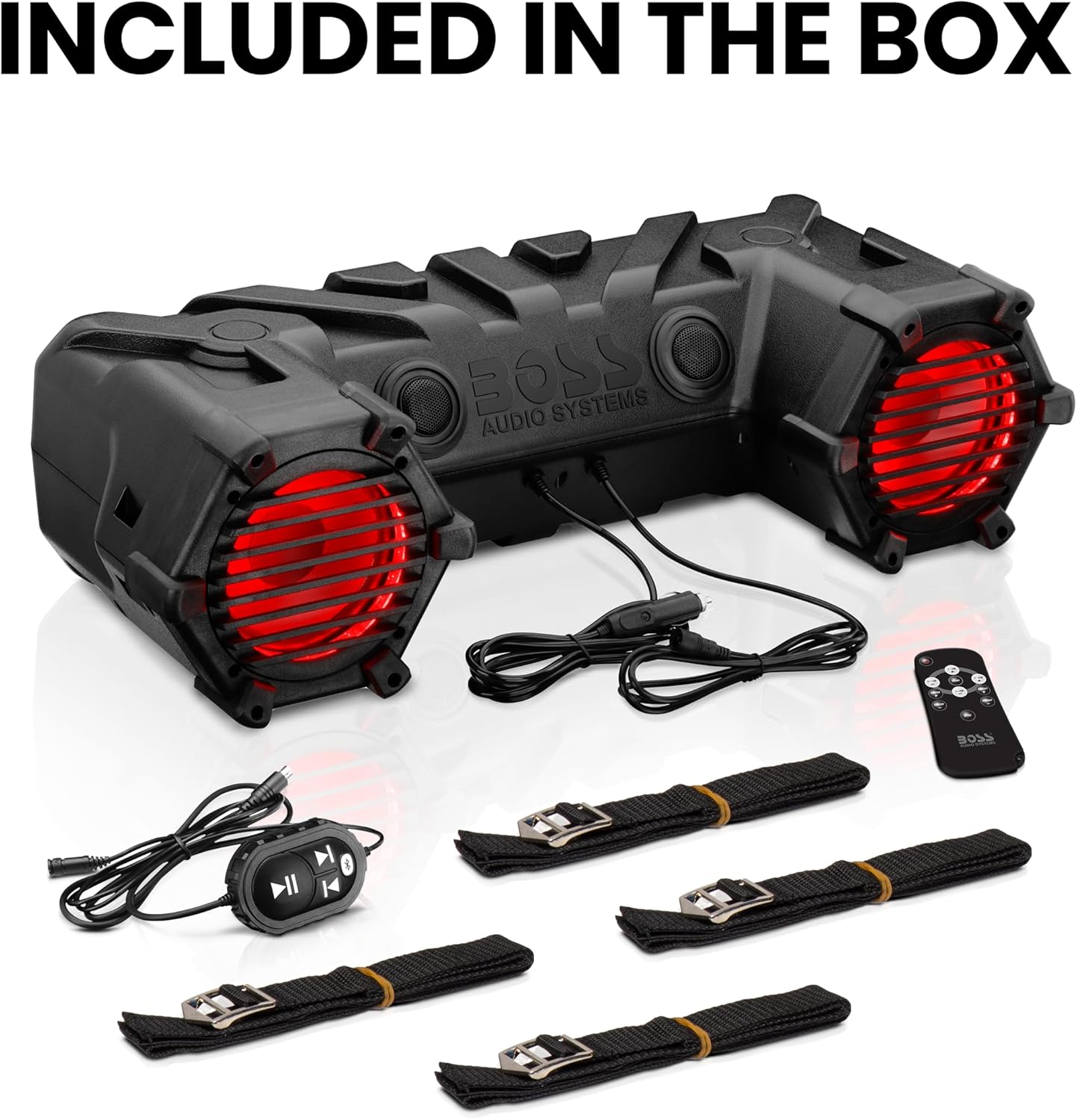
Figure 2: All components included with the ATV30BRGB speaker system.
3. Features
The ATV30BRGB speaker system is equipped with several features designed for outdoor use:
- Audio System: Dual 6.5-inch speakers and 1.0-inch tweeters powered by a high-performance internal Class A/B amplifier, delivering up to 450 Watts maximum output.
- Connectivity: Bluetooth for wireless audio streaming and a 3.5mm Auxiliary Input for wired connections.
- Illumination: Multi-color RGB illumination with 20 different options, controllable via the included remote. Features a dual-row LED lightbar.
- Durability: Weatherproof poly injection cone speakers and an IPX5 water resistance rating, designed to withstand outdoor conditions.
- Convenience: Integrated storage compartment and a handlebar controller for easy access to functions.

Figure 3: The ATV30BRGB system mounted on an ATV, demonstrating its outdoor application.

Figure 4: Detail of the integrated dual-row LED lightbar and customizable RGB speaker illumination.

Figure 5: The ATV30BRGB system operating in snowy conditions, illustrating its IPX5 water resistance.
4. Setup and Installation
Proper installation is crucial for optimal performance and safety. It is recommended to have this product professionally installed.
4.1 Mounting the Speaker System
- Identify a secure and stable mounting location on your ATV or UTV. Ensure the location does not obstruct your view or vehicle controls.
- Use the four heavy-duty straps with Velcro to securely fasten the speaker system to the chosen mounting position. Ensure the straps are tightened to prevent movement during operation.
- Verify that the speaker system is firmly attached and does not interfere with any moving parts or safety features of your vehicle.
4.2 Power Connection
- Locate the 12V power outlet (cigarette lighter socket) on your ATV or UTV.
- Connect the provided power cable to the speaker system and then insert the 12V adapter into your vehicle's power outlet.
- Ensure a secure connection. The system requires a 12-volt power source.
- Important: To prevent battery drain, always unplug the speaker system from the 12V power outlet when the vehicle is not in use for extended periods.
4.3 Handlebar Controller Installation
Mount the handlebar controller in a convenient location on your handlebars for easy access to audio controls. Connect the controller cable to the designated port on the speaker system.
5. Operating Instructions
5.1 Powering On/Off
Once connected to power, the system can be turned on or off using the power button on the unit or the handlebar controller.
5.2 Bluetooth Audio Streaming
- Ensure the speaker system is powered on.
- Activate Bluetooth on your mobile device (smartphone, tablet, etc.).
- Search for available Bluetooth devices and select "BOSS ATV30BRGB" from the list.
- Once paired, you can stream audio wirelessly from your device to the speaker system. The Bluetooth range is approximately 10 meters (33 feet).
5.3 Auxiliary Input (AUX)
For devices without Bluetooth, connect them using the provided 3.5mm auxiliary input cable. Plug one end into your audio device's headphone jack and the other into the AUX input port on the speaker system.
5.4 Controlling RGB Illumination and LED Lightbar
Use the dedicated remote control to manage the multi-color RGB illumination and the integrated LED lightbar.
- The remote allows you to select from 20 different multi-color illumination options for the speakers.
- Control the LED lightbar's on/off function and brightness settings.
6. Maintenance
To ensure the longevity and performance of your ATV30BRGB speaker system, follow these maintenance guidelines:
- Cleaning: Use a soft, damp cloth to clean the exterior of the unit. Avoid harsh chemicals or abrasive cleaners.
- Weather Resistance: The unit is rated IPX5 water resistant, meaning it can withstand splashes and light rain. However, it is not fully waterproof and should not be submerged. Avoid prolonged exposure to heavy rain or direct high-pressure water sprays.
- Storage: When not in use for extended periods, store the speaker system in a dry, protected environment. Disconnect it from the vehicle's power source.
- Connections: Periodically check all cable connections for corrosion or damage. Ensure they are securely fastened.
7. Troubleshooting
If you encounter issues with your ATV30BRGB speaker system, refer to the following common problems and solutions:
| Problem | Possible Cause | Solution |
|---|---|---|
| No Power |
|
|
| No Sound |
|
|
| Bluetooth Disconnection |
|
|
| LED Lights Not Working |
|
|
8. Specifications
| Feature | Detail |
|---|---|
| Model Name | ATV30BRGB |
| Speaker Type | Tweeter, 6.5-inch Speakers |
| Subwoofer Diameter | 6.5 Inches |
| Speaker Maximum Output Power | 450 Watts |
| Impedance | 4 Ohm |
| Wireless Communication Technology | Bluetooth |
| Bluetooth Range | 10 Meters |
| Water Resistance Level | Water Resistant (IPX5) |
| Special Features | Dustproof, LED Light, Multi-Color Illumination |
| Control Method | Remote |
| Power Source | Corded Electric (12V Input) |
| Product Dimensions (D x W x H) | 28.54" x 11.61" x 7.87" (725mm x 295mm x 200mm) |
| Item Weight | 14.45 Pounds (6.55 kg) |
| Batteries Required (for remote) | 1 CR2 battery |
| Compatible Devices | Smartphone, Tablets, Music Players |
| Vehicle Service Type | ATV, UTV |

Figure 6: Dimensional diagram of the ATV30BRGB speaker system.
9. Warranty and Support
9.1 Warranty Information
BOSS Audio Systems provides a 3-Year Platinum Online Dealer Warranty. This warranty is valid only on products sold and shipped by Amazon.com. This offer is not valid on purchases made from third-party marketplace sellers. Registration online after purchase may be required to activate the full warranty.
For warranty claims or detailed terms and conditions, please refer to the official BOSS Audio Systems website or contact their customer support.
9.2 Customer Support
For technical assistance, troubleshooting beyond this manual, or general inquiries, please contact BOSS Audio Systems customer support. Refer to the product packaging or the official BOSS Audio Systems website for current contact information.


