
Introduction
This manual provides comprehensive instructions for the Modu T 3G Smartphone. It covers essential information regarding device setup, operation, features, and maintenance to ensure optimal performance and user experience.
Package Contents
Verify that all items are present in your Modu T package:
- Modu T Smartphone
- Charger
- USB Cable
- Headphones (USB-C type)
- Sport Armband
- Camera Jacket (optional, if included)
- Quick Start Guide
Setup
1. Inserting the SIM Card and Memory Card
Locate the SIM card slot and the microSDHC card slot. Carefully insert your 3G compatible SIM card and an optional microSDHC card (up to 32GB) into their respective slots. Ensure the phone is powered off before insertion.

Figure 1: Modu T smartphone displaying its application interface. The screen shows icons for various apps like YouTube, Facebook, and Twitter.
2. Charging the Battery
Connect the charger to the phone's USB port and plug it into a power outlet. The battery indicator will show charging status. For first-time use, fully charge the device.
3. Powering On/Off
To power on, press and hold the Power button until the screen illuminates. To power off, press and hold the Power button, then select "Power off" from the options.
Operating Instructions
Basic Navigation
The Modu T features a 2.2-inch resistive touchscreen with a resolution of 240 x 320 pixels. Use your finger or a stylus to tap, drag, and swipe across the screen to navigate menus and applications.
Making Calls
- From the home screen, tap the "Phone" icon.
- Enter the phone number using the on-screen keypad.
- Tap the "Call" button to initiate the call.

Figure 2: A user's hand holding the Modu T smartphone, demonstrating the on-screen numeric keypad for dialing a phone number.
Sending Messages
Tap the "Messages" icon, then select "New Message." Enter the recipient's number and type your message using the on-screen keyboard. Tap "Send."
Camera Functionality
The Modu T is equipped with a camera. To access, tap the "Camera" icon. You can take photos and record videos. The camera functionality can be extended using an optional camera jacket.
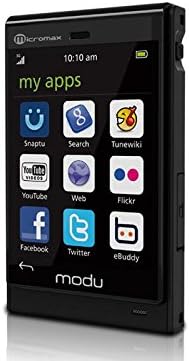
Figure 3: The Modu T smartphone screen showing the camera application interface, including options for mode, scenes, quality, and flash settings.
Music Player
The device supports MP3, AMR, MIDI, and WAV audio formats. Transfer music files to your microSDHC card. Tap the "Music" icon to browse and play your audio library. The phone uses a USB-C port for headphones.
Internet Browsing
Utilize the 3G network (HSDPA 3.6Mbps 900/1900/2100 MHz) for internet access. Tap the "Browser" or "Web" icon to open the web browser. Note that the Modu T does not include Wi-Fi functionality.
Special Features
- Compact Design: The Modu T is designed to be a small and lightweight 3G smartphone.
- Expandable Memory: Supports microSDHC cards up to 32GB for additional storage.
- Sport Armband Compatibility: The device can be used with a sport armband for activities like running or working out.
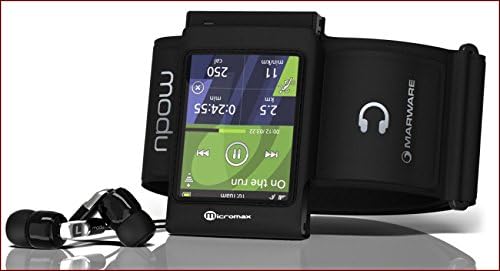
Figure 4: The Modu T smartphone integrated into a sport armband, showing a fitness application on its screen, accompanied by wired headphones.
Maintenance
- Cleaning: Use a soft, dry cloth to clean the screen and body of the phone. Avoid harsh chemicals.
- Battery Care: To prolong battery life, avoid extreme temperatures and fully charge the device before first use.
- Storage: Store the phone in a cool, dry place when not in use.
Troubleshooting
| Problem | Solution |
|---|---|
| Phone does not power on. | Ensure the battery is charged. Connect to the charger and attempt to power on after a few minutes. |
| Cannot make or receive calls. | Check if the SIM card is correctly inserted and activated. Verify network signal strength. |
| Touchscreen is unresponsive. | Restart the device. Ensure the screen is clean and free of debris. |
| Slow operating system performance. | Close unnecessary applications. Clear cache if possible. Note that the Modu T OS may exhibit some delays as mentioned in user feedback. |
| Music player does not recognize folders. | The Modu T music player may not support folder-based organization for playlists. Organize music by artist name or individual tracks. |
Specifications
| Feature | Detail |
|---|---|
| Model Name | Modu T |
| Dimensions | 75 x 46.5 x 11mm |
| Screen | 2.2-inch resistive touch screen |
| Resolution | 240 x 320 pixels (QVGA) |
| Cellular Technology | 3G (HSDPA 3.6Mbps 900/1900/2100 MHz) |
| Memory | Removable microSDHC support (2GB included, max. 32GB) |
| Camera | 5 MP (with optional camera jacket) |
| Connectivity | USB |
| Audio Formats | MP3, AMR, MIDI, WAV |
| Talk Time | Up to 6 hours |
| Manufacturer | Micromax |
Warranty and Support
For warranty information and technical support, please refer to the documentation provided with your purchase or contact your retailer. Specific warranty terms may vary by region and retailer.