
Gemini Sound ES-210MXBLU
Gemini Portable PA System User Manual
Model: ES-210MXBLU
Introduction
This manual provides comprehensive instructions for the setup, operation, and maintenance of your Gemini Portable PA System with Bluetooth (Model ES-210MXBLU). Please read this manual thoroughly before operating the unit to ensure proper use and to prevent damage.
What's in the Box
Upon unpacking, please verify that all components listed below are present and in good condition:
- (2) 10" Passive PA Speakers
- (1) Powered Mixer
- (2) Audio Cables
- (1) Dynamic Microphone
- (1) Microphone Cable
- (1) Storage Container (integrated with mixer)
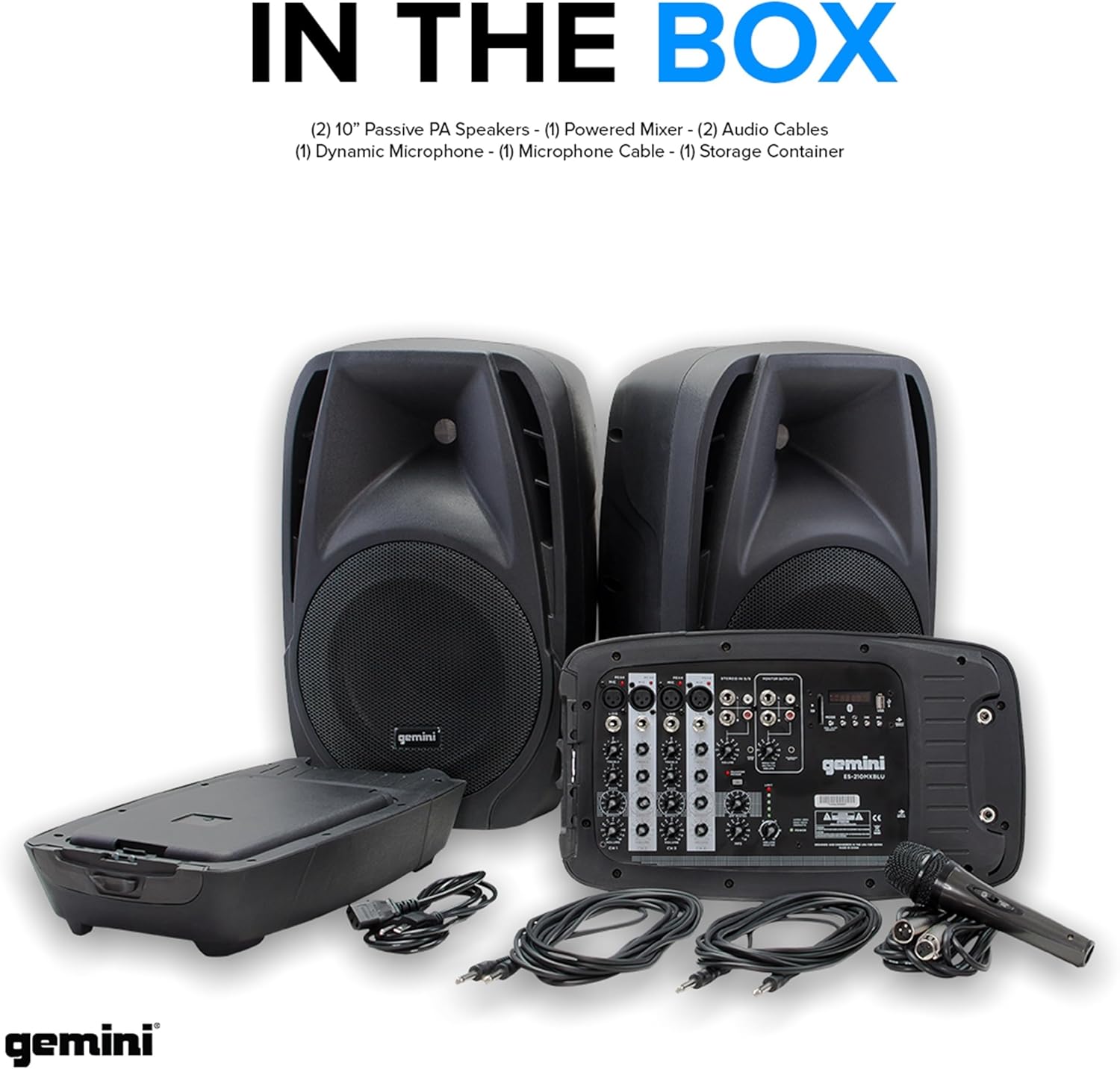
Image: All components included in the Gemini Portable PA System package, laid out for clear viewing.
Product Features and Components
Powered Mixer (ES-210MXBLU)
The central component of the system, featuring a 6-channel mixer with various inputs and controls.
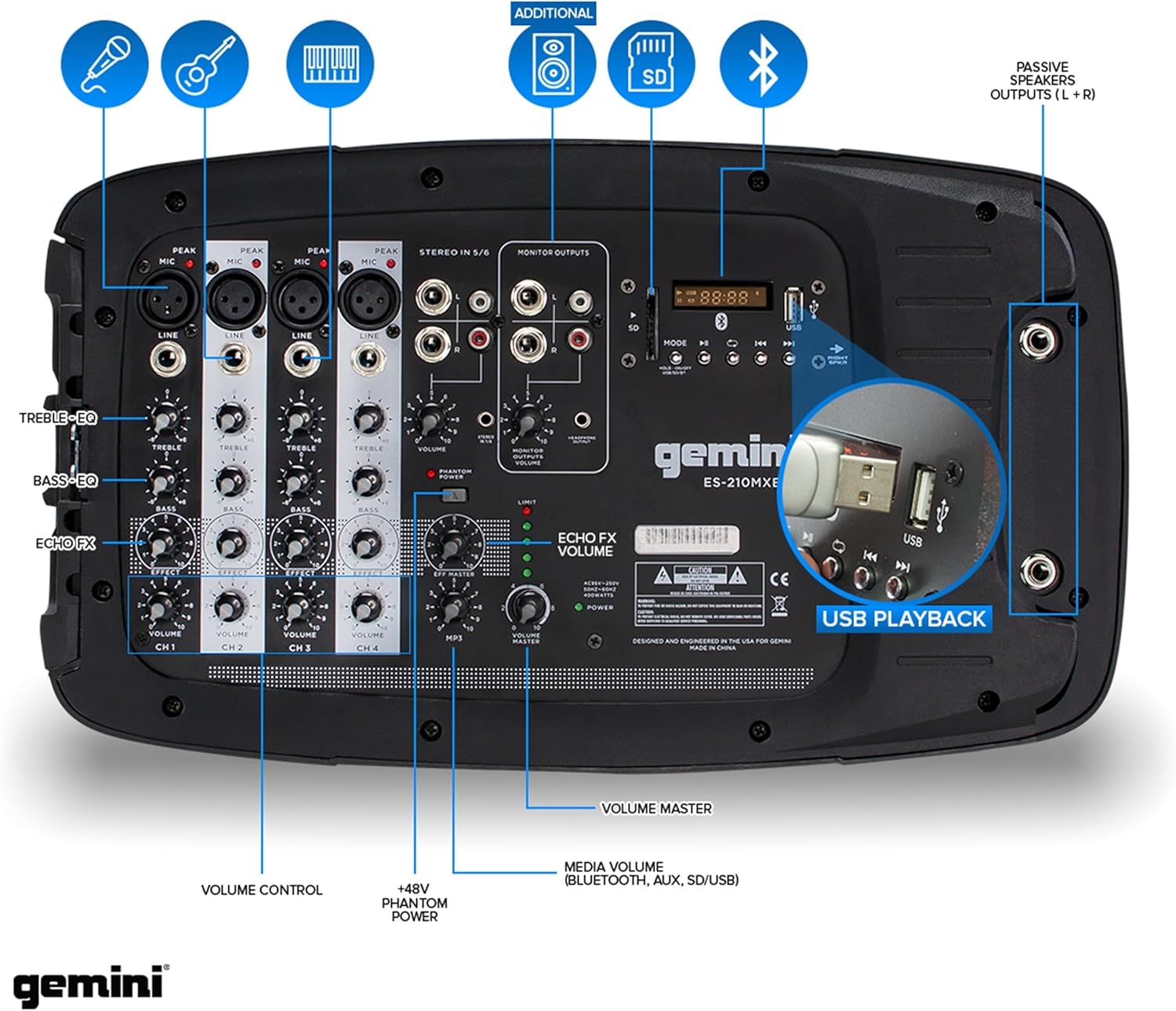
Image: Front panel of the ES-210MXBLU mixer, highlighting input jacks, EQ controls, volume knobs, and media player section.
- Channels 1-4: XLR and 1/4" combo inputs for microphones or line-level instruments. Each channel includes individual Bass, Treble, and Volume controls.
- Stereo In 5/6: RCA and 1/4" inputs for connecting external audio sources like CD players or other mixers.
- Media Player: Integrated Bluetooth, USB, and SD card inputs for versatile audio playback. Features a digital display and control buttons.
- Echo FX: Built-in digital echo effect with adjustable level.
- Monitor Outputs: RCA outputs for connecting to external monitors or recording devices.
- Passive Speaker Outputs (L+R): 1/4" outputs for connecting the included passive speakers.
- +48V Phantom Power: Switchable phantom power for condenser microphones on channels 1-4.
Speakers
The system includes two 10-inch passive PA speakers designed to deliver clear and powerful audio.

Image: Visual representation of the speaker's sound output, emphasizing its 600W peak power capability.
- Size: Dual 10-inch woofers for robust sound reproduction.
- Power Handling: Capable of handling 600W peak power.
- Mounting: Designed for pole mounting (poles not included) or floor placement.
Integrated Storage
The mixer unit features a clever design that allows one of the speakers to attach to it, creating a compact storage compartment for cables and the microphone.

Image: Instructions demonstrating how to access the internal storage compartment by detaching a speaker and opening the lid.

Image: The storage compartment fully open, revealing the microphone and cables neatly stored within the mixer unit.
Setup Guide
- Unpack Components: Carefully remove all items from the packaging and verify against the "What's in the Box" section.
- Position Speakers: Place the two passive speakers in desired locations. For optimal sound dispersion, consider using speaker stands (sold separately) to elevate them to ear level.
- Connect Speakers to Mixer: Use the provided audio cables to connect the 1/4" outputs on the mixer (labeled "Passive Speakers Outputs L+R") to the corresponding inputs on each speaker. Ensure connections are secure.
- Connect Microphone: Plug the included dynamic microphone into one of the XLR/1/4" combo inputs on channels 1-4 of the mixer using the microphone cable.
- Power Connection: Connect the power cable to the mixer and then to a suitable AC power outlet.
- Initial Volume Settings: Before powering on, ensure all volume knobs on the mixer are turned down to their minimum position to prevent sudden loud noises.
Operating Instructions
Powering On/Off
- To power on, press the power switch located on the mixer. The display will illuminate.
- To power off, ensure all volumes are turned down, then press the power switch again.
Bluetooth Connectivity
The system supports wireless audio streaming via Bluetooth.

Image: A smartphone connected via Bluetooth to the Gemini PA system, ready for music playback.
- Power on the mixer.
- Press the "MODE" button on the media player section until "BT" appears on the display.
- On your Bluetooth-enabled device (smartphone, tablet, etc.), search for "Gemini ES-210MXBLU" in the Bluetooth settings.
- Select the device to pair. Once connected, the display will indicate a successful connection.
- Start playing audio from your device. Adjust the "MEDIA VOLUME" knob on the mixer and the volume on your device for desired output.
USB/SD Card Playback
Play audio files directly from a USB drive or SD card.
- Insert a USB drive into the USB port or an SD card into the SD card slot on the media player section.
- The mixer will automatically switch to USB or SD mode, or you may need to press the "MODE" button to select the correct source.
- Use the media player controls (Play/Pause, Next, Previous) to navigate and play tracks.
- Adjust the "MEDIA VOLUME" knob for the desired output level.
Microphone and Instrument Usage
- Connect your microphone or instrument to an available XLR or 1/4" input on channels 1-4.
- Slowly increase the "VOLUME" knob for the corresponding channel.
- Adjust the "BASS" and "TREBLE" knobs for tonal shaping.
- If using a condenser microphone, ensure the +48V Phantom Power switch is engaged (if required by your microphone).
- Adjust the "ECHO FX VOLUME" and "ECHO" knob for the desired echo effect.
- Use the "MASTER VOLUME" knob to control the overall output level of the system.
Maintenance
- Cleaning: Use a soft, dry cloth to clean the surfaces of the mixer and speakers. Avoid using abrasive cleaners or solvents.
- Storage: When not in use, store the system in a cool, dry place. Utilize the integrated storage compartment for cables and the microphone to keep them organized and protected.
- Cable Management: Ensure cables are not kinked or pinched during setup or storage to prevent damage.
- Ventilation: Ensure proper ventilation around the mixer during operation to prevent overheating. Do not block ventilation openings.
Troubleshooting
| Problem | Possible Cause | Solution |
|---|---|---|
| No sound output | Power off; Volume too low; Incorrect input selected; Loose cables. | Check power connection and switch; Increase master and channel volumes; Select correct input mode (Bluetooth, USB, SD); Secure all audio cables. |
| Distorted sound | Volume too high (clipping); Incorrect EQ settings; Damaged cables. | Reduce volume levels (master and channel) to avoid clipping (indicated by PEAK LED); Adjust Bass/Treble settings; Try different cables. |
| Bluetooth not connecting | Mixer not in Bluetooth mode; Device too far; Previously paired device connected. | Ensure mixer is in "BT" mode; Move device closer to mixer; Disconnect from other Bluetooth devices. |
| Microphone not working | Microphone not connected; Channel volume low; Phantom power off (for condenser mics). | Ensure microphone is securely connected; Increase channel volume; Activate +48V Phantom Power if using a condenser microphone. |
Specifications
- Model: ES-210MXBLU
- Output Wattage: 600 Watts (Peak)
- Speaker Size: Dual 10-inch Woofers
- Mixer Channels: 6-Channel (4 Mic/Line, 1 Stereo)
- Connectivity: Bluetooth, USB, SD Card
- Phantom Power: +48V (Channels 1-4)
- Item Weight: 40 Pounds (total system)
- Product Dimensions: 12 x 12 x 18 inches (mixer unit, approximate)
- Mounting Type: Pole Mount
- UPC: 747705001498
Versatile Performance Applications
The Gemini Portable PA System is designed for a wide range of uses, offering clear and powerful sound for various events and settings.

Ideal for public speaking, conferences, and presentations.

Perfect for live music performances and outdoor events.

Suitable for ceremonies, worship services, and private gatherings.
Warranty and Support
For warranty information and technical support, please refer to the official Gemini Sound website or contact their customer service directly. Keep your purchase receipt as proof of purchase.
User Manual (PDF): A detailed PDF version of the user manual is available for download: Download User Manual
Ask a question about this manual
Ask about setup, troubleshooting, compatibility, parts, safety, or missing instructions. Manuals+ will review the question and use this page’s manual context to help answer it.