
1. Product Overview
The Nikon D810 is an FX-format Digital SLR camera designed for professional photographers and cinematographers. It features a newly designed 36.3 megapixel full-frame image sensor without an optical low-pass filter, paired with the EXPEED 4 image processing engine. This combination delivers exceptional detail, wide dynamic range, and low noise across an ISO range of 64 to 12,800 (expandable to 51,200).
Key features include:
- 36.3 MP FX-format CMOS sensor without an Optical Low Pass Filter (OLPF)
- 30% faster EXPEED 4 image processing engine
- 51-point AF system with 3D Color Matrix metering III and a 91,000-pixel RGB sensor
- ISO 64-12,800, expandable to 51,200
- New RAW Small Size option for 16MP images with smaller file sizes
- Professional Full HD 1080p video and audio capabilities
2. Initial Setup
2.1. What's in the Box
Verify that all components are present:
- Nikon D810 FX-format Digital SLR Camera Body
- AF-S NIKKOR 24-120mm f/4G ED VR Lens
- EN-EL15 Rechargeable Li-ion Battery
- MH-25a Battery Charger
- UC-E22 USB Cable
- AN-DC12 Strap
- BF-1B Body Cap
- BS-1 Accessory Shoe Cap
- DK-17 Eyepiece
- BM-12 LCD Monitor Cover
- USB Cable Clip
- HDMI Cable Clip
- ViewNX 2 CD-ROM
- LC-77 Snap-on Front Lens Cap
- LF-4 Rear Lens Cap
- HB-53 Bayonet Lens Hood
- CL-1218 Soft Lens Case
2.2. Charging the Battery
- Insert the EN-EL15 battery into the MH-25a charger.
- Plug the charger into a power outlet. The charge lamp will blink during charging and turn steady when complete.
2.3. Attaching the Lens
- Remove the body cap from the camera and the rear lens cap from the lens.
- Align the mounting mark on the lens with the mounting mark on the camera body.
- Rotate the lens counter-clockwise until it clicks into place.

Figure 1: Nikon D810 FX-format Digital SLR with 24-120mm f/4G ED VR Lens.
3. Operating Instructions
3.1. Basic Controls and Display
The D810 features a robust control layout for intuitive operation. Familiarize yourself with the main dials and buttons for efficient use.
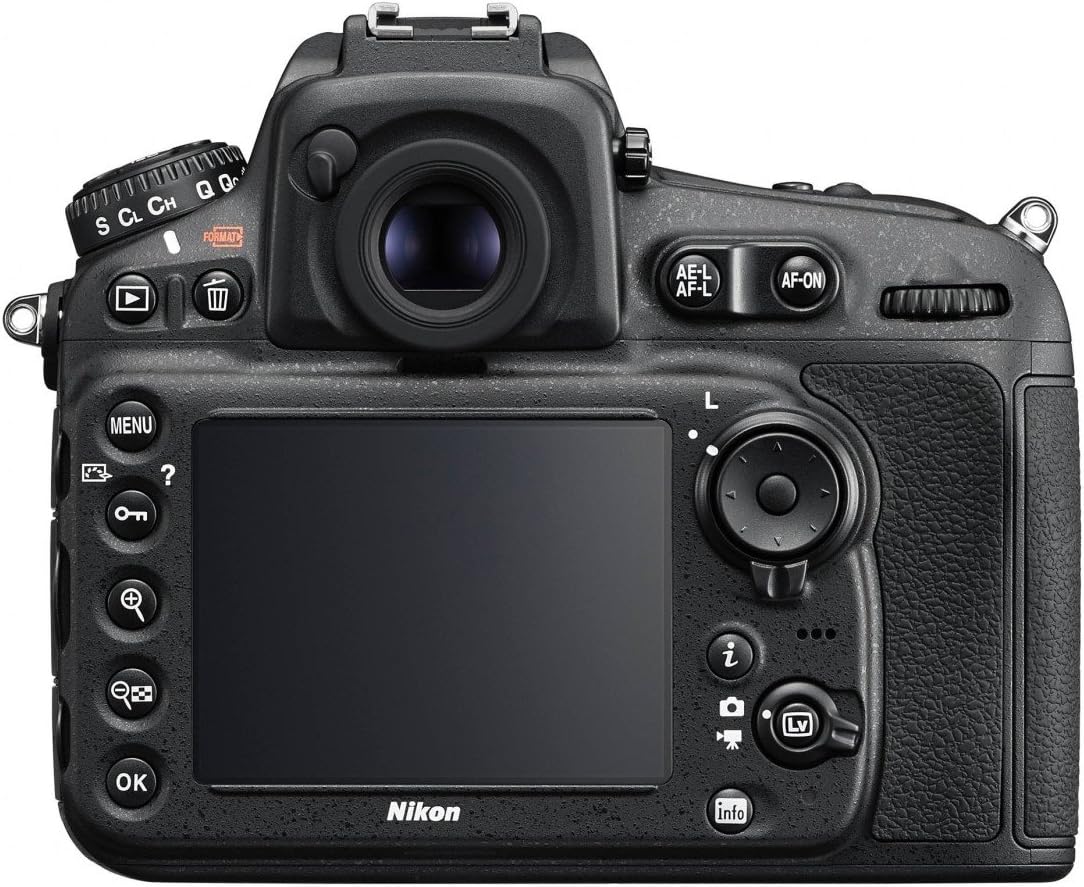
Figure 2: Rear view of the Nikon D810, highlighting the LCD monitor and control buttons.

Figure 3: Top view of the Nikon D810, illustrating the mode dial and top controls.
The 3.2-inch, 1,229k-dot LCD display provides a clear view for reviewing images and navigating menus. It features RGBW alignment for enhanced visibility and can display zebra striping to monitor highlights during video capture.
3.2. Photography
The D810's 36.3 MP FX-format sensor captures images with exceptional detail. The EXPEED 4 processor ensures fast performance and excellent noise reduction.
- ISO Sensitivity: The camera offers a native ISO range of 64 to 12,800, expandable to 51,200, providing flexibility in various lighting conditions.
- Shutter Speed: Control exposure with shutter speeds from 30 seconds to 1/4000 seconds.
- Autofocus System: Utilize the 51-point AF system, including 15 cross-type sensors, for precise focusing. The new Group Area AF mode enhances subject tracking.
- Metering: The 3D Color Matrix Metering III system, with its 91,000-pixel RGB sensor, provides accurate exposure readings. Highlight-weighted metering is available for scenes with bright highlights.
- RAW Small Size: For situations requiring smaller file sizes without sacrificing RAW flexibility, the 12-bit uncompressed RAW size S option produces 16MP images.
- Continuous Shooting: Capture action at up to 5 frames per second at full resolution, or 7 frames per second in DX-crop mode with the optional MB-D12 battery pack.
3.3. Videography
The D810 offers advanced video capabilities for cinematic productions:
- Full HD Video: Record 1080p video at 60/50/30/25/24p. Video can be recorded uncompressed to an external device, compressed to an internal CF/SD card, or both simultaneously.
- Exposure Control: ISO Auto Adjust allows smooth transitions between dark and light scenes without manual iris or frame-rate adjustments. Power iris control enables smooth depth of field changes.
- Picture Control: A flat picture style is available to enhance dynamic range and streamline post-production color grading.
- Audio: The camera provides broadcast-caliber audio control directly, with dedicated microphone and headphone jacks.
3.4. Photo Tips
Nikon Photo Tips: Filling the Frame
This video provides guidance on composing shots by filling the frame with your subject, a fundamental technique for impactful photography. It emphasizes getting closer to your subject to eliminate distractions and create a stronger visual impact.
Nikon Photo Tip: Shooting in Winter Weather
Learn how to optimize your Nikon D810 settings for winter photography. This tip covers adjusting ISO for changing light and utilizing Vibration Reduction (VR) to counteract camera shake in cold conditions.
Nikon Photo Tips: Holiday Lights
Discover techniques for capturing stunning holiday light displays. This video suggests shooting during the 'magic hour' (twilight) and using fast lenses with appropriate ISO settings to achieve beautiful, soft backgrounds.
Nikon Smart Tip: Fall Photo Shoots
This smart tip offers creative ideas for fall photography, such as capturing action shots of leaves in the air or dramatic wide-angle shots by positioning the camera low to the ground and pointing upwards.
4. Maintenance
Proper maintenance ensures the longevity and optimal performance of your Nikon D810.
- Cleaning: Use a blower brush to remove dust from the lens and sensor. For stubborn spots, use a lens cleaning solution and microfiber cloth. Avoid touching the sensor directly.
- Storage: Store the camera in a dry, cool place away from direct sunlight and extreme temperatures. Use silica gel packets to absorb moisture if storing in humid environments.
- Battery Care: Fully charge the battery before extended storage. Remove the battery from the camera if not in use for a long period.
- Firmware Updates: Periodically check the Nikon support website for firmware updates to ensure your camera has the latest features and bug fixes.
5. Troubleshooting
This section addresses common issues you might encounter. For more detailed troubleshooting, refer to the comprehensive user manual provided with your camera or visit the Nikon support website.
- Camera Not Powering On: Ensure the battery is fully charged and correctly inserted. Check if the battery contacts are clean.
- Images Are Blurry: Verify that the lens is properly attached and clean. Check your focus mode and ensure sufficient light for autofocus. Consider using a higher shutter speed or image stabilization (VR) in low light.
- Memory Card Error: Ensure the memory card is inserted correctly and is not locked. Try formatting the card (this will erase all data, so back up first). Use a compatible and reliable memory card.
- Exposure Issues: Check your metering mode and exposure compensation settings. In challenging lighting, try bracketing exposures or adjusting ISO.
6. Specifications
| Feature | Detail |
|---|---|
| Brand | Nikon |
| Model Name | Nikon D810 |
| Model Number | 1556 |
| Sensor Type | CMOS |
| Photo Sensor Resolution | 36.3 MP |
| Photo Sensor Size | Full Frame (35mm) |
| Processor | EXPEED 4 |
| ISO Range | 64-12,800 (Expanded: 50-51,200) |
| Autofocus Points | 51 |
| Maximum Shutter Speed | 1/4000 Seconds |
| Minimum Shutter Speed | 30 Seconds |
| Continuous Shooting | 5 FPS (11 FPS with optional MB-D12 and EN-EL18a battery in DX-crop) |
| Video Resolution | FHD 1080p |
| Video Capture Format | MOV |
| Screen Size | 3.2 Inches |
| Display Type | LCD |
| Memory Slots Available | 2 (SD) |
| Connectivity Technology | HDMI, USB |
| Item Weight | 0.88 Kilograms |
7. Warranty Information
The Nikon D810 comes with a 1-year coverage for labor and 1-year coverage for parts. This warranty does not apply to the batteries and software driver that accompany this product. Please retain your proof of purchase for warranty claims.
8. Customer Support
For further assistance, technical support, or service inquiries, please visit the official Nikon support website or contact their customer service department. Refer to the full product manual for detailed contact information and extended support resources.


