
Introduction
This manual provides essential instructions for the safe and effective use, installation, and maintenance of your Shop-Vac Power Unit Assembly, Model QULP 600 (Part No. 7260497). Please read this manual thoroughly before operating the unit and retain it for future reference.
Safety Information
Always observe basic safety precautions when using electrical appliances to reduce the risk of fire, electric shock, or injury. This power unit is designed for specific applications as detailed in this manual. Use only as described in this manual. Use only manufacturer's recommended attachments.
- Ensure the power source matches the unit's requirements.
- Do not operate the unit with a damaged cord or plug.
- Keep hair, loose clothing, fingers, and all parts of the body away from openings and moving parts.
- Unplug from outlet when not in use and before servicing.
- Do not allow to be used as a toy. Close attention is necessary when used by or near children.
Product Components
The Shop-Vac Power Unit Assembly QULP 600 consists of the main motor housing, a float mechanism, and the power cord. Familiarize yourself with these components before assembly and operation.
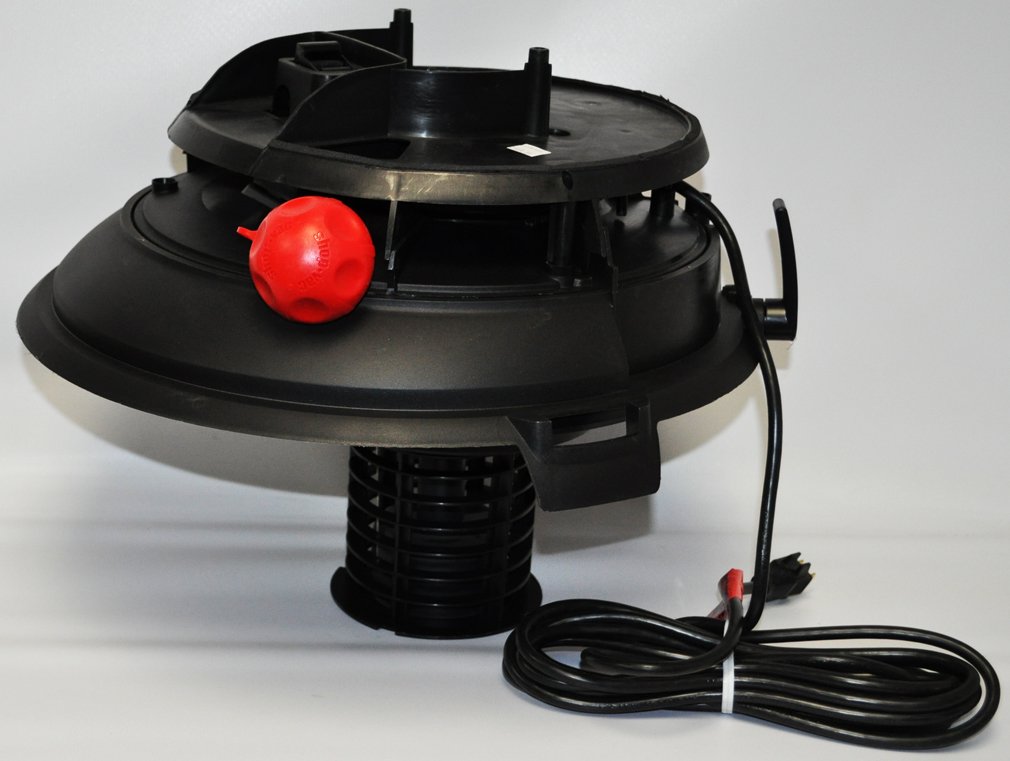
Figure 1: Overview of the Shop-Vac Power Unit Assembly QULP 600. This image displays the black motor housing, the red spherical float mechanism visible on the side, and the coiled power cord extending from the unit.
- Motor Housing: The primary component containing the motor and fan assembly.
- Float Mechanism: A safety device (often red) that rises to shut off suction when the liquid level in the tank is too high, preventing motor damage.
- Power Cord: Connects the unit to an electrical outlet.
Setup
- Unpacking: Carefully remove all components from the packaging. Inspect for any damage.
- Assembly: This power unit is typically installed onto a compatible Shop-Vac collection tank. Ensure the unit is securely seated and latched onto the tank according to your specific vacuum model's instructions. The float mechanism should be free to move.
- Power Connection: Ensure the power switch on the unit is in the "OFF" position. Plug the power cord into a grounded electrical outlet.
Operating Instructions
Once the power unit is correctly assembled onto the vacuum tank and connected to power:
- Power On: Flip the power switch to the "ON" position. The motor will start.
- Operation: Use the vacuum according to its intended purpose (wet or dry pickup).
- Wet Pickup Safety: During wet pickup, the float mechanism will rise and shut off suction when the tank is full. When this occurs, turn off the vacuum, unplug it, and empty the tank.
- Power Off: After use, flip the power switch to the "OFF" position.
- Unplug: Disconnect the power cord from the electrical outlet.
Maintenance
Regular maintenance ensures optimal performance and extends the life of your power unit.
- Cleaning: Periodically wipe down the exterior of the power unit with a damp cloth. Do not immerse the unit in water.
- Float Mechanism Check: Ensure the float mechanism moves freely. Clean any debris that might obstruct its movement.
- Cord Inspection: Regularly inspect the power cord for any signs of damage, cuts, or fraying. Replace if damaged.
- Filter Maintenance: Refer to your specific Shop-Vac model's manual for instructions on cleaning or replacing filters, as this directly impacts the power unit's efficiency.
Troubleshooting
| Problem | Possible Cause | Solution |
|---|---|---|
| Unit does not turn on. | No power, faulty switch, or damaged cord. | Check power outlet, ensure cord is plugged in, inspect cord for damage, check switch position. |
| Loss of suction. | Full tank (wet pickup), clogged filter, hose obstruction, or loose connections. | Empty tank, clean/replace filter, clear hose, ensure all connections are secure. |
| Motor overheats. | Blocked airflow, prolonged use, or motor issue. | Check for obstructions, allow unit to cool, ensure proper ventilation. If problem persists, seek professional service. |
For issues not listed here, or if solutions do not resolve the problem, contact Shop-Vac customer support.
Specifications
| Feature | Detail |
|---|---|
| Brand | Shop-Vac |
| Model Name | QULP 600 |
| Manufacturer Part No. | 7260497 (SV-7260497) |
| Item Weight | 16 Pounds |
| Form Factor | Compact |
| Power Source | Electric |
| Specific Uses | Heavy duty cleaning, Workshop use |
Warranty and Support
This Shop-Vac Power Unit Assembly is covered by the manufacturer's standard warranty. Please refer to the warranty card included with your original purchase for specific terms and conditions.
For technical assistance, replacement parts, or warranty claims, please contact Shop-Vac Customer Service:
- Website: www.shopvac.com
- Phone: Refer to the official Shop-Vac website or product packaging for current contact numbers.
When contacting support, please have your model number (QULP 600) and part number (7260497) readily available.