
1. Introduction
The GODOX Leadpower LP-800X is a portable power supply designed to provide AC power for studio flashes and other AC-powered devices in outdoor or remote locations. It offers flexibility for both studio and on-location photography, delivering reliable power from its high-capacity lithium-ion battery. This manual provides essential information for the safe and effective use of your LP-800X.
2. Safety Precautions
Please read and understand all safety instructions before using the GODOX Leadpower LP-800X. Failure to follow these instructions may result in electric shock, fire, or serious injury.
- Do not expose the unit to rain, moisture, or extreme temperatures.
- Do not disassemble, modify, or attempt to repair the unit yourself. Refer all servicing to qualified personnel.
- Ensure proper ventilation during operation to prevent overheating. The unit includes a cooling fan; do not block its vents.
- Use only the specified charger and cables provided or approved by GODOX.
- Keep the unit away from flammable materials and explosive environments.
- Avoid short-circuiting the output terminals.
- Handle the lithium-ion battery with care. Do not puncture, drop, or expose it to fire.
- If the unit emits smoke, unusual odors, or makes abnormal noises, immediately turn it off and disconnect it from all power sources.
3. Product Overview
The GODOX Leadpower LP-800X is a robust and portable power solution. It consists of a main inverter unit and a detachable battery pack.
3.1 Main Unit Features
- AC Outlets: Three 110V / 230V AC outlets for connecting studio flashes or other AC devices.
- USB Ports: Three DC 5V USB ports (2000mA, 1000mA, 500mA) for charging mobile devices.
- Power Switch: Controls the main power to the unit.
- Mode Switch: Selects between "Flash Mode" and "Normal Mode."
- Battery Level Indicator: LEDs display the current battery charge status.
- Low Voltage Warning: An alarm indicates when the battery charge is critically low.
- Cooling Fan: Integrated fan to dissipate heat during operation.
- DC 12V Input: External terminals for charging from a 12V car battery.
3.2 Components
- GODOX Leadpower LP-800X Main Unit
- 12000 mAh Lithium-Ion Battery Pack
- AC Charger Adapter
- Power Cable
- Shoulder Strap / Carry Bag

Figure 1: Front view of the GODOX Leadpower LP-800X portable power supply, showing the main controls and output ports.
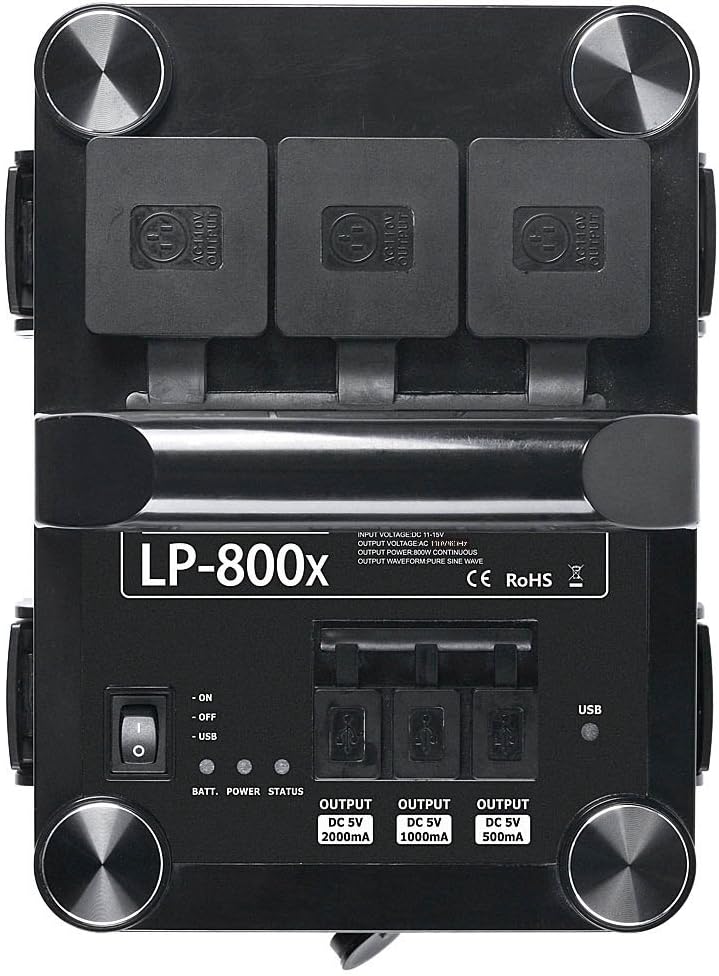
Figure 2: Detailed view of the top panel, highlighting the three AC outlets, three USB output ports, power switch, battery status indicators, and mode switch.

Figure 3: The LP-800X main unit separated from its interchangeable battery pack, illustrating the modular design.
4. Setup
4.1 Attaching the Battery Pack
- Align the battery pack with the main inverter unit.
- Gently slide the battery pack into place until it clicks securely. Ensure the locking mechanisms are engaged.

Figure 4: The detachable battery pack shown separately from the main unit, ready for attachment or external charging.
4.2 Initial Charging
Before first use, fully charge the battery pack. Refer to Section 6 for detailed charging instructions.
5. Operating Instructions
5.1 Powering On/Off
- To power on, press the main power switch to the "ON" position. The battery level indicators will illuminate.
- To power off, press the main power switch to the "OFF" position.
5.2 Selecting Operating Mode
The LP-800X features two operating modes:
- Flash Mode: This mode is specifically optimized for powering studio flashes. It provides rapid power delivery suitable for flash recycling times.
- Normal Mode: This mode is suitable for powering general AC electrical devices that require a constant power source, such as laptops, chargers, or small fans.
Use the mode switch located on the side of the unit to select the appropriate mode for your connected devices.

Figure 5: Side view of the LP-800X, indicating the position of the Flash/Normal mode switch and the cooling fan vent.
5.3 Connecting Devices
- Ensure the LP-800X is powered off before connecting any devices.
- For AC-powered devices (e.g., studio flashes), plug them into one of the three AC outlets.
- For USB-powered devices (e.g., smartphones, tablets), plug them into one of the three DC 5V USB ports.
- Once devices are connected, power on the LP-800X and select the appropriate operating mode.
The LP-800X can power up to 3000Ws total, providing over 500 flashes with a 500Ws flash unit.

Figure 6: Illustration of the LP-800X connected to and powering three separate studio flash units, demonstrating its multi-device capability.
6. Charging the Battery
The 12000 mAh Lithium-Ion battery pack can be charged either while attached to the main unit or separately.
6.1 Charging with AC Adapter
- Connect the AC charger adapter to the charging port on the LP-800X (or directly to the battery pack if detached).
- Plug the power cable into the AC charger adapter and then into a standard wall outlet.
- The charging indicator on the charger will show the charging status. A full charge takes approximately 3 hours.
- Once fully charged, disconnect the charger from the unit and the wall outlet.

Figure 7: The AC charger adapter used to recharge the LP-800X battery, featuring its input and output connectors.

Figure 8: The LP-800X unit connected to its AC charger and power cable, demonstrating the charging setup.
6.2 Charging from a Car Battery
The LP-800X can also be charged from a 12V car battery using the external DC 12V input terminals. Ensure correct polarity when connecting.
7. Maintenance
- Cleaning: Use a soft, dry cloth to clean the exterior of the unit. Do not use liquid cleaners or solvents.
- Storage: When not in use for extended periods, store the unit in a cool, dry place. Ensure the battery is partially charged (around 50-70%) before storage and recharge it every 3-6 months to maintain battery health.
- Battery Care: Avoid fully discharging the battery frequently. Recharge promptly when the low voltage warning activates.
- Ventilation: Regularly check that the cooling fan vents are clear of dust and debris.

Figure 9: Close-up view of the cooling fan grille and fuse compartment on the side of the LP-800X, emphasizing the importance of clear ventilation.
8. Troubleshooting
| Problem | Possible Cause | Solution |
|---|---|---|
| Unit does not power on. | Battery is fully discharged or not properly connected. | Ensure battery is securely attached. Charge the battery using the AC adapter. |
| Connected device is not receiving power. | Unit is off, wrong mode selected, or device draws too much power. | Turn on the unit. Select the correct operating mode (Flash or Normal). Check if the device's power consumption exceeds the LP-800X's capacity (800W continuous). |
| Low voltage warning alarm sounds. | Battery charge is low. | Recharge the battery immediately. |
| Unit overheats and shuts down. | Blocked ventilation or excessive load. | Ensure cooling fan vents are clear. Reduce the load on the unit. Allow the unit to cool down before restarting. |
9. Specifications
| Feature | Detail |
|---|---|
| Model | LP-800X |
| Continuous Output Power | 800W |
| Peak Power | 1400W |
| Input Voltage Range | 110V / 60Hz or 230V / 50Hz (for charging) |
| Output Voltage / Frequency | AC: 110V/230V (depending on model/region); DC: 11-15.5V (internal battery voltage) |
| Battery Type | 12000 mAh Lithium-Ion |
| Charging Time (AC Adapter) | Approximately 3 hours |
| USB Output | DC 5V (2000mA, 1000mA, 500mA) |
| Main Unit Weight | Approximately 4 kg (8.8 lbs) |
| Battery Pack Weight | Approximately 2.2 kg (4.85 lbs) |
| Unit Dimensions (L x W x H) | Approximately 37.3 x 37.1 x 30 cm (14.7 x 14.6 x 11.8 inches) |
| Manufacturer | GODOX |
10. Warranty and Support
For warranty information, please refer to the documentation provided at the time of purchase or contact your retailer. GODOX provides support for its products. For technical assistance or service inquiries, please visit the official GODOX website or contact their customer service department.
Information regarding spare parts availability and software updates is not provided in the product details. Please contact GODOX directly for the most current information.