
1. Important Safety Instructions
Read and understand all safety warnings and instructions before operating this drill press. Failure to follow the warnings and instructions may result in electric shock, fire, and/or serious injury.
- Always wear eye protection.
- Keep work area clean and well-lit.
- Do not operate power tools in explosive atmospheres.
- Keep children and bystanders away.
- Secure the workpiece firmly before drilling.
- Do not force the tool.
- Disconnect power before changing accessories or performing maintenance.
- Use appropriate accessories for the task.
2. Unpacking and Assembly
Carefully remove all components from the packaging. Inspect for any damage that may have occurred during shipping. Ensure all parts listed in the packing list are present.
2.1 Package Contents
- Titan 55682 Drill Press Unit
- Chuck Key
- Assembly Hardware
- User Manual
2.2 Assembly Steps
- Attach the column to the base using the provided bolts and washers.
- Slide the table assembly onto the column and secure it at the desired height.
- Mount the drill head assembly onto the top of the column.
- Install the chuck onto the spindle. Ensure it is seated firmly.
- Connect the power cord to a suitable electrical outlet.
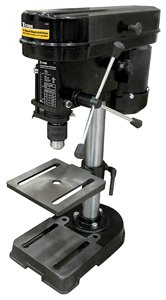
Figure 1: Fully assembled Titan 55682 5-Speed Drill Press. This image shows the main components including the base, column, table, and drill head.
3. Operation
3.1 Powering On/Off
To turn the drill press on, press the green "ON" button. To turn it off, press the red "OFF" button.
3.2 Adjusting Speed
The Titan 55682 features 5 speed settings, allowing for optimal drilling performance across various materials. To change the speed, open the belt housing cover and adjust the belt position on the pulleys according to the speed chart located inside the cover. The available speeds are up to 1700 RPM.
3.3 Installing Drill Bits and Accessories
Ensure the drill press is unplugged before installing or removing accessories. Insert the drill bit or sanding drum into the 1/2" chuck. Tighten the chuck jaws securely using the chuck key. Always remove the chuck key before starting the drill press.
3.4 Drilling Procedure
- Select the appropriate speed for your material (wood, plastic, or metal).
- Secure the workpiece to the drill press table using clamps.
- Adjust the table height and angle as needed.
- Lower the drill bit to the workpiece to mark the drilling point.
- Turn on the drill press.
- Slowly lower the drill bit into the workpiece with steady pressure.
- Retract the drill bit periodically to clear chips, especially when drilling deep holes.
- Once drilling is complete, raise the drill bit and turn off the machine.
4. Maintenance
Regular maintenance ensures the longevity and safe operation of your drill press. Always disconnect the power supply before performing any maintenance.
- Cleaning: Keep the machine clean and free of dust and debris. Use a brush or vacuum cleaner.
- Lubrication: Periodically apply a light coat of machine oil to moving parts, such as the column and quill.
- Chuck Care: Keep the chuck jaws clean. If the chuck becomes stiff, clean it thoroughly and apply a small amount of lubricant.
- Belt Inspection: Check the drive belt for wear, cracks, or stretching. Replace if necessary.
5. Troubleshooting
| Problem | Possible Cause | Solution |
|---|---|---|
| Drill press does not start. | No power supply; faulty switch. | Check power connection; inspect switch for damage. |
| Excessive vibration during operation. | Loose components; unbalanced drill bit; worn belt. | Tighten all fasteners; ensure drill bit is properly seated; inspect and replace belt if worn. |
| Inaccurate drilling. | Loose chuck; workpiece not secured; dull drill bit. | Ensure chuck is tight; clamp workpiece firmly; replace or sharpen drill bit. |
| Motor overheats. | Overloading; insufficient ventilation. | Reduce load; ensure motor vents are clear. |
6. Specifications
- Model: 55682
- Brand: Titan
- Motor: 2.4 Amp
- Voltage: 240 Volts
- Maximum Rotational Speed: 1700 RPM
- Speed Settings: 5
- Chuck Capacity: 1/2 inch (0.5 Inches)
- Item Weight: 29.95 Pounds
- UPC: 802090556821
7. Warranty and Support
This Titan 55682 Drill Press comes with a 1 Year Warranty from the date of purchase. This warranty covers defects in materials and workmanship under normal use.
For warranty claims, technical support, or replacement parts, please contact Titan customer service. Keep your purchase receipt as proof of purchase.
Note: Warranty terms may vary based on region and retailer. Please refer to the specific warranty card included with your product for full details.