
1. Introduction
This manual provides essential information for the safe and proper installation, operation, and maintenance of the Siemens BQ3-B100 100 Amp, 3-Pole Circuit Breaker. It is intended for use by qualified electrical professionals. Please read all instructions carefully before proceeding with installation or operation.
2. Safety Information
WARNING: Electrical shock hazard. Improper installation or maintenance can result in serious injury or death. Always disconnect power before working on electrical equipment.
- Installation and servicing must be performed by qualified personnel only.
- Adhere to all local and national electrical codes and regulations.
- Ensure the circuit breaker is rated correctly for the application.
- Do not operate the circuit breaker if it appears damaged.
- Use appropriate personal protective equipment (PPE).
3. Product Overview
The Siemens BQ3-B100 is a standard 100 Amp, 3-Pole circuit breaker designed for reliable overcurrent protection in electrical systems. It features a plug-in mount design for ease of installation in compatible load centers or panelboards.
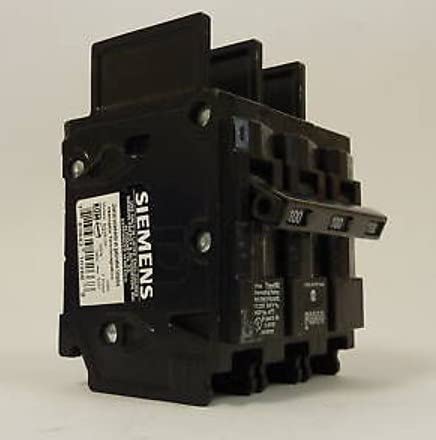
Image 1: Siemens BQ3-B100 100A 3-Pole Circuit Breaker. This image shows the black, rectangular circuit breaker with the Siemens logo visible on the side and the three-pole handle in the 'ON' position.
4. Setup and Installation
Installation of this circuit breaker should only be performed by a qualified electrician.
4.1 Pre-Installation Checks
- Verify that the main power supply to the panelboard is disconnected and locked out.
- Confirm the panelboard is compatible with Siemens BQ-type plug-in circuit breakers.
- Inspect the circuit breaker for any signs of damage. Do not install if damaged.
- Ensure the wire gauge for the circuit matches the 100 Amp rating of the breaker.
4.2 Mounting Instructions
- With the main power off, locate the appropriate slot in the panelboard for a 3-pole breaker.
- Align the circuit breaker's mounting clips with the bus bar stabs in the panelboard.
- Firmly press the circuit breaker onto the bus bar until it is securely seated. Ensure all three poles make proper contact.
- Verify the breaker is firmly attached and does not wobble.
4.3 Wiring Connections
- Connect the load wires to the appropriate terminals on the circuit breaker. For a 3-pole breaker, there will be three load terminals.
- Tighten terminal screws to the torque specifications provided by Siemens (refer to product labeling or Siemens documentation for exact values). Overtightening or undertightening can cause issues.
- Ensure all connections are secure and free from loose strands.
- Replace the panelboard cover once all connections are verified.
5. Operating Instructions
5.1 Turning On/Off
- To turn the circuit ON, push the handle firmly to the 'ON' position.
- To turn the circuit OFF, push the handle firmly to the 'OFF' position.
5.2 Understanding Trip Conditions
When an overcurrent or short circuit condition occurs, the circuit breaker will automatically 'trip' to protect the circuit. The handle will move to a center or 'tripped' position, which is typically between 'ON' and 'OFF'.
5.3 Resetting a Tripped Breaker
- First, identify and correct the cause of the trip (e.g., overloaded circuit, short circuit).
- Push the breaker handle firmly to the 'OFF' position. You may feel a click as it resets internally.
- Then, push the handle firmly to the 'ON' position to restore power.
- If the breaker trips immediately again, do not attempt to reset it. Consult a qualified electrician.
6. Maintenance
Circuit breakers generally require minimal maintenance. However, periodic inspection is recommended.
- Annual Inspection: With power disconnected, visually inspect the breaker for any signs of physical damage, discoloration, or loose connections.
- Cleaning: If necessary, gently clean the exterior of the breaker with a dry, lint-free cloth. Do not use liquids or abrasive cleaners.
- Replacement: If the breaker frequently trips without an apparent cause, shows signs of damage, or fails to operate correctly, it should be replaced by a qualified electrician.
7. Troubleshooting
| Problem | Possible Cause | Solution |
|---|---|---|
| Breaker trips frequently | Overloaded circuit, short circuit, faulty appliance, or defective breaker. | Reduce load on the circuit, unplug appliances, inspect wiring for shorts. If problem persists, consult an electrician. |
| Breaker does not reset | Persistent fault on the circuit, internal breaker damage. | Ensure the handle is pushed fully to 'OFF' before attempting to reset to 'ON'. If it still won't reset, disconnect power and have an electrician inspect or replace the breaker. |
| Breaker is hot to the touch | Overload, loose connection, or internal fault. | Immediately disconnect power. This indicates a serious issue. Consult a qualified electrician. |
8. Specifications
- Brand: SIEMENS
- Model: BQ3-B100
- Current Rating: 100 Amps
- Number Of Poles: 3
- Circuit Breaker Type: Standard
- Mounting Type: Plug-In Mount
- Product Dimensions: 23 x 16 x 18 inches (approximate shipping dimensions); 2 Pounds
9. Warranty and Support
For specific warranty information regarding your Siemens BQ3-B100 circuit breaker, please refer to the documentation provided at the point of purchase or visit the official Siemens website. For technical support or service inquiries, please contact Siemens customer service directly.
Siemens Official Website: www.siemens.com