
BLACK+DECKER EVO183B1
BLACK+DECKER 18V Multi-Tool EVO183B1 User Manual
Model: EVO183B1
1. Introduction
The BLACK+DECKER 18V Multi-Tool EVO183B1 is a versatile power tool designed to handle a variety of DIY and home improvement tasks. Its innovative interchangeable head system allows you to quickly switch between drill driver, jigsaw, and sander functions, providing efficiency and convenience. This manual provides essential information for the safe and effective operation, maintenance, and troubleshooting of your multi-tool.

Figure 1.1: The BLACK+DECKER 18V Multi-Tool showing the main body and the three interchangeable heads: drill driver, jigsaw, and sander. Arrows indicate the attachment points for each head.
2. Key Features
- Voltage: DC18V
- Battery Capacity: 1.5Ah Lithium-ion
- Switch: Variable Speed for precise control
- LED Light: Integrated for illuminating the work area
- Bit Holder: Magnetic for secure bit retention
- Drill Driver:
- Rotation Speed: 0-800 rpm
- Max Torque: 22 N·m
- Clutch: 11 stages for various materials
- Chuck Capacity: 1-10mm
- Jigsaw:
- Stroke Rate: 0-2,800 spm
- Stroke Length: 13mm
- Sander:
- Rotation Speed: 0-9,000 rpm
- Pad Replacement: One-touch system
3. Package Contents
Ensure all items listed below are present in your kit:
- BLACK+DECKER 18V Multi-Tool Main Unit
- Drill Driver Head Attachment
- Jigsaw Head Attachment
- Sander Head Attachment
- 11 x Bits (Drill: 2.5/4/5/6/8mm; Phillips: #1/#2; Slotted: #6; Pozi: #2; Hex: #5/#6)
- 5 x Jigsaw Blades (6 TPI wood cutting x2, 10 TPI wood cutting x2, curve cutting x1)
- 10 x Sandpaper Sheets (Coarse #80 x5, Fine #120 x5)
- Dust Collection Adapter
- 2 x 1.5Ah Lithium-ion Batteries
- 40-minute Rapid Charger
- Dedicated Kit Box

Figure 3.1: A visual representation of the various accessories included with the multi-tool, such as drill bits, jigsaw blades, sandpaper, charger, and batteries.
4. Setup
4.1 Charging the Battery
- Insert the battery into the rapid charger.
- Plug the charger into a standard power outlet.
- The charger indicator light will show the charging status. A full charge typically takes 40 minutes.
- Once fully charged, remove the battery from the charger.
4.2 Attaching/Detaching Head Attachments
- Ensure the tool is switched off and the battery is removed before attaching or detaching heads.
- Align the desired head attachment (drill, jigsaw, or sander) with the main unit.
- Push the head firmly onto the main unit until it clicks securely into place.
- To detach, press the release buttons on the sides of the main unit and pull the head away.

Figure 4.1: Illustrates the process of attaching or detaching an interchangeable head from the main multi-tool body, highlighting the secure connection mechanism.
5. Operating Instructions
5.1 General Operation
- Insert a charged battery into the tool's base.
- Select the appropriate head attachment for your task.
- Press the trigger to start the tool. The variable speed switch allows for controlled operation.
- The integrated LED light will illuminate the work area when the trigger is pressed.
5.2 Using the Drill Driver Attachment
- Attach the drill driver head.
- Insert the desired drill bit or screwdriver bit into the chuck and tighten securely.
- Adjust the clutch setting (1-11) based on the material and desired torque to prevent overtightening or stripping screws.
- For drilling, apply steady pressure and maintain a straight angle. For screwdriving, ensure the bit is fully engaged with the screw head.
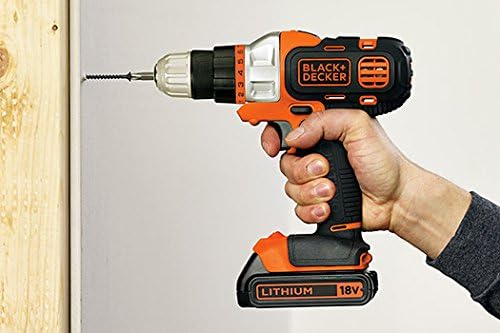
Figure 5.1: A user demonstrating the drill driver attachment in action, screwing into a wooden surface. This highlights the tool's ergonomic design and ease of use for drilling and fastening tasks.
5.3 Using the Jigsaw Attachment
- Attach the jigsaw head.
- Select the appropriate jigsaw blade for your material (wood, metal, etc.) and insert it into the blade clamp. Ensure it is securely locked.
- Place the base plate of the jigsaw firmly on the workpiece.
- Start the tool and guide it along your cutting line, applying consistent, moderate pressure.
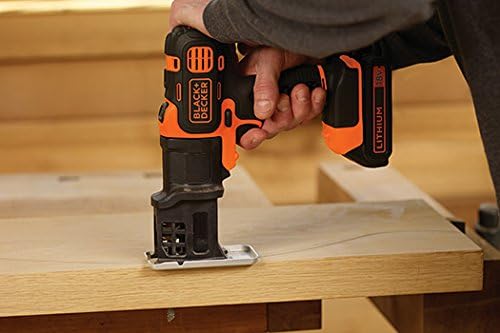
Figure 5.2: A user operating the jigsaw attachment to make a cut in a wooden board. This image emphasizes the tool's capability for precise cutting tasks.
5.4 Using the Sander Attachment
- Attach the sander head.
- Attach the appropriate sandpaper sheet to the sanding pad. Ensure the dust collection adapter is connected if using dust extraction.
- Place the sander flat on the surface to be sanded.
- Start the tool and move it in smooth, overlapping motions across the surface.

Figure 5.3: A user demonstrating the sander attachment smoothing a wooden surface. This illustrates the tool's effectiveness for finishing and surface preparation.
6. Maintenance
Regular maintenance ensures the longevity and optimal performance of your BLACK+DECKER Multi-Tool.
- Cleaning: After each use, wipe down the tool and attachments with a clean, damp cloth. Do not use harsh chemicals or abrasive cleaners.
- Ventilation Openings: Keep the ventilation openings clear of dust and debris to prevent overheating. Use compressed air if necessary.
- Accessory Inspection: Regularly inspect drill bits, jigsaw blades, and sandpaper for wear or damage. Replace worn accessories promptly for best results and safety.
- Battery Care: Store batteries in a cool, dry place away from direct sunlight. Do not store fully discharged batteries for extended periods.
- Storage: Store the tool, batteries, and charger in the dedicated kit box in a dry, secure location, out of reach of children.
7. Troubleshooting
If you encounter issues with your multi-tool, refer to the following common problems and solutions:
| Problem | Possible Cause | Solution |
|---|---|---|
| Tool does not start | Battery not charged or not inserted correctly. | Ensure battery is fully charged and properly seated in the tool. |
| Reduced power or performance | Battery low or accessory (bit/blade/sandpaper) is dull/worn. | Recharge battery. Replace worn accessories. |
| Head attachment not securing | Head not fully aligned or debris in connection. | Ensure proper alignment and push firmly until it clicks. Clean connection points. |
| Overheating | Blocked ventilation openings or continuous heavy use. | Clear ventilation openings. Allow tool to cool down during prolonged use. |
If the problem persists after attempting these solutions, please contact BLACK+DECKER customer support.
8. Specifications
- Brand: BLACK+DECKER
- Product Model Number: EVO183B1
- Product Dimensions: 22.5 x 7.5 x 23 cm
- Item Weight: 970 g
- Color: Orange
- Power Source: Rechargeable
- Voltage: 18 Volts DC
- Max Torque (Drill Driver): 22 N·m
- Max Rotation Speed (Drill Driver): 800 RPM
- Battery Type: Lithium-ion
- Battery Included: Yes (2x 1.5Ah)
- Special Feature: Integrated LED Work Light
9. Warranty and Support
9.1 Warranty Information
This BLACK+DECKER Multi-Tool EVO183B1 comes with a 1-year warranty from the date of purchase. Please retain your proof of purchase for warranty claims. The warranty covers defects in materials and workmanship under normal use.
9.2 Customer Support
For technical assistance, warranty claims, or to purchase replacement parts and accessories, please visit the official BLACK+DECKER website or contact their customer service department. Refer to the contact information provided on the product packaging or the official brand website.
Ask a question about this manual
Ask about setup, troubleshooting, compatibility, parts, safety, or missing instructions. Manuals+ will review the question and use this page’s manual context to help answer it.