
Fujifilm FinePix S9800
Fujifilm FinePix S9800 Digital Camera Instruction Manual
1. Introduction
This manual provides essential instructions for the safe and effective use of your Fujifilm FinePix S9800 Digital Camera. Please read this manual thoroughly before using the camera and retain it for future reference. The Fujifilm FinePix S9800 is a versatile digital camera featuring a powerful 50x optical zoom lens, a 16.2-megapixel CMOS sensor, and Full HD video recording capabilities, designed for capturing a wide range of photographic and video content.
2. Camera Components
Familiarize yourself with the various parts of your Fujifilm FinePix S9800 camera.
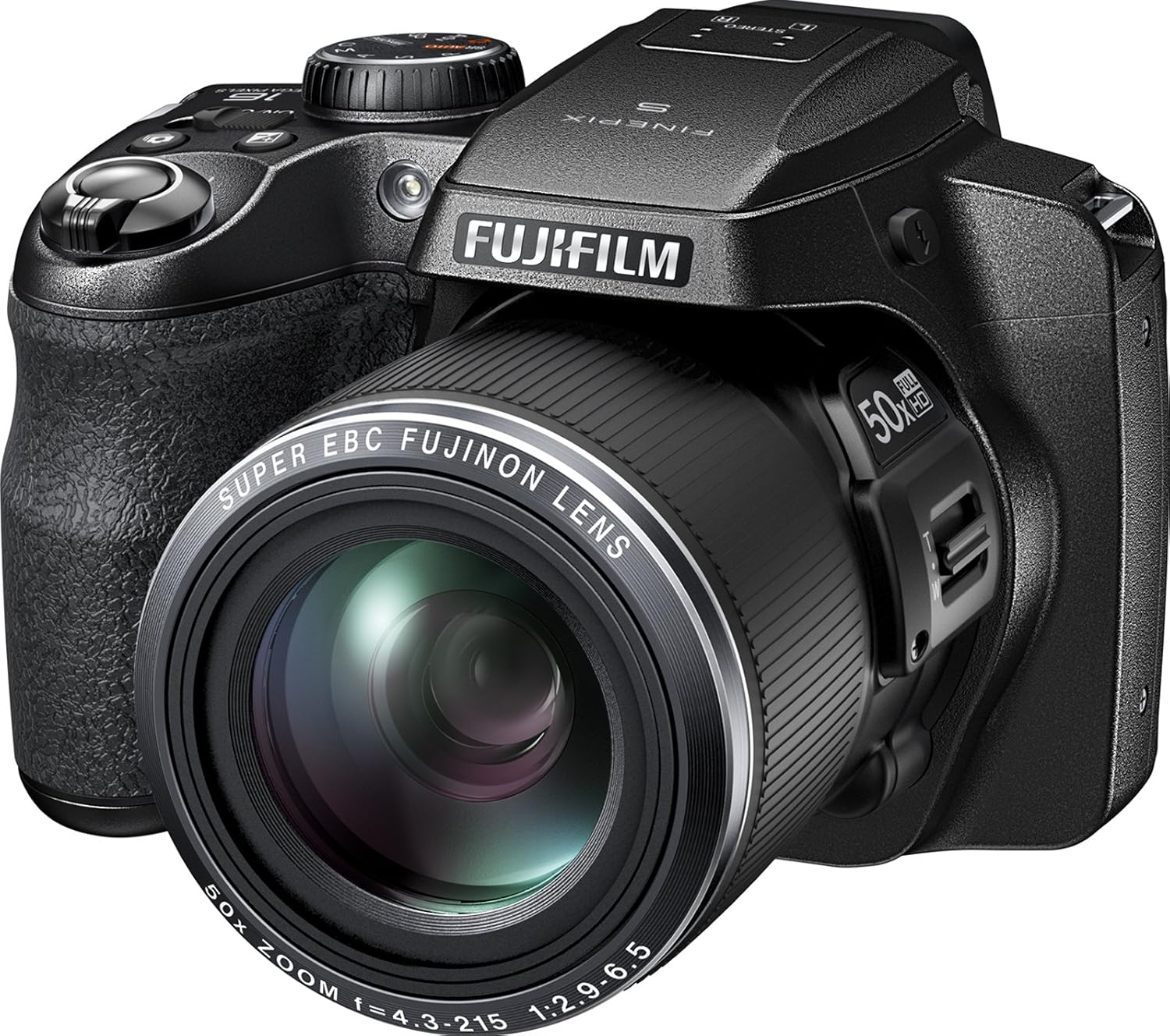
Figure 2.1: Front view of the Fujifilm FinePix S9800 Digital Camera. This image displays the camera's lens, grip, and the Fujifilm branding.

Figure 2.2: Rear view of the Fujifilm FinePix S9800 Digital Camera. This image highlights the 3.0-inch LCD screen, electronic viewfinder, and various control buttons including the menu, playback, and directional pad.

Figure 2.3: Top view of the Fujifilm FinePix S9800 Digital Camera. This image shows the mode dial, power switch, shutter button, and zoom lever.

Figure 2.4: Front view of the Fujifilm FinePix S9800 Digital Camera with the built-in flash in the raised position, ready for use.

Figure 2.5: Side view of the Fujifilm FinePix S9800 Digital Camera with the lens extended to its maximum zoom position, demonstrating its telephoto capability.
3. Initial Setup
3.1. Battery Installation
- Open the battery compartment cover located on the bottom of the camera.
- Insert four AA-size batteries, ensuring correct polarity (+/-) as indicated inside the compartment.
- Close the battery compartment cover securely.
3.2. Memory Card Insertion
- Open the memory card slot cover, typically located on the side or bottom of the camera.
- Insert an SD, SDHC, or SDXC memory card into the slot until it clicks into place. Ensure the card is facing the correct direction.
- Close the memory card slot cover securely.
4. Operating the Camera
4.1. Power On/Off
To power on the camera, slide the ON/OFF switch located on the top of the camera. To power off, slide the switch again.
4.2. Selecting a Shooting Mode
Rotate the mode dial on the top of the camera to select your desired shooting mode:
- P (Program AE): Camera sets aperture and shutter speed for optimal exposure.
- S (Shutter-Priority AE): You set shutter speed, camera sets aperture.
- A (Aperture-Priority AE): You set aperture, camera sets shutter speed.
- M (Manual): You set both aperture and shutter speed.
- SR AUTO (Scene Recognition Auto): Camera automatically detects the scene and applies optimal settings.
- Panorama: For capturing wide panoramic images.
- Adv. (Advanced Filter): Access various creative filter effects.
4.3. Taking Photos
- Turn on the camera and select a shooting mode.
- Frame your shot using the LCD monitor or electronic viewfinder.
- Use the zoom lever around the shutter button to adjust the focal length.
- Press the shutter button halfway down to focus. The camera will use contrast detection autofocus.
- Once focus is achieved (indicated by a green frame), press the shutter button fully to take the picture.
4.4. Recording Videos
- Ensure the camera is in a video-compatible mode (e.g., SR AUTO or Movie mode).
- Press the dedicated Movie Record Button (red dot icon) to start recording.
- Press the button again to stop recording. The camera supports Full HD 1080p video at 60 frames per second with 5-Axis Image Stabilization.
5. Key Features
- 16.2 Megapixel Backlit CMOS Sensor: Delivers high-quality images, particularly in low-light conditions, and supports continuous shooting at 10.0 frames per second.
- 50x Fujinon Optical Zoom Lens: Offers a versatile focal length range equivalent to 24mm - 1200mm (35mm format), allowing for wide-angle to super-telephoto photography.
- High-Resolution Electronic Viewfinder (EVF): A 920K-dot EVF provides precise framing and clear viewing, especially in bright conditions.
- 5-Axis Image Stabilization: Enhances video recording stability, particularly useful when shooting at telephoto settings. Optical image stabilization is also present for still photography.
- Full HD Movie Recording: Captures videos in 1080i resolution at 60 frames per second, saved in MP4 format.
- 3.0-Inch LCD Display: A fixed 460,000-dot LCD screen for reviewing images and navigating menus.
6. Maintenance and Care
6.1. Cleaning the Camera
- Lens: Use a blower brush to remove dust, then gently wipe with a lens cleaning cloth. Avoid touching the lens surface with your fingers.
- LCD Screen: Wipe gently with a soft, dry cloth. For stubborn smudges, use a specialized LCD cleaning solution.
- Camera Body: Wipe with a soft, dry cloth. Do not use organic solvents or strong cleaning agents.
6.2. Battery Care
- Remove batteries when the camera will not be used for an extended period.
- Store batteries in a cool, dry place.
- Use only recommended AA alkaline batteries or equivalent rechargeable batteries.
6.3. Storage
Store the camera in a dry, well-ventilated area, away from direct sunlight, high temperatures, and humidity. Use a camera bag to protect it from dust and physical damage.
7. Troubleshooting
| Problem | Possible Cause | Solution |
|---|---|---|
| Camera does not power on. | Batteries are depleted or incorrectly inserted. | Replace with fresh batteries or re-insert correctly. |
| Images are blurry. | Camera shake, subject movement, or incorrect focus. | Hold the camera steady, use a tripod, or ensure the camera focuses correctly before shooting. Check lighting conditions. |
| Memory card error message. | Card is full, corrupted, or incompatible. | Delete unnecessary files, format the card (this will erase all data), or try a different compatible SDXC card. |
| Flash does not fire. | Flash is disabled or in a mode where it won't fire. | Check flash settings in the menu. Ensure the flash is raised if using the built-in flash. |
8. Specifications
| Feature | Detail |
|---|---|
| Model Name | Fujifilm FinePix S9800 |
| Image Sensor | 16.2 MP 1/2.3-inch BSI-CMOS |
| Lens | 50x Fujinon Optical Zoom (24-1200mm equivalent) |
| Aperture Range | F3.5 (Wide) - F6.5 (Tele) |
| Image Stabilization | Optical (Stills), 5-Axis (Video) |
| ISO Sensitivity | 100-12800 (Expanded) |
| Shutter Speed | 8 seconds - 1/1700 seconds |
| Video Recording | Full HD 1080p at 60 FPS (MP4) |
| Display | 3.0-inch LCD (460,000 dots) |
| Viewfinder | Electronic (920,000 dots) |
| Storage Media | SD, SDHC, SDXC Memory Cards |
| Connectivity | HDMI, USB |
| Power Source | 4x AA Alkaline Batteries |
| Dimensions (Approx.) | Not specified in detail, Item Height: 3.43 inches |
| Weight (Approx.) | 2.2 Pounds (with batteries) |
9. Warranty and Support
For information regarding warranty coverage, technical support, or service, please refer to the warranty card included with your product or visit the official Fujifilm website. Contact details for customer support are typically available on the manufacturer's website.