1. Introduction
This manual provides comprehensive instructions for the safe and efficient operation, installation, and maintenance of your Samsung DW60H9950FW freestanding dishwasher. Please read this manual thoroughly before using your appliance and keep it for future reference.

Figure 1: Front view of the Samsung DW60H9950FW Dishwasher. This image displays the appliance's clean white finish and minimalist design, highlighting the integrated handle with a subtle blue indicator light.
2. Safety Information
Always follow basic safety precautions when using electrical appliances to reduce the risk of fire, electric shock, or injury to persons. This dishwasher is intended for household use only.
- Electrical Safety: Ensure the appliance is properly grounded. Do not use extension cords or adapters. Disconnect power before servicing.
- Water Safety: Do not operate the dishwasher if there are visible signs of damage to the water supply hose or electrical cord.
- Child Safety: Keep children away from the dishwasher when it is operating. Detergents and rinse aids should be stored out of reach of children.
- Sharp Objects: Load sharp items (knives, skewers) with the handles up to prevent injury.
- Flammable Materials: Do not wash items that have been contaminated with gasoline, paint, or other flammable liquids.
3. Product Features
The Samsung DW60H9950FW dishwasher incorporates advanced technologies for superior cleaning performance and user convenience.
3.1 WaterWall™ Technology
The revolutionary WaterWall™ cleaning system replaces traditional rotary spray arms with a powerful, sweeping wall of water. This high-pressure jet moves across the entire tub, ensuring uniform and deep cleaning of all dishes, regardless of their position in the dishwasher.
3.2 FlexTray™
The FlexTray™ is a flexible, removable third rack designed for cutlery and small utensils. Its unique design allows for easy loading and unloading, optimizing space within the dishwasher.

Figure 2: Interior view of the Samsung DW60H9950FW Dishwasher. This image highlights the spacious interior, including the upper FlexTray for cutlery and the adjustable main racks, demonstrating the appliance's loading flexibility.
3.3 Capacity and Efficiency
- Capacity: 14 Place Settings, accommodating a large volume of dishes.
- Energy Efficiency: A++ rated, ensuring low energy consumption.
- Noise Level: Operates quietly at 44 dB.
- Programs: Features 5 distinct washing programs, including a delayed start option for convenience.
4. Setup and Installation
The Samsung DW60H9950FW is a freestanding dishwasher designed for easy placement in your kitchen. For detailed installation instructions, refer to the separate installation guide provided with your appliance.
4.1 Placement
Position the dishwasher on a level, stable surface near a water supply, drain, and electrical outlet. Ensure adequate clearance for the door to open fully.
4.2 Connections
- Water Supply: Connect the water inlet hose to a hot water supply (max 60°C) with appropriate pressure.
- Drain Hose: Securely connect the drain hose to your kitchen sink drain or a dedicated drain connection, ensuring no kinks.
- Electrical Connection: Plug the dishwasher into a grounded 240 Volt electrical outlet.

Figure 3: Side view of the Samsung DW60H9950FW Dishwasher. This image illustrates the appliance's dimensions and freestanding nature, useful for planning installation space.
5. Operating Instructions
Follow these steps for optimal washing results.
5.1 Loading the Dishwasher
Scrape off large food particles before loading. Do not pre-rinse dishes excessively as this can affect detergent effectiveness.
- Lower Rack: Ideal for plates, bowls, and larger items.
- Upper Rack: Suitable for glasses, cups, and smaller bowls.
- FlexTray™: Use for cutlery, serving utensils, and small kitchen tools.
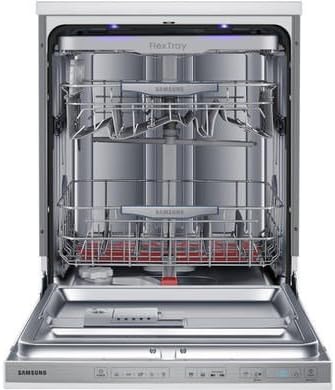
Figure 4: Interior view with racks extended. This image demonstrates the full capacity and accessibility of the dishwasher's racks, including the upper and lower baskets, and the FlexTray.
5.2 Adding Detergent and Rinse Aid
Fill the detergent dispenser with the recommended amount of dishwasher detergent. Add rinse aid to the rinse aid dispenser to improve drying performance and prevent spots.
5.3 Selecting a Program
The dishwasher offers 5 washing programs. Select the program best suited for your load's soil level and type of dishes. Consult the control panel for program options.
5.4 Delayed Start
Utilize the delayed start function to postpone the wash cycle for up to several hours, allowing you to run the dishwasher at a more convenient time or during off-peak energy hours.
6. Maintenance and Cleaning
Regular maintenance ensures optimal performance and longevity of your dishwasher.
6.1 Cleaning Filters
Periodically check and clean the filter system at the bottom of the dishwasher tub. Remove any food debris to prevent blockages and ensure efficient cleaning.
6.2 Cleaning the Interior and Exterior
Wipe the interior with a damp cloth to remove any residue. Clean the exterior surfaces with a soft, damp cloth and mild detergent. Avoid abrasive cleaners.
6.3 Winterizing (if applicable)
If the dishwasher is to be left in an unheated location during winter, drain all water from the appliance to prevent freezing and damage.
7. Troubleshooting
Before contacting service, refer to the following common issues and their solutions.
| Problem | Possible Cause | Solution |
|---|---|---|
| Dishes not clean | Improper loading, clogged spray arms, insufficient detergent, dirty filters. | Reload dishes correctly, clean spray arm nozzles, use correct detergent amount, clean filters. |
| Dishwasher not starting | Door not closed properly, power supply issue, program not selected. | Ensure door is latched, check power connection, select a wash program. |
| Water not draining | Clogged drain hose or filter, drain pump issue. | Check and clear drain hose/filter. If problem persists, contact service. |
| Excessive noise | Dishes rattling, foreign object in pump, improper installation. | Rearrange dishes, check for foreign objects, ensure dishwasher is level. |
8. Specifications
Key technical specifications for the Samsung DW60H9950FW Dishwasher.
| Specification | Value |
|---|---|
| Brand | Samsung |
| Model Number | DW60H9950FW/EU |
| Installation Type | Freestanding |
| Color | White |
| Voltage | 240 Volts |
| Energy Efficiency Class | A++ |
| Noise Level | 44 dB |
| Drying Class | A |
| Annual Energy Consumption | 266 kWh |
| Special Features | Portable (referring to freestanding), WaterWall™, FlexTray™ |
9. Warranty and Support
Your Samsung DW60H9950FW Dishwasher comes with a comprehensive warranty to ensure peace of mind.
9.1 Warranty Information
This product is covered by a 5-Year Warranty on both parts and labor, provided by Samsung. Please retain your proof of purchase for warranty claims.

Figure 5: Samsung 5-Year Warranty Badge. This image confirms the extensive warranty coverage for the product, including both parts and labor.
9.2 Customer Support
For technical assistance, service requests, or to order genuine Samsung replacement parts, please contact Samsung Customer Service. Refer to the official Samsung website or your product registration card for contact details specific to your region.


