
GOWE XC3-32T-E
GOWE XC3-32T-E PLC User Manual
Model: XC3-32T-E
1. Introduction
This user manual provides comprehensive instructions for the installation, operation, and maintenance of the GOWE XC3-32T-E Programmable Logic Controller (PLC). The XC3-32T-E is a robust and reliable industrial control device designed for various automation applications. Please read this manual thoroughly before using the product to ensure safe and efficient operation.
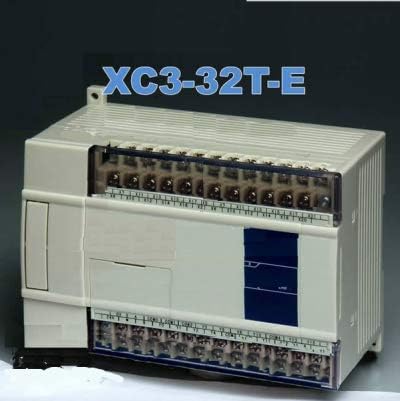
Figure 1: Front view of the GOWE XC3-32T-E PLC unit. This image shows the compact design and the various input/output terminals accessible on the front panel.
2. Safety Information
Always observe the following safety precautions to prevent personal injury and damage to the equipment:
- Ensure power is disconnected before installation or maintenance.
- Only qualified personnel should perform installation and wiring.
- Do not expose the PLC to excessive moisture, dust, or corrosive gases.
- Verify correct voltage supply (230 Volts AC) as specified for the unit.
- Ground the unit properly to prevent electrical shock.
3. Setup and Installation
3.1 Unpacking and Inspection
Carefully unpack the XC3-32T-E PLC and inspect it for any signs of damage during transit. Report any damage to your supplier immediately.
3.2 Mounting
The PLC should be mounted in a control cabinet or enclosure that provides adequate ventilation and protection from environmental factors. Use standard DIN rail mounting for secure installation.
3.3 Wiring
Connect the power supply, input devices, and output devices according to the wiring diagrams provided in the detailed product documentation (not included in this general manual). Ensure all connections are secure and correctly polarized.
The XC3-32T-E operates on 230 Volts AC. Refer to the terminal markings for specific input and output assignments.

Figure 2: Functional Specification Table for the GOWE XC3-32T-E PLC. This table details various operational parameters such as program operation mode, I/O points, power supply, timer, and counter specifications.
4. Operating Instructions
4.1 Powering On
Once all wiring is complete and verified, apply power to the PLC. The power indicator LED should illuminate, indicating successful power-up.
4.2 Programming
The XC3-32T-E PLC supports programming via instructions and ladder chart. Programming is typically done using dedicated software on a computer connected to the PLC via a communication port (not detailed in this manual). Refer to the programming software manual for detailed instructions on creating, downloading, and debugging programs.
The PLC features a program capacity of 8000 steps and supports a dispose speed of 0.5 microseconds.
4.3 Operation Modes
The PLC operates in a circulation scanning mode with timing scanning mode. This ensures efficient execution of the control logic.
5. Maintenance
The GOWE XC3-32T-E PLC is designed for minimal maintenance. However, regular checks can extend its lifespan and ensure reliable operation:
- Cleaning: Periodically clean the exterior of the PLC with a soft, dry cloth. Do not use solvents or abrasive cleaners.
- Connections: Routinely check all wiring connections for tightness and signs of corrosion.
- Ventilation: Ensure that the ventilation openings are not obstructed to prevent overheating.
- Environment: Maintain the operating environment within specified temperature and humidity ranges.
6. Troubleshooting
This section provides basic troubleshooting steps for common issues. For more complex problems, contact technical support.
| Problem | Possible Cause | Solution |
|---|---|---|
| PLC does not power on. | No power supply; incorrect voltage; faulty wiring. | Check power source (230V); verify wiring connections; inspect fuses. |
| Inputs not responding. | Incorrect wiring; faulty input device; program error. | Verify input wiring; test input device; check PLC program logic. |
| Outputs not activating. | Incorrect wiring; faulty output device; program error. | Verify output wiring; test output device; check PLC program logic. |
| PLC enters error state. | Program error; hardware fault; communication issue. | Review program for errors; perform self-diagnose function; check communication cables. |
The PLC features a self-diagnose function that can monitor timer, grammar, and check for power-on issues.
7. Specifications
| Feature | Specification |
|---|---|
| Model Number | XC3-32T-E (Manufacturer Part Number: GWE-1008463) |
| Brand | GOWE |
| Program Operation Mode | Circulation scanning mode, timing scanning mode |
| Program Mode | Instructions and ladder chart |
| Dispose Speed | 0.5us |
| Power Failure Holding | Flash ROM |
| User Program's Capacity | 8000 steps |
| I/O Points | 14 input points, 10 output points |
| Output Format | Relay |
| Power Supply | AC220V (Note: Product specification states 230 Volts) |
| Interior Coil's Points (M) | 8512 points |
| Timer (T) | 620 points (100mS timer: set time 0.1~3276.7 seconds; 10mS timer: set time 0.01~327.67 seconds; 1mS timer: set time 0.001~32.767 seconds) |
| Counter (C) | 635 Points (16 bits counter: Set value K0~32767; 32 bits counter: Set value K0~2147483647) |
| Data Register (D) | 8512 characters |
| Flash ROM Register (FD) | 2048 characters |
| High-speed Count Format | - |
| Timing Scanning Interval Setting | 1~99ms |
| Password Protection | 6 characters ASCII |
| Self-diagnose Function | Power on self-diagnose, monitor timer, grammar check |
| Item Weight | 2.2 pounds |
| Date First Available | January 2, 2015 |
Note: The product specifications indicate a voltage of 230 Volts, while the functional specification image lists AC220V. Please refer to the product label for the exact voltage requirement.
8. Warranty and Support
For warranty information and technical support, please contact GOWE customer service or refer to the official GOWE website. Keep your purchase receipt for warranty claims.
Manufacturer: Gowegroup
For further assistance, you may visit the GOWE Store on Amazon.
Ask a question about this manual
Ask about setup, troubleshooting, compatibility, parts, safety, or missing instructions. Manuals+ will review the question and use this page’s manual context to help answer it.