
1. Introduction
This instruction manual provides essential information for the proper installation, operation, and maintenance of your Middle Atlantic MPR-9A Modular Power Raceway. Please read this manual thoroughly before installation and retain it for future reference. The MPR-9A is designed to provide efficient and organized power distribution within various professional audio/video and IT environments.
2. Safety Information
Always adhere to the following safety guidelines to prevent injury or damage to the equipment:
- Installation should only be performed by qualified personnel in accordance with all local and national electrical codes.
- Ensure the power raceway is properly grounded before connecting any electrical devices.
- Do not exceed the maximum current rating of the raceway or any connected modules.
- Avoid exposing the unit to moisture or extreme temperatures.
- Disconnect power before performing any maintenance or installation procedures.
3. Product Overview
The Middle Atlantic MPR-9A is an 80-inch modular power raceway designed for flexible power distribution. It is capable of accepting eight 8-inch power modules when utilizing its integral J-box, or nine 8-inch power modules if an optional external J-box is employed. This design allows for customizable power configurations to suit specific installation requirements.
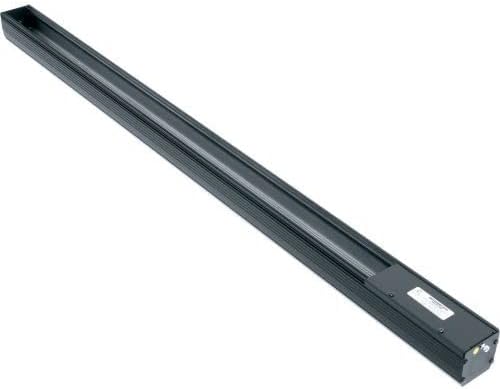
Figure 1: The Middle Atlantic MPR-9A Modular Power Raceway, a long, black, rectangular unit designed for power distribution, viewed from an angle. The unit features a channel for modules and an end cap with connection points.
4. Setup and Installation
4.1 Mounting the Raceway
The MPR-9A can be mounted in various configurations, including rack-mounted, wall-mounted, or surface-mounted. Ensure the mounting surface is stable and capable of supporting the weight of the raceway and all connected modules and cables.
- Identify the desired mounting location and mark the drilling points for the mounting hardware (not included).
- Securely attach the raceway using appropriate screws or bolts.
- Ensure the raceway is level and firmly fixed to prevent movement.
4.2 Connecting Power
Connect the main power input to the raceway's integral J-box. If using an optional external J-box, follow its specific installation instructions for power connection. Verify all connections are secure and meet electrical code requirements.
4.3 Installing Power Modules
The MPR-9A is designed to accept 8-inch power modules. Carefully slide the modules into the raceway channel until they click into place. Ensure proper alignment and secure seating of each module.
- For integral J-box configurations, up to eight 8-inch modules can be installed.
- For optional external J-box configurations, up to nine 8-inch modules can be installed.
5. Operation
Once the MPR-9A is installed and power modules are in place, connect your equipment's power cords to the outlets on the installed modules. The raceway provides a centralized and organized power distribution point for your devices.
- Ensure all connected devices are compatible with the power specifications of the installed modules.
- Avoid overloading individual modules or the entire raceway.
6. Maintenance
Regular maintenance helps ensure the longevity and reliable operation of your MPR-9A power raceway.
- Cleaning: Periodically clean the exterior of the raceway with a soft, dry cloth. Do not use liquid cleaners or solvents. Ensure power is disconnected before cleaning.
- Inspection: Annually inspect the raceway and all connected modules for any signs of damage, loose connections, or wear. Address any issues promptly.
- Module Replacement: If a power module becomes faulty, disconnect power to the raceway, carefully remove the faulty module, and replace it with a new, compatible module.
7. Troubleshooting
If you encounter issues with your MPR-9A, refer to the following troubleshooting steps:
- No Power to Devices:
- Check the main power connection to the raceway.
- Verify that the circuit breaker or fuse supplying power to the raceway has not tripped.
- Ensure power modules are correctly seated in the raceway.
- Individual Module Not Working:
- Try reseating the module.
- Test the module in a different slot or replace it with a known working module to isolate the issue.
- Overheating:
- Ensure adequate ventilation around the raceway.
- Verify that the total load connected to the raceway does not exceed its rated capacity.
If problems persist after following these steps, contact Middle Atlantic customer support.
8. Specifications
| Feature | Specification |
|---|---|
| Model Number | MPR-9A |
| Brand | Middle Atlantic |
| Length | 80 inches |
| Module Capacity (Integral J-box) | 8 x 8-inch modules |
| Module Capacity (Optional External J-box) | 9 x 8-inch modules |
| Item Weight | 12.8 pounds |
| ASIN | B00RLA0PCU |
| Date First Available | September 13, 2017 |
| Manufacturer | Middle Atlantic Products |
9. Warranty and Support
Middle Atlantic Products warrants its products to be free from defects in material or workmanship. Specific warranty terms and conditions may vary. Please refer to the official Middle Atlantic Products website or your purchase documentation for detailed warranty information.
Customer Support
For technical assistance, troubleshooting, or warranty claims, please contact Middle Atlantic Products customer support through their official website or the contact information provided with your product purchase.
For more information, visit: www.middleatlantic.com