
Introduction
The LotFancy Laptop Cooling Pad is designed to enhance the performance and longevity of your laptop by providing efficient cooling and ergonomic support. This manual provides essential information for the proper setup, operation, and maintenance of your cooling pad.

Figure 1: LotFancy Laptop Cooling Pad with active blue LED fans illustrating upward airflow for effective cooling.
Package Contents
- 1 x LotFancy Laptop Cooling Pad (Model: 12R-2697-S)
- 1 x USB Power Cable
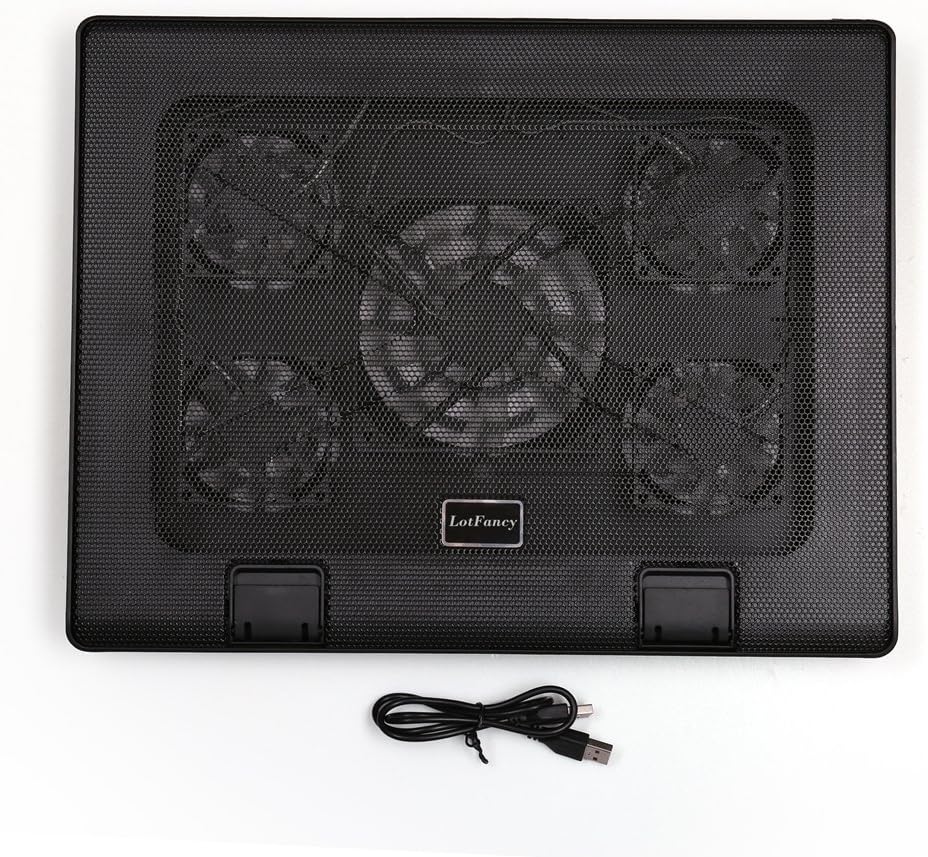
Figure 2: The cooling pad and its USB power cable.
Setup Instructions
- Positioning the Cooling Pad: Place the cooling pad on a flat, stable surface.
- Connecting Power: Connect the included USB cable to one of the USB ports on the cooling pad. Plug the other end of the USB cable into an available USB port on your laptop. The cooling pad is USB powered and does not require an external power adapter.
- Placing Your Laptop: Carefully place your laptop on top of the cooling pad. Ensure it is centered and stable.
- Adjusting Height (Optional): The cooling pad features a 6-level height adjustment mechanism. Lift the rear of the cooling pad and engage the support bar into one of the six available notches to achieve your desired ergonomic angle.

Figure 3: The 6-level height adjustment allows for various viewing and typing angles.
- Securing Your Laptop: Utilize the anti-slip tabs located at the front of the cooling pad to prevent your laptop from sliding forward, especially when using an elevated angle.

Figure 4: Anti-slip tabs prevent the laptop from sliding.
Operating Instructions
The LotFancy Laptop Cooling Pad features 5 ultra-quiet LED fans designed to provide optimal airflow and reduce laptop heat. The fans are controlled by two buttons on the front of the pad.

Figure 5: Control panel with fan switches and USB ports.
- Fan Control:
- The left button controls the large center fan. Press once to turn it on/off.
- The right button controls the four smaller corner fans. Press once to turn them on/off.
You can choose to operate only the center fan, only the corner fans, or all five fans simultaneously, depending on your cooling needs. Green LED indicators next to the buttons should illuminate when the fans are active.
- Additional USB Port: The cooling pad includes two USB ports. One is used to power the cooling pad from your laptop, leaving the second port available for connecting other USB devices.
Maintenance
To ensure optimal performance and longevity of your LotFancy Laptop Cooling Pad, follow these simple maintenance guidelines:
- Cleaning: Regularly wipe the surface of the cooling pad with a soft, dry cloth to remove dust. For deeper cleaning, gently use a can of compressed air to clear dust from the fan grilles and blades. Ensure the device is unplugged before cleaning.
- Storage: When not in use, store the cooling pad in a cool, dry place away from direct sunlight and extreme temperatures.
- Cable Care: Avoid bending or twisting the USB cable excessively to prevent damage.
Troubleshooting
If you encounter issues with your cooling pad, please refer to the following common solutions:
- Fans Not Spinning:
- Ensure the USB cable is securely connected to both the cooling pad and a functioning USB port on your laptop.
- Verify that your laptop's USB port is providing power. Try connecting another USB device to the port to test it.
- Press the fan control buttons on the cooling pad to ensure they are switched on. The green LED indicators should illuminate.
- Reduced Airflow:
- Check for any obstructions (e.g., dust, debris) on the fan grilles or blades. Clean as per the Maintenance section.
- Ensure your laptop is not blocking the airflow vents on the cooling pad.
- Unstable Laptop:
- Make sure the anti-slip tabs are raised and properly supporting your laptop.
- Confirm that the height adjustment mechanism is securely locked into a notch.
Specifications
| Brand | LotFancy |
| Model Number | 12R-2697-S |
| Product Dimensions | 380 x 300 x 35 mm (14.96 x 11.81 x 1.38 inches) |
| Large Fan Size | 120 x 120 x 25 mm (5.9 x 5.9 x 0.98 inches) |
| Small Fan Size (x4) | 70 x 70 x 15 mm (2.76 x 2.76 x 0.59 inches) |
| Net Weight | 1140 g (40 oz / 2.6 pounds) |
| Fan Speed | Approximately 1000 RPM |
| Air Volume | 74 CFM |
| Power Source | USB Powered (5V DC) |
| USB Ports | 2 (1 for power, 1 pass-through) |
| Compatibility | Laptops from 12 to 17 inches |

Figure 6: Product dimensions and compatible laptop sizes.
Warranty and Support
For warranty information or technical support, please refer to the product packaging or contact LotFancy customer service directly. Contact details are typically available on the manufacturer's official website or through your purchase platform.