
1. Introduction and Overview
The Peco T8532-IAQ Performance PRO Programmable Thermostat is designed for multi-stage and heat pump applications, offering advanced control over your indoor climate. This thermostat supports up to 3 heating and 2 cooling stages in heat pump mode, and includes integrated humidification and dehumidification capabilities. It features an 8-inch blue backlit digital display for clear visibility and a comprehensive 365-day programmable calendar.
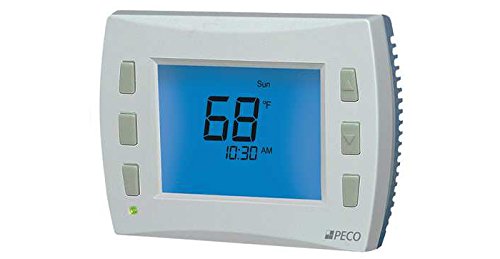
Image of the Peco T8532-IAQ Performance PRO Programmable Thermostat, showing its 8-inch blue backlit digital display and white casing.
2. Key Features
- Compatible with multi-stage and heat pump applications.
- Supports up to 3 heating and 2 cooling stages in heat pump mode.
- Integrated humidification and dehumidification control.
- Large 8-inch blue backlit digital display.
- Three levels of keypad lockout and PIN access for security.
- 365-day programmable calendar with 20 holiday settings and daylight-saving time shift.
- Compressor and auxiliary lockout for dual fuel (fossil) or electric auxiliary heat systems.
- Occupancy sensor/setback support.
- Heating/Cooling LED indicator.
- Low battery and change filter indicators.
- Support for remote indoor sensors.
- Optimized algorithms with configurable ramp recovery.
- Programmable and intermittent fan operation.
3. Safety Information
Please read all instructions carefully before installing or operating this thermostat. Failure to follow instructions could result in property damage, personal injury, or death.
- Electrical Hazard: Disconnect power to the heating and cooling system before installing or servicing the thermostat to prevent electrical shock and equipment damage.
- Proposition 65 Warning: This product may contain chemicals known to the State of California to cause cancer and birth defects or other reproductive harm. Wash hands after handling.
- Ensure all wiring complies with local electrical codes and ordinances.
- Do not short out the terminals on the gas valve or at the system control to test the thermostat. This will damage the thermostat and void the warranty.
4. Installation
Installation of the Peco T8532-IAQ thermostat should ideally be performed by a qualified HVAC technician. If you are performing the installation yourself, ensure you have a clear understanding of your HVAC system's wiring and safety procedures.
4.1 Pre-Installation Steps
- Power Disconnection: Turn off the power to your heating and cooling system at the main circuit breaker or fuse box before beginning any work.
- Existing Thermostat Removal: Carefully remove your old thermostat. Note the wiring connections, labeling each wire with the corresponding terminal letter before disconnecting.
- Mounting Location: Choose an indoor location away from drafts, direct sunlight, and heat sources. The thermostat should be mounted on an interior wall, approximately 5 feet (1.5 meters) above the floor.
4.2 Wiring and Mounting
Refer to the detailed wiring diagrams provided in the separate installation guide included with your thermostat. The T8532-IAQ operates on 24 Volts and can be battery-powered (requires 2 AA batteries) or hardwired. Ensure correct terminal connections for your specific HVAC system type (conventional or heat pump, multi-stage).
- Connect wires to the appropriate terminals on the new thermostat's sub-base.
- Mount the sub-base to the wall using the provided screws.
- Attach the thermostat body to the sub-base.
4.3 Power Up
Once installation is complete, restore power to your HVAC system at the circuit breaker. The thermostat display should illuminate, indicating it is ready for initial setup.
5. Initial Setup
After power-up, the thermostat will guide you through initial configuration steps. These typically include:
- Date and Time Setting: Set the current date and time, including the year.
- Daylight Saving Time: Enable or disable automatic daylight saving time adjustments.
- System Type Configuration: Select your HVAC system type (e.g., conventional furnace/AC, heat pump with auxiliary heat). This is crucial for correct operation.
- Fan Type: Configure fan operation (e.g., gas or electric furnace).
- Temperature Scale: Choose between Fahrenheit (°F) or Celsius (°C).
- Keypad Lockout: Configure keypad lockout levels and set a PIN for restricted access if desired.
Consult the detailed programming guide for specific menu navigation and option selections.
6. Operating Instructions
The Peco T8532-IAQ offers various modes and programming options for optimal comfort and energy efficiency.
6.1 System Modes
Use the system mode button to select from available modes:
- HEAT: The system will only heat to maintain the set temperature.
- COOL: The system will only cool to maintain the set temperature.
- AUTO: The system automatically switches between heating and cooling to maintain the set temperature range.
- OFF: Both heating and cooling systems are turned off.
6.2 Fan Modes
Use the fan mode button to select:
- AUTO: The fan runs only when the heating or cooling system is active.
- ON: The fan runs continuously, regardless of heating or cooling calls.
- PROGRAMMABLE/INTERMITTENT: Refer to the programming guide for setting specific fan schedules or intermittent operation.
6.3 Programming Schedule
The thermostat features a 365-day programmable calendar with 20 holiday settings. This allows for customized temperature settings throughout the day and week to match your schedule.
- Access the programming menu to set desired temperatures for different time periods (e.g., Wake, Leave, Return, Sleep).
- Configure holiday schedules to override regular programming for specific dates.
- Utilize the occupancy sensor/setback support to automatically adjust temperatures when the space is unoccupied.
6.4 Humidification/Dehumidification
The T8532-IAQ allows you to set desired humidity levels. Access the humidity control menu to adjust the setpoint for humidification or dehumidification, depending on your system's capabilities and your comfort needs.
6.5 Remote Control
This thermostat supports remote control functionality. Refer to the specific instructions for your remote control device for pairing and operation.
7. Maintenance
Regular maintenance ensures optimal performance and longevity of your thermostat.
- Battery Replacement: The thermostat requires 2 AA batteries. When the low battery indicator appears on the display, replace the batteries promptly to avoid loss of settings.
- Filter Change Indicator: The thermostat will display a "Change Filter" reminder based on programmed run time. Replace your HVAC system's air filter as indicated to maintain air quality and system efficiency. Reset the indicator after changing the filter.
- Cleaning: Gently wipe the thermostat's exterior with a soft, damp cloth. Do not use abrasive cleaners or solvents.
8. Troubleshooting
If you encounter issues with your Peco T8532-IAQ thermostat, try the following troubleshooting steps:
- No Display/No Power:
- Check if the circuit breaker for your HVAC system is tripped.
- Ensure batteries are correctly installed and not depleted. Replace if necessary.
- Verify wiring connections are secure at the thermostat and HVAC system.
- System Not Responding (Heating/Cooling):
- Confirm the system mode is set to HEAT, COOL, or AUTO, not OFF.
- Check that the set temperature is appropriately above (for heating) or below (for cooling) the ambient room temperature.
- Ensure the keypad is not locked. Unlock it if necessary using the PIN.
- Verify that the HVAC system itself is powered on and functioning.
- Incorrect Temperature Readings:
- Ensure the thermostat is not exposed to direct sunlight, drafts, or heat sources.
- If using a remote indoor sensor, ensure it is properly connected and positioned.
- Programming Issues:
- Review the programming schedule to ensure settings are correct for the current day and time.
- Check for active holiday schedules that might be overriding regular programming.
If problems persist after attempting these steps, contact a qualified HVAC technician or Peco customer support for assistance.
9. Specifications
| Specification | Detail |
|---|---|
| Brand | Peco |
| Model Name | T8532-IAQ |
| Product Dimensions | 30"D x 8"W x 6"H |
| Special Features | Auto-Scheduling, Programmable |
| Color | White |
| Specific Uses For Product | Indoor use only |
| Power Source | Battery Powered (2 AA batteries required) |
| Voltage | 24 Volts |
| Display Type | Digital |
| Screen Size | 8 Inches |
| Control Type | Remote Control |
| Backlight | Yes |
| Item Weight | 1.2 pounds |
| UPC | 879978001155 |
10. Warranty and Support
Warranty: This product is sold without an explicit warranty. Please refer to your purchase agreement or retailer for any implied warranties or return policies.
Customer Support: For technical assistance, installation questions, or further information regarding your Peco T8532-IAQ thermostat, please contact Peco customer support directly. Contact information can typically be found on the manufacturer's website or on the product packaging.


