
1. Introduction
This manual provides essential information for the safe and effective use of the OMRON H3CR-F8 Timer Relay. The H3CR-F8 is a multi-functional solid-state timer designed for precise time control in various industrial and commercial applications. It operates within a wide input voltage range of 100-240V AC and can control circuits up to 5A. Please read this manual thoroughly before installation and operation.
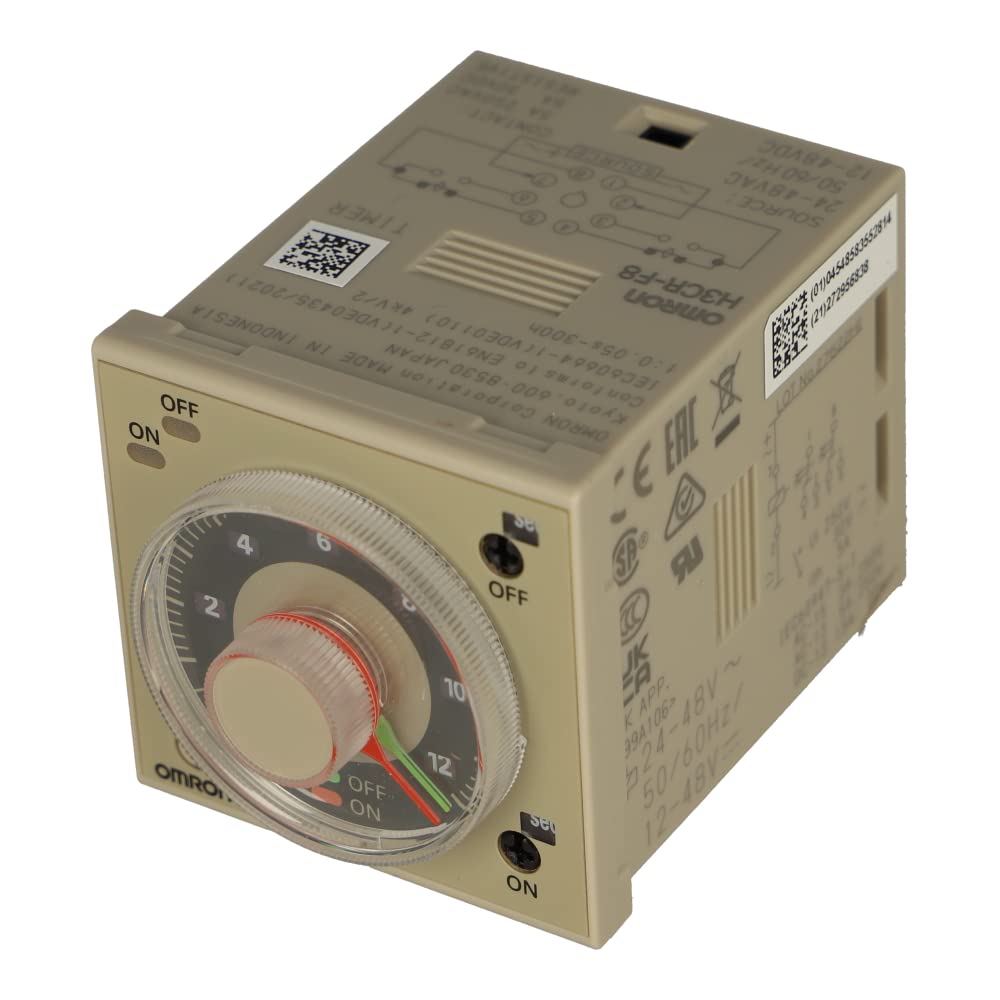
Figure 1: OMRON H3CR-F8 Timer Relay. This image shows the front view of the timer relay, typically featuring the time setting dials, mode selector, and status indicators.
2. Safety Information
WARNING: Electrical shock hazard. Improper installation or operation can result in serious injury or death. Always disconnect power before working with electrical components.
- Installation and wiring should only be performed by qualified personnel.
- Ensure the power supply voltage matches the timer's specifications (100-240V AC).
- Do not exceed the maximum output current rating of 5A.
- Avoid installing the device in areas with excessive vibration, humidity, dust, or corrosive gases.
- Verify all connections are secure before applying power.
3. Package Contents
The package should contain the following items:
- OMRON H3CR-F8 Timer Relay Unit
- Instruction Manual (this document)
4. Setup and Installation
4.1 Mounting
The H3CR-F8 timer relay is designed for panel mounting or DIN rail mounting using a compatible socket (e.g., PF083A, PF085A, or P2CF-08). Ensure sufficient space for ventilation and access to controls.
4.2 Wiring
Refer to the wiring diagram provided with your specific socket or the full product datasheet for precise terminal connections. The H3CR-F8 typically uses an 8-pin socket. Below is a general guide:
- Power Supply (A1, A2 or 2, 7): Connect the 100-240V AC power supply to the designated power terminals.
- Control Output (1, 3, 4 or 8, 5, 6): The timer features DPDT (Double Pole Double Throw) contacts. Connect the load circuit to these terminals.
- Common (C)
- Normally Open (NO)
- Normally Closed (NC)
Always double-check wiring against the official product datasheet or consult a qualified electrician. Incorrect wiring can damage the unit or connected equipment.
5. Operating Instructions
The OMRON H3CR-F8 offers various operating modes and time ranges, typically selected via front-panel switches or dials.
5.1 Setting Time Range
Use the time range selector switch (often labeled 'Range' or 'Mode') to choose the desired time unit (e.g., seconds, minutes, hours). The H3CR-F8 supports a wide range from 1.2 seconds to 300 hours.
5.2 Setting Time Value
Rotate the main time setting dial to set the specific delay time within the selected range. Some models may have fine-tuning dials for precise adjustments.
5.3 Operating Modes
The H3CR-F8 typically supports multiple operating modes (e.g., ON-delay, OFF-delay, Interval, Flicker). Refer to the markings on your specific unit or the full datasheet to select the appropriate mode for your application. The unit has 3 settings, which usually correspond to different operational modes or time multiplier settings.
Once power is applied and settings are configured, the timer will begin its sequence according to the selected mode and time value. Status indicators (LEDs) on the front panel will typically show power status and output relay status.
6. Maintenance
The OMRON H3CR-F8 Timer Relay is designed for long-term, reliable operation with minimal maintenance.
- Cleaning: Periodically wipe the unit with a soft, dry cloth to remove dust. Do not use abrasive cleaners or solvents.
- Inspection: Regularly inspect wiring connections for tightness and signs of wear or damage.
- Environment: Ensure the operating environment remains within specified temperature and humidity ranges to prevent premature failure.
Always disconnect power before performing any maintenance or inspection.
7. Troubleshooting
If the OMRON H3CR-F8 Timer Relay does not operate as expected, consider the following:
| Problem | Possible Cause | Solution |
|---|---|---|
| Unit does not power on. | No power supply, incorrect voltage, or faulty wiring. | Check power connections and supply voltage. Ensure wiring is correct. |
| Timer does not count or output does not switch. | Incorrect time range/value setting, incorrect operating mode, or faulty load connection. | Verify time and mode settings. Check load wiring and ensure the load is functional. |
| Output switches immediately or not at all. | Incorrect operating mode selected (e.g., instant output mode instead of delay). | Review and adjust the operating mode settings. |
If issues persist after checking these points, contact Omron technical support or a qualified electrician.
8. Specifications
| Feature | Specification |
|---|---|
| Model | H3CR-F8 |
| Manufacturer | OMRON |
| Input Voltage | 100-240V AC |
| Output Current Rating | 5A |
| Timer Type | Multi-functional Solid-State Timer |
| Time Range | 1.2 seconds to 300 hours |
| Number of Settings | 3 (typically for modes/ranges) |
| Switch Style | DPDT (Double Pole Double Throw) |
| Product Dimensions | Approximately 6 x 6 x 6 inches (15.24 x 15.24 x 15.24 cm) |
| Item Weight | 0.1 Kilograms (3.52 ounces) |
| Material | Plastic |
| Color | Beige |
9. Warranty and Support
For warranty information and technical support, please refer to the official Omron website or contact your local Omron distributor. Keep your purchase receipt for warranty claims.
Omron Official Website: www.omron.com


