
Introduction
This manual provides essential information for the safe and efficient operation, setup, and maintenance of your LW Scientific WBL-10LC-SSD1 Water Bath. Please read this manual thoroughly before operating the device to ensure proper usage and to prevent damage or injury.
The LW Scientific 10 liter water bath is designed to create a constant temperature environment with an open reservoir and immersion circulator, ideal for heating temperature-sensitive samples. Its seamless stainless steel reservoir prevents rust and leaks, and its rounded corners facilitate easy cleaning. The control unit ensures rapid temperature achievement and stable maintenance, preventing sample overheating. Users can select desired settings via the touch-pad digital controller and monitor the actual temperature on the red LED display. The compact design and durable stainless steel reservoir make this unit a valuable asset for any laboratory.
Product Overview
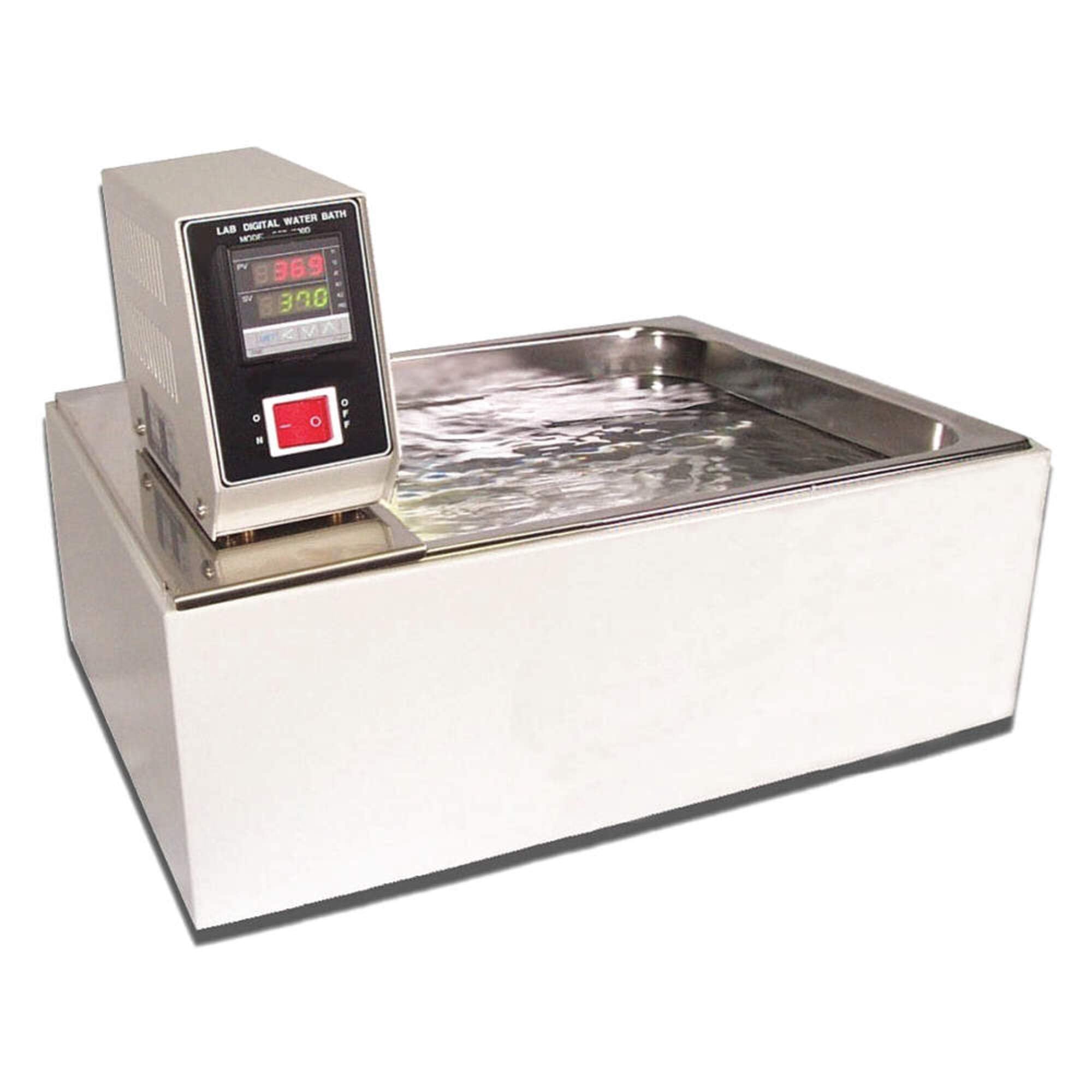
Figure 1: LW Scientific WBL-10LC-SSD1 Water Bath. This image displays the complete water bath unit, featuring a white rectangular base that houses the stainless steel water reservoir. A digital control unit is securely mounted on top of the reservoir. The control unit's front panel includes a red digital display indicating the current temperature and a green digital display for the set temperature, along with a prominent illuminated power switch.
Setup
Unpacking: Carefully remove the water bath from its packaging. Inspect for any visible damage incurred during transit. Retain all packaging materials for future transport or storage.
Placement: Position the water bath on a stable, level surface in a well-ventilated area. Ensure there is adequate clearance around the unit for air circulation and easy access for operation and maintenance. Avoid placing the unit near heat sources or in direct sunlight.
Filling the Reservoir: Fill the stainless steel reservoir with distilled or deionized water to the recommended level. Do not overfill. The water level should be sufficient to cover the heating elements and temperature sensor of the immersion circulator, typically 1-2 inches below the top edge of the reservoir.
Power Connection: Connect the power cord to a grounded electrical outlet. Ensure the voltage matches the unit's requirements (110 Volts for this model). Do not use extension cords unless absolutely necessary and ensure they are rated for the unit's power consumption.
Operating Instructions
Power On: Press the illuminated power switch on the control unit to turn on the water bath. The digital displays will illuminate.
Setting Temperature: Use the touch-pad digital controller to set the desired temperature. Refer to the control unit's specific button functions (e.g., UP/DOWN arrows, SET button) to adjust the set point. The green LED display typically shows the set temperature (SV), while the red LED display shows the actual temperature (PV).
Heating Process: Once the temperature is set, the heating element will activate to bring the water to the desired temperature. The red LED display will show the water's current temperature as it rises. The immersion circulator will ensure uniform temperature distribution throughout the reservoir.
Monitoring: Continuously monitor the actual temperature on the red LED display to ensure it stabilizes at the set point. The unit is designed to maintain a constant temperature to prevent sample overheating.
Power Off: When operation is complete, press the power switch to turn off the unit. Allow the water to cool before draining or handling.
Safety Precautions
Always ensure the water level is adequate before operation to prevent damage to heating elements.
Do not touch the hot water or internal components during operation. Use appropriate heat-resistant gloves if handling items from the bath.
Disconnect power before performing any maintenance or cleaning.
Avoid spilling liquids on the control unit or electrical components.
Maintenance
Regular Cleaning: The stainless steel reservoir should be cleaned regularly to prevent algae growth and mineral buildup. Drain the water, wipe down the interior with a mild detergent solution, and rinse thoroughly with distilled water. The rounded corners make cleaning easier.
Water Replacement: Replace the water in the reservoir frequently, especially if using tap water or if the water appears cloudy. Distilled or deionized water is recommended to minimize mineral deposits.
Exterior Cleaning: Wipe the exterior surfaces of the unit with a damp cloth. Do not use abrasive cleaners or solvents that could damage the finish.
Inspection: Periodically inspect the power cord for any signs of damage. Ensure all connections are secure.
Troubleshooting
| Problem | Possible Cause | Solution |
|---|---|---|
| Unit does not power on. | No power supply; faulty power cord; unit switch off. | Check power outlet and connection. Ensure power switch is in the 'ON' position. Inspect power cord for damage. |
| Water not heating. | Temperature set too low; heating element malfunction; insufficient water level. | Verify set temperature is above ambient. Check water level and add distilled water if necessary. If problem persists, contact support. |
| Temperature fluctuates significantly. | Improper water level; circulator malfunction; external drafts. | Ensure proper water level. Relocate unit away from drafts. If circulator is not operating, contact support. |
| Unusual noise during operation. | Foreign object in reservoir; circulator issue. | Power off and inspect reservoir for any foreign objects. If noise persists, contact support. |
Specifications
- Model Number: WBL-10LC-SSD1
- Brand: LW Scientific
- Capacity: 10 Liters (Note: This model, WBL-10LC-SSD1, is specifically for 10 liters.)
- Voltage: 110 Volts
- Material: Stainless Steel (Reservoir)
- Control Method: Touch-pad Digital Controller
- Package Dimensions: 63.5 cm (L) x 41.402 cm (W) x 23.114 cm (H) (25 x 16.3 x 9.1 inches)
- Product Type: Lab Supply
- Country Of Origin: Taiwan
- Manufacturer: Thomas Scientific
- Date First Available: August 27, 2012
Warranty and Support
For specific warranty information and terms, please refer to the documentation provided with your purchase or contact LW Scientific directly. Warranty details are typically provided by the manufacturer and may vary.
Should you require technical assistance, parts, or service, please contact LW Scientific customer support or your authorized distributor. Provide your model number (WBL-10LC-SSD1) and serial number (if applicable) when contacting support to expedite service.
LW Scientific Contact Information: Please visit the official LW Scientific website for the most current contact details, including phone numbers and email addresses for customer service and technical support.