
Introduction
This manual provides essential information for the safe and correct installation, operation, and maintenance of your Ideal Standard Wall-Mounted Washbasin Mixer, Model A5933AA. Please read these instructions thoroughly before beginning installation or use, and retain them for future reference. This product is designed for use with standard domestic water supply systems.
Safety Information
- Always shut off the main water supply before attempting any installation or maintenance.
- Ensure all connections are secure to prevent leaks.
- If you are unsure about any part of the installation process, consult a qualified plumber.
- Do not use abrasive cleaners or harsh chemicals on the faucet finish, as this may cause damage.
Package Contents
Verify that all components are present before beginning installation:
- Wall-mounted washbasin mixer unit (Model A5933AA)
- Mounting hardware (screws, anchors, gaskets)
- Installation instructions (this manual)
If any parts are missing or damaged, do not proceed with installation. Contact Ideal Standard customer support.
Setup and Installation
This section outlines the steps for installing your wall-mounted washbasin mixer. Professional installation is recommended.
- Prepare the Installation Area: Ensure the wall is structurally sound and capable of supporting the faucet. Confirm that hot and cold water supply lines are correctly positioned and accessible. The recommended rough-in dimensions for the water connections (G1/2) and the spout reach are critical for proper function and aesthetics. Refer to the technical drawing for precise measurements, including the 204 mm spout reach and the 132.8 mm center-to-center distance for the wall mounts.
- Shut Off Water Supply: Locate the main water shut-off valve for your property and turn it off completely. Open nearby faucets to drain any remaining water from the pipes.
- Install the Rough-in Body (if applicable): If your mixer includes a separate rough-in body, install it according to its specific instructions, ensuring it is level and securely fastened within the wall. The G1/2 connections should be correctly oriented.
- Connect Water Lines: Connect the hot and cold water supply lines to the corresponding inlets on the mixer. Use appropriate plumbing tape or sealant on threaded connections to ensure a watertight seal. The technical drawing indicates G1/2 connections.
- Mount the Faucet Body: Secure the faucet body to the wall using the provided mounting hardware. Ensure it is level and firmly attached. The design features a single lever for operation.
- Test for Leaks: Slowly turn the main water supply back on. Carefully inspect all connections for any signs of leaks. If leaks are detected, shut off the water supply, tighten the connections, and re-test.
Product Overview Image:
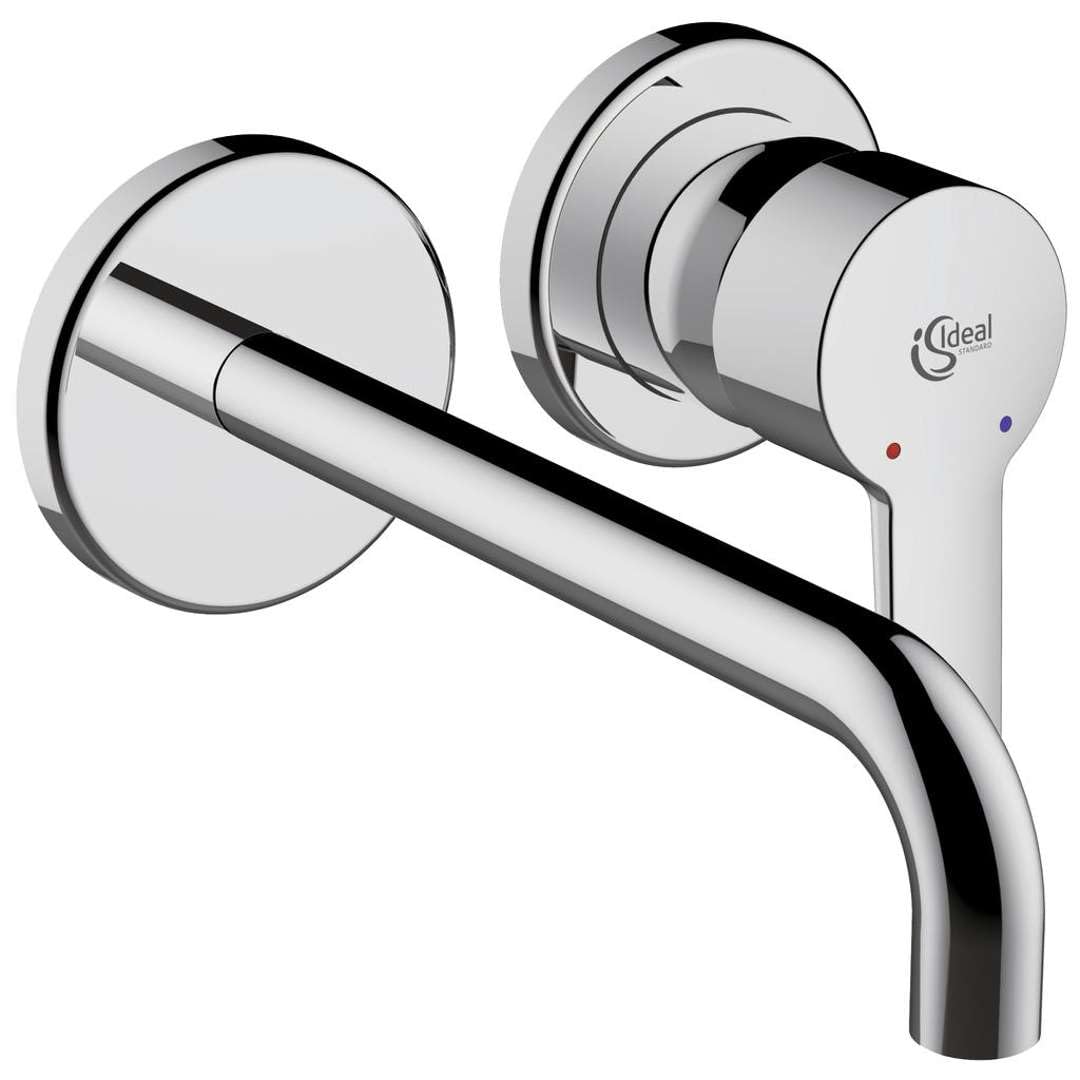
This image shows the Ideal Standard Wall-Mounted Washbasin Mixer A5933AA in a polished chrome finish, illustrating its design and wall-mounted configuration. Note the single lever handle and the extended spout.
Operating Instructions
The Ideal Standard Wall-Mounted Washbasin Mixer A5933AA features a single lever for controlling both water flow and temperature.
- To Turn On/Off: Lift the lever upwards to turn on the water. Push the lever downwards to turn off the water.
- To Adjust Water Flow: The further you lift the lever, the greater the water flow.
- To Adjust Water Temperature: Move the lever to the left for hotter water and to the right for colder water. The center position typically provides mixed water.
Maintenance
Regular cleaning and proper care will ensure the longevity and appearance of your Ideal Standard washbasin mixer.
- Cleaning the Finish: Clean the faucet regularly with a soft cloth and mild soap and water. Rinse thoroughly with clean water and dry with a soft cloth to prevent water spots.
- Avoid Harsh Cleaners: Do not use abrasive cleaners, scouring pads, ammonia-based cleaners, bleach, or other harsh chemicals, as these can damage the chrome finish.
- Aerator Maintenance: If water flow becomes restricted, the aerator at the end of the spout may be clogged. Unscrew the aerator, clean any debris, and rinse it before reattaching.
Troubleshooting
| Problem | Possible Cause | Solution |
|---|---|---|
| Low Water Flow | Clogged aerator; partially closed shut-off valve; debris in supply line. | Clean aerator; ensure shut-off valves are fully open; flush supply lines. |
| Leaking from Spout | Worn cartridge; debris in cartridge. | Replace cartridge; clean cartridge. (Consult a professional). |
| Leaking at Connections | Loose connections; worn gaskets. | Tighten connections; replace gaskets. (Ensure water supply is off). |
| Water Temperature Not Adjusting | Faulty cartridge; issues with hot/cold supply. | Replace cartridge; check hot/cold water supply to the faucet. |
For issues not listed or if troubleshooting steps do not resolve the problem, contact Ideal Standard customer support or a qualified plumber.
Specifications
The following table details the key specifications for the Ideal Standard Wall-Mounted Washbasin Mixer A5933AA:
| Feature | Detail |
|---|---|
| Brand | Ideal Standard |
| Model Number | A5933AA |
| Mounting Type | Wall Mount |
| Finish Type | Polished Chrome |
| Material | Metal |
| Number of Handles | 1 |
| Handle Type | Lever |
| Installation Type | Single Hole (for mixer body) |
| Spout Reach | 204 Millimeters |
| Global Trade Identification Number (GTIN) | 04015413315739 |
For detailed dimensional information, refer to the technical drawing provided with your product, which illustrates measurements such as the 132.8 mm overall width of the wall plate, 83 mm diameter of the escutcheons, and the 49-66 mm adjustable depth for the G1/2 connections.
Warranty Information
Ideal Standard products are manufactured to high-quality standards and come with a manufacturer's warranty. The specific terms and duration of the warranty may vary by region and product type. Please refer to the warranty card included with your purchase or visit the official Ideal Standard website for detailed warranty information. Keep your proof of purchase for any warranty claims.
Customer Support
If you require further assistance, have questions about your product, or need to report a defect, please contact Ideal Standard customer support. Contact details can typically be found on the Ideal Standard website or on the packaging of your product. When contacting support, please have your model number (A5933AA) and proof of purchase readily available.