
Introduction
This manual provides comprehensive instructions for the setup, operation, and maintenance of your iHome iDL43 Dual Charging Stereo FM Clock Radio. Please read this manual thoroughly before using the device to ensure proper functionality and to maximize your user experience. Keep this manual for future reference.
Important Safety Instructions
- Do not expose this product to rain or moisture.
- Do not place objects filled with liquids, such as vases, on the apparatus.
- Clean only with a dry cloth.
- Do not block any ventilation openings. Install in accordance with the manufacturer's instructions.
- Do not install near any heat sources such as radiators, heat registers, stoves, or other apparatus (including amplifiers) that produce heat.
- Only use attachments/accessories specified by the manufacturer.
- Refer all servicing to qualified service personnel. Servicing is required when the apparatus has been damaged in any way.
Package Contents
- iHome iDL43 Dual Charging Stereo FM Clock Radio
- AC Power Adapter
- User Manual (this document)
Setup
1. Power Connection
Connect the supplied AC power adapter to the DC jack on the back of the iDL43 unit and then plug the adapter into a standard wall outlet. The unit will power on automatically.
2. Time Setting
Upon initial power-up, the clock display may flash. To set the time:
- Press and hold the Time Set button located on the top of the unit.
- Use the +/- buttons to adjust the hour. Press Time Set again to confirm.
- Use the +/- buttons to adjust the minute. Press Time Set again to confirm.
- The time is now set.
3. Docking and Charging Devices
The iDL43 features a Lightning connector dock and a USB charging port.

Image: The iHome iDL43 unit displaying the time, with an iPad docked on the Lightning connector and a smartphone connected to the USB port on the side for charging.
- Lightning Connector: Carefully place your compatible iPhone or iPad onto the Lightning connector located on the top of the unit. Ensure it is seated properly. Your device will begin charging and can play audio through the iDL43.
- USB Charging Port: Connect your device's USB charging cable (not included) to the USB port on the back of the iDL43. Connect the other end to your device. This port is for charging only and does not support audio playback.
Operating Instructions
1. Power On/Off and Volume Control
- Press the Power button to turn the unit on or off.
- Use the Volume +/- buttons to adjust the audio output level.
2. FM Radio Operation
- Press the FM button to switch to FM radio mode.
- Press the Tune +/- buttons to manually tune to a desired frequency.
- Press and hold the Tune +/- buttons to auto-scan for the next available station.
- Setting Presets: To save a station, press and hold a Preset (1-6) button until the display flashes. Use the Tune +/- buttons to select the desired preset number, then press the Preset button again to confirm.
- Recalling Presets: Briefly press a Preset (1-6) button to recall a saved station.
3. Alarm Setting
The iDL43 features dual alarms. To set an alarm:
- Press and hold the Alarm 1 or Alarm 2 button. The alarm time will flash.
- Use the +/- buttons to adjust the hour. Press the Alarm button again to confirm.
- Use the +/- buttons to adjust the minute. Press the Alarm button again to confirm.
- Select the alarm source (Dock, FM Radio, Tone) using the +/- buttons. Press the Alarm button again to confirm.
- Adjust the alarm volume using the +/- buttons. Press the Alarm button again to confirm.
- The alarm is now set. Press the corresponding Alarm button briefly to activate or deactivate the alarm.
4. Sleep and Snooze Functions
- Snooze: When an alarm sounds, press the Snooze/Dimmer button to temporarily silence the alarm for a set period (default 9 minutes).
- Sleep: Press the Sleep button to activate the sleep timer. Repeatedly press to cycle through sleep durations (e.g., 120, 90, 60, 30, 15 minutes, Off). The unit will automatically turn off after the selected time.
- Dimmer: Press the Snooze/Dimmer button (when no alarm is sounding) to adjust the brightness of the display.
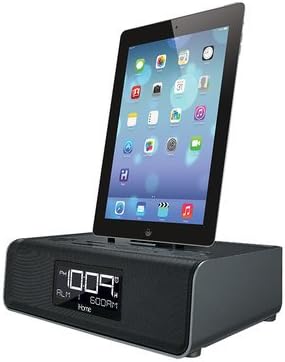
Image: A side-angle view of the iHome iDL43, highlighting the sleek design and the docked iPad, providing a perspective of the unit's overall form factor.
Maintenance
- Cleaning: Use a soft, dry cloth to clean the exterior of the unit. Do not use liquid cleaners or abrasive materials.
- Connector Care: Ensure the Lightning connector and USB port are free from dust and debris. Avoid applying excessive force when docking or connecting devices.
- Placement: Place the unit on a stable, level surface away from direct sunlight, heat sources, and moisture.
Troubleshooting
| Problem | Possible Cause / Solution |
|---|---|
| Unit does not power on. | Ensure the AC power adapter is securely connected to both the unit and a working wall outlet. |
| No audio from docked device. |
|
| Device not charging. |
|
| FM radio reception is poor. |
|
| Alarm does not sound. |
|
Specifications
| Model Number | iDL43 |
| Brand | iHome |
| Compatible Devices | iPad, iPhone 6, iPhone 6 Plus (Lightning Connector), USB-chargeable devices |
| Hardware Interface | Lightning, USB |
| Total USB Ports | 1 (for charging) |
| Power Source | AC Power Adapter |
| Dimensions (Approx.) | 12.32 x 9.96 x 6.42 inches |
| Weight (Approx.) | 4.69 pounds |
| UPC | 047532906530 |
Warranty and Support
For warranty information and technical support, please refer to the warranty card included with your product or visit the official iHome website. Do not attempt to service this product yourself.