
Sony ILCE7M2/B
Sony Alpha 7 II E-mount Mirrorless Camera Instruction Manual
Model: ILCE7M2/B
1. Introduction
The Sony Alpha 7 II (ILCE7M2/B) is an E-mount interchangeable lens mirrorless camera featuring a 24.3-megapixel full-frame sensor. This camera is designed to deliver high-resolution still images and Full HD video with enhanced stability and performance. Key features include a 5-axis in-body image stabilization system and a fast hybrid autofocus system.
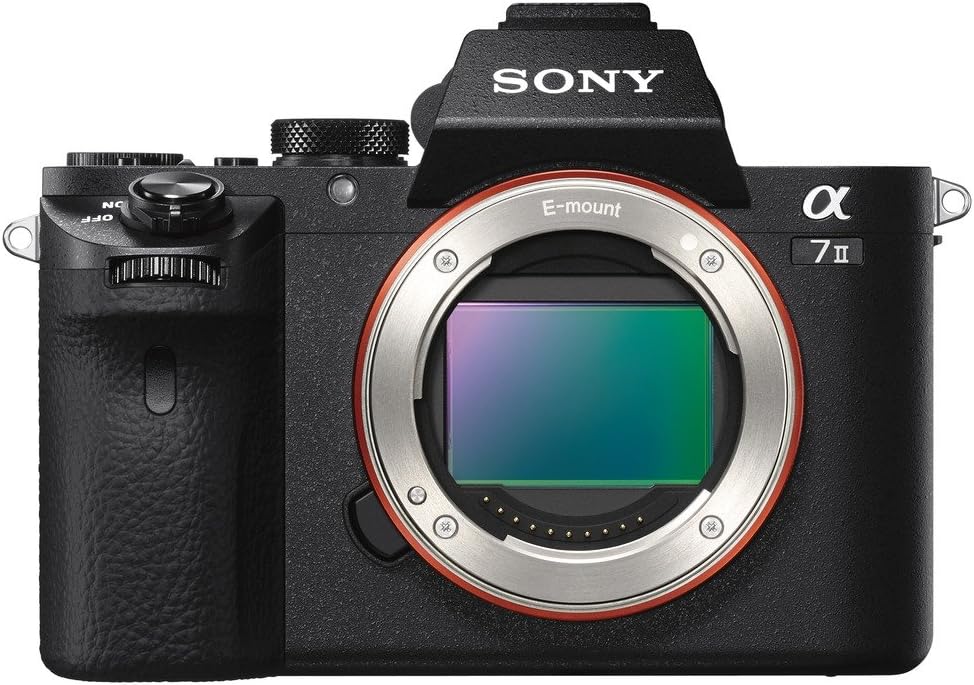
Figure 1.1: Front view of the Sony Alpha 7 II camera body.
2. Getting Started
2.1. What's in the Box
Verify that all the following items are included with your camera:
- Sony Alpha 7 II Camera Body
- NP-FW50 Lithium-Ion Rechargeable Battery (1020mAh)
- AC-UUD11 AC Battery Charging Adaptor
- Shoulder Strap
- Body Cap
- Multi-Interface Shoe Cover
- Eyepiece Cup
- Micro-USB Cable
- Limited 1-Year Warranty Documentation
2.2. Charging the Battery
Before initial use, fully charge the supplied NP-FW50 battery using the AC-UUD11 AC Battery Charging Adaptor and Micro-USB cable. Connect the adaptor to a power outlet and the camera via the USB cable. The charging indicator will illuminate during charging and turn off when complete.
2.3. Inserting Battery and Memory Card
Open the battery/memory card cover located on the bottom of the camera. Insert the charged battery with the arrow facing inward until it locks into place. Insert a compatible SD (SDHC/SDXC) or Memory Stick PRO Duo (PRO-HG Duo) card into the memory card slot with the contacts facing the correct direction until it clicks.

Figure 2.1: Bottom view of the camera, illustrating the battery and memory card compartment.
2.4. Attaching a Lens
Align the white index mark on the lens with the white index mark on the camera body. Mount the lens by turning it clockwise until it clicks into place. Ensure the lens is securely attached before use. The camera is compatible with Sony E-mount lenses.

Figure 2.2: Front view of the Sony Alpha 7 II with an E-mount lens attached.
3. Basic Operation
3.1. Power On/Off
To power on the camera, slide the ON/OFF switch located on the top plate. To power off, slide the switch back to the OFF position.
3.2. Shooting Modes
The mode dial on the top of the camera allows selection of various shooting modes:
- AUTO: Camera automatically adjusts settings for optimal results.
- Programmed AE (P): Camera sets aperture and shutter speed, while you control other settings.
- Aperture Priority (A): You set the aperture, and the camera sets the shutter speed.
- Shutter Priority (S): You set the shutter speed, and the camera sets the aperture.
- Manual (M): You control both aperture and shutter speed.
- Movie: Dedicated mode for video recording.
- Scene Selection (SCN): Choose from various scene modes for specific shooting conditions.
- Sweep Panorama: Capture panoramic images by sweeping the camera.

Figure 3.1: Top view of the camera, highlighting the mode dial and control layout.
3.3. Autofocus System
The Alpha 7 II features a fast hybrid autofocus system with 117 phase-detection points and 25 contrast-detection points. This system provides improved subject-tracking performance and focusing speed. Focus modes include Continuous-Servo AF (AF-C) and Single-Servo AF (AF-S).
3.4. 5-Axis In-Body Image Stabilization
The camera incorporates a 5-axis in-body image stabilization system, which compensates for camera shake across five directions: vertical, horizontal, pitch, yaw, and roll. This system is effective for both still images and video recording, and it functions with a wide range of lenses, including A-mount or non-Sony lenses when used with an adapter.
3.5. Using the Viewfinder and LCD Screen
The camera is equipped with an XGA OLED Tru-Finder electronic viewfinder and a tiltable 3-inch (1,229k dots) Xtra Fine LCD display. The viewfinder provides a detailed view of your scene, reflecting camera settings. The LCD screen can tilt approximately 90° up and 45° down, facilitating high and low-angle shooting. WhiteMagic technology enhances visibility in bright daylight.

Figure 3.2: Rear view of the camera with the LCD screen tilted for flexible viewing angles.
3.6. Recording Full HD Video
The Alpha 7 II supports Full HD (1920x1080) video recording in XAVC S, AVCHD, and MP4 formats. The XAVC S format allows for high-bitrate recording at 50 Mbps, offering improved video quality. Frame rates include 60p, 60i, 30p, and 24p. The camera also supports 120fps shooting at standard HD resolution (1280x720p) in APS-C crop mode for 5x slow-motion effects.
4. Advanced Features
4.1. Connectivity (Wi-Fi/NFC)
The camera offers Wi-Fi and NFC (Near Field Communication) for simplified connectivity with smartphones and tablets. Use Wi-Fi for sharing images and remote control. NFC enables one-touch connection for transferring images to compatible Android devices.

Figure 4.1: Left side view of the camera with port covers open, revealing connectivity options.
4.2. Remote Camera Control
Control your Alpha 7 II from a PC and transfer files using a USB cable. This feature includes video capture control.
4.3. PlayMemories Camera Apps
Expand camera functionality by adding new features through PlayMemories Camera Apps. These apps cater to various shooting styles, including portraits, close-ups, sports, time-lapse, and motion shots. Apps can also facilitate sharing and saving photos to smartphones via Wi-Fi.
4.4. Professional Video Features
The Alpha 7 II includes professional video capabilities such as S-Log2 gamma, which expands dynamic range by up to 1300% to preserve detail in highlights and shadows. Picture Profile settings allow adjustment of gamma, black level, and color. The camera also features Full HD HDMI output, time code/user bit for editing, and various marker and zebra displays.
4.5. Microphone Compatibility
The Multi-terminal interface shoe is compatible with Sony's XLR Adaptor Microphone Kits (XLR-K1M and XLR-K2M), enabling the use of professional microphone systems for enhanced audio recording.
5. Maintenance and Care
5.1. Cleaning the Camera
- Use a soft, dry cloth to clean the camera body.
- For the lens and image sensor, use specialized cleaning tools and follow manufacturer guidelines to avoid damage.
- Avoid using organic solvents or strong chemicals.
5.2. Battery Care
- Store batteries in a cool, dry place when not in use.
- Avoid exposing batteries to extreme temperatures.
- Do not short-circuit the battery terminals.
5.3. Storage
When storing the camera for extended periods, remove the battery and memory card. Store the camera in a dry, well-ventilated area, ideally with a desiccant to prevent mold and mildew.
6. Troubleshooting
This section provides general guidance for common issues. For detailed troubleshooting, refer to the official Sony support website.
- Camera does not power on: Ensure the battery is fully charged and correctly inserted.
- Images are blurry: Check focus settings, ensure sufficient light, or utilize the 5-axis image stabilization.
- Memory card error: Ensure the memory card is correctly inserted and compatible. Try formatting the card (this will erase all data).
- Wi-Fi/NFC connection issues: Ensure Wi-Fi/NFC is enabled on both the camera and the connected device. Check network settings.
7. Specifications
| Feature | Specification |
|---|---|
| Model Name | Sony Alpha a7II (ILCE7M2/B) |
| Sensor Type | 35mm Full-Frame CMOS |
| Effective Still Resolution | 24.3 MP |
| Image Stabilization | Sensor-shift, 5-axis |
| Lens Mount | Sony E-mount |
| Autofocus Points | 117 (Phase Detection) |
| ISO Sensitivity (Expanded) | 50-25600 |
| Shutter Speed | 30 seconds to 1/8000 seconds |
| Continuous Shooting Speed | Up to 5 fps |
| Video Resolution | Full HD 1080p (XAVC S, AVCHD, MP4) |
| Viewfinder Type | 0.5-type Electronic Viewfinder (XGA OLED Tru-Finder) |
| LCD Screen | 3-inch Tilting LCD (1,229k dots) |
| Connectivity | Wi-Fi, NFC, HDMI, USB |
| Dimensions (Approx.) | 3.78 inches (Height) |
| Weight (Body Only) | 1.3 Pounds |
7.1. Teleconverter Compatibility
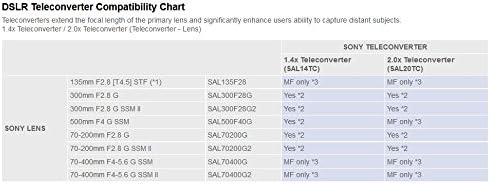
Figure 7.1: Teleconverter compatibility chart for various Sony lenses.
8. Warranty and Support
8.1. Warranty Information
The Sony Alpha 7 II comes with a limited 1-year warranty, covering both labor and parts. Please refer to the warranty documentation included in the box for full terms and conditions.
8.2. Customer Support
For further assistance, technical support, or service inquiries, please visit the official Sony support website or contact Sony customer service.