
Introduction
This manual provides essential information for the safe and efficient operation, installation, and maintenance of your Quincy QGS10 Rotary Screw Compressor. Please read this manual thoroughly before operating the compressor to ensure proper usage and to prevent potential hazards or damage.
The Quincy QGS10 is an oil-injected twin screw compressor designed for reliable and quiet compressed air performance. Its compact design allows for flexible installation, and it is capable of continuous 100% duty cycle operation.
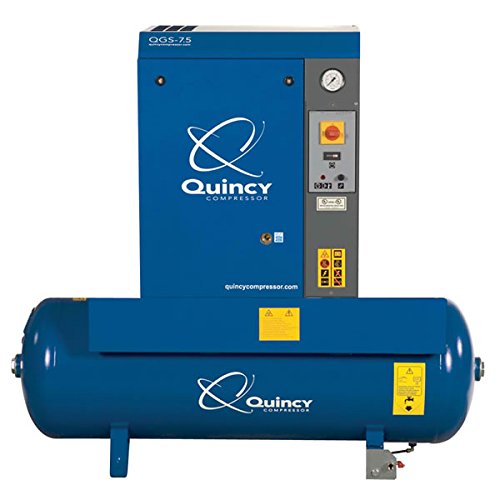
Image: Quincy QGS10 Rotary Screw Compressor. This image displays the compact design of the compressor unit, highlighting its main components and overall structure.
Safety Information
Always observe all safety warnings and instructions provided in this manual and on the compressor unit. Failure to do so can result in serious injury or death. Ensure all personnel operating or maintaining the compressor are trained and aware of safety procedures.
- Electrical Safety: Ensure the compressor is properly grounded. Disconnect power before performing any maintenance.
- Pressure Safety: Do not exceed the maximum operating pressure. Relieve all pressure before servicing.
- Hot Surfaces: Compressor components can become hot during operation. Avoid contact with hot surfaces.
- Noise Protection: Wear hearing protection when operating the compressor in noisy environments.
Setup
1. Unpacking and Inspection
Carefully remove the compressor from its packaging. Inspect the unit for any signs of shipping damage. Report any damage to the carrier immediately.
2. Placement and Ventilation
Place the compressor on a level, solid surface capable of supporting its weight. Ensure adequate clearance around the unit for proper ventilation and cooling. Avoid confined spaces. Maintain a minimum of 3 feet (1 meter) clearance from walls or other obstructions.
3. Electrical Connection
The QGS10 compressor requires a 3-phase electrical supply (208V, 230V, or 460V). Consult a qualified electrician for proper wiring and connection to the main power supply. Ensure the power supply matches the compressor's voltage requirements. The compressor must be properly grounded.
4. Initial Oil Level Check
Before initial startup, verify the oil level in the compressor. The oil level indicator is typically located on the side of the oil separator tank. Add Quincy Compressor approved lubricant if the level is below the minimum mark.
5. Air Line Connection
Connect the compressor's air outlet to your air distribution system using appropriate piping and fittings. Ensure all connections are leak-free. Install a suitable air dryer and filters downstream of the compressor if dry, clean air is required for your application.
Operating Instructions
1. Pre-Start Checks
- Verify oil level.
- Check for any loose connections or obstructions.
- Ensure all valves are in the correct position.
- Confirm power supply is connected.
2. Starting the Compressor
Turn the main power switch to the 'ON' position. Press the 'START' button on the control panel. The compressor will begin its startup sequence. Allow the unit to reach operating pressure before drawing air.
3. Stopping the Compressor
Press the 'STOP' button on the control panel. The compressor will enter a shutdown sequence and depressurize. For complete shutdown, turn the main power switch to the 'OFF' position and disconnect the power supply.
4. Pressure Adjustment
The operating pressure can be adjusted via the control panel. Refer to the specific instructions on the control panel for detailed steps. Do not exceed the maximum rated pressure of the compressor or your air system.
5. Emergency Stop
In case of an emergency, press the red 'EMERGENCY STOP' button immediately. This will cut power to the compressor and initiate an immediate shutdown.
Maintenance
Regular maintenance is crucial for the longevity and efficient operation of your Quincy QGS10 compressor. Always disconnect power before performing any maintenance.
Maintenance Schedule
| Interval | Task |
|---|---|
| Daily | Check oil level, drain condensate from receiver tank. |
| Weekly | Clean exterior of compressor, check for leaks. |
| Monthly | Inspect air filter, check belt tension (if applicable), clean cooler fins. |
| Annually / Every 2000 hours | Change compressor oil, replace oil filter, replace air filter, replace separator element. |
Specific Maintenance Procedures
- Air Filter Replacement: Remove the air filter housing cover, replace the old filter element with a new one, and secure the cover.
- Oil Change: Drain the old oil from the compressor when warm. Replace the oil filter. Refill with Quincy Compressor approved lubricant to the correct level.
- Condensate Drain: Manually open the drain valve at the bottom of the air receiver tank to release accumulated condensate. Ensure all pressure is relieved before draining.
Troubleshooting
This section provides solutions to common operational issues. For problems not listed or if solutions do not resolve the issue, contact authorized service personnel.
| Problem | Possible Cause | Solution |
|---|---|---|
| Compressor does not start | No power supply, emergency stop engaged, motor overload. | Check power connection, reset emergency stop, check motor overload protector. |
| Low air pressure | Air leak, clogged air filter, worn separator element. | Inspect air lines for leaks, replace air filter, replace separator element. |
| Excessive noise/vibration | Loose components, worn bearings, improper installation. | Tighten loose parts, contact service for bearing inspection, ensure proper mounting. |
| High oil consumption | Worn separator element, oil leaks. | Replace separator element, inspect for and repair oil leaks. |
Specifications
Key technical specifications for the Quincy QGS10 Rotary Screw Compressor:
- Model: QGS10
- Horsepower (HP): 10 HP
- Voltage: 208/230/460V, 3-Phase
- Air Flow Capacity (CFM): 37 CFM
- Tank Capacity: 120 Gallons
- Noise Level: 68 Decibels
- Power Source: Electric (Corded Electric)
- Included Components: Filters
- Manufacturer Model Number: 4152008416
Warranty
Quincy Compressor products are backed by a manufacturer's warranty. Specific warranty terms and conditions vary by product and region. Please refer to the warranty documentation included with your purchase or visit the official Quincy Compressor website for detailed information regarding coverage, duration, and claim procedures. Keep your proof of purchase for warranty claims.
Support
For technical assistance, parts inquiries, or service, please contact your authorized Quincy Compressor dealer or the Quincy Compressor customer support team. Provide your compressor model number (QGS10) and serial number when requesting support to ensure efficient service.
You can find contact information for authorized dealers and customer support on the official Quincy Compressor website: www.quincycompressor.com