
Introduction
This manual provides instructions for the Goldmaster RCU 881 Universal Remote Control. This device is designed to control various television sets using infrared technology, offering a convenient replacement or alternative to multiple original remote controls.
Safety Information
- Keep batteries out of reach of children.
- Do not mix old and new batteries, or different types of batteries.
- Do not expose the remote control to extreme temperatures, direct sunlight, or moisture.
- Dispose of used batteries according to local environmental regulations.
- Avoid disassembling the remote control; this may void any warranty.
Package Contents
- 1 x Goldmaster RCU 881 Universal Remote Control
- Note: Batteries are not included and must be purchased separately (2x AAA batteries required).
Product Overview
The Goldmaster RCU 881 is a universal infrared remote control featuring a sleek silver design and a comprehensive button layout for intuitive control of compatible devices, primarily televisions.
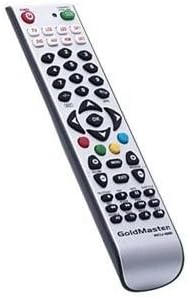
Image: Front view of the Goldmaster RCU 881 Universal Remote Control, showing its silver finish and button layout.

Image: The official Goldmaster brand logo.
Setup
1. Battery Installation
- Locate the battery compartment cover on the back of the remote control.
- Slide the cover off in the direction indicated by an arrow (if present).
- Insert two AAA batteries, ensuring correct polarity (+ and - symbols match the markings inside the compartment).
- Replace the battery compartment cover until it clicks securely into place.
2. Programming the Remote Control
The Goldmaster RCU 881 is a universal remote. Programming typically involves entering a code specific to your TV brand or using an automatic search function. Refer to the included code list (if available with your purchase) or follow these general steps:
- Turn on the device you wish to control (e.g., your television).
- Press and hold the SET button (or a similar button, if present) on the remote until the indicator light turns on and remains lit.
- Enter the 3 or 4-digit code for your TV brand using the number buttons. If the indicator light turns off, the code has been accepted.
- Test the remote by pressing the POWER button or other function buttons. If the device responds, the programming is successful.
- If the code does not work, or if the indicator light flashes and turns off without controlling the device, repeat steps 2-4, trying other codes listed for your brand.
- If no code works, or if a code list is not provided, use the automatic search function:
- Press and hold the SET button until the indicator light turns on.
- Press the POWER button once. The indicator light will begin to flash slowly.
- Point the remote at your TV and repeatedly press the POWER button (or CH+ button) slowly, allowing a few seconds between presses, until the TV turns off.
- Once the TV turns off, immediately press the SET button to save the code. The indicator light will turn off.
- Test the remote. If it controls your TV, programming is complete. If not, repeat the automatic search process.
Note: Specific programming steps and available codes may vary. Consult the original packaging or manufacturer's website for a comprehensive code list or detailed instructions for your specific device model.
Operating Instructions
Once programmed, the Goldmaster RCU 881 functions like your original remote control for the assigned device. Below are common button functions:
- Power Button: Turns the device on or off.
- Channel Buttons (CH+/CH-): Changes channels up or down.
- Volume Buttons (VOL+/VOL-): Adjusts the sound volume.
- Mute Button: Mutes or unmutes the sound.
- Number Buttons (0-9): Used for direct channel input.
- Menu/Settings Buttons: Accesses device menus and settings.
- Navigation Buttons (Up/Down/Left/Right/OK): Navigates through menus and confirms selections.
- Input/Source Button: Changes the input source (e.g., HDMI 1, AV, Component).
Button layout and specific functionality may vary based on the programmed device and the universal code used.
Maintenance
- Clean the remote control with a soft, dry cloth. Do not use liquid cleaners, abrasive materials, or chemical solvents.
- If the remote control will not be used for an extended period (e.g., one month or more), remove the batteries to prevent potential leakage and damage.
- Avoid dropping the remote control or exposing it to strong impacts, which can damage internal components.
- Store the remote in a cool, dry place away from direct sunlight.
Troubleshooting
Remote not working after programming:
- Ensure batteries are inserted correctly with the correct polarity and are not depleted. Replace if necessary.
- Re-attempt the programming process, trying different codes for your device brand.
- Ensure there are no obstructions between the remote control and the device's infrared receiver.
- The remote control may not be compatible with all functions of your specific device model.
Some buttons not working:
- This can occur if the programmed code does not fully support all functions of your device. Try a different code.
- Ensure the buttons are clean and free from debris.
Indicator light not turning on:
- Check battery installation and ensure batteries have sufficient charge. Replace batteries if needed.
Specifications
| Feature | Detail |
|---|---|
| Brand | GoldMaster |
| Model | RCU-881 |
| Connectivity Technology | Infrared |
| Compatible Devices | Television |
| Color | Silver |
| Input Method | Button |
| Batteries Included | No |
| Model Year | 2014 |
| ASIN | B00PUIXRRA |
Warranty and Support
Specific warranty information for the Goldmaster RCU 881 Universal Remote Control is not provided in the product details. For warranty claims, technical support, or further assistance, please contact GoldMaster customer service directly or refer to the documentation included with your original purchase.
You can often find up-to-date support information and contact details on the official GoldMaster website.