1. Introduction
This manual provides comprehensive instructions for the operation and maintenance of your new replacement remote control for Panasonic Air Conditioners. This remote is designed to provide seamless control over your air conditioning unit, replicating the functionality of several original Panasonic models.
2. Product Overview
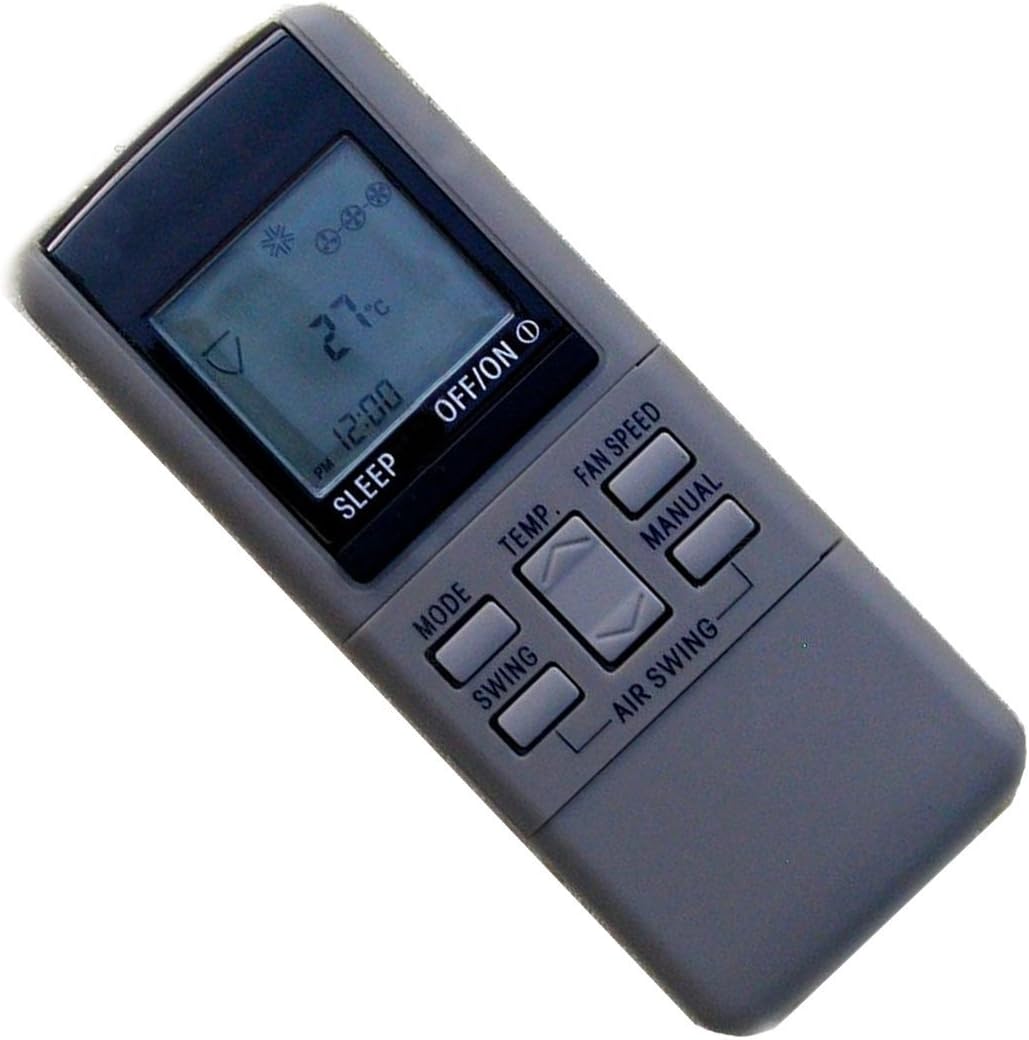
Figure 1: Front view of the replacement remote control. The remote features a clear LCD display at the top, showing temperature, mode, and fan settings. Below the screen are buttons for various functions, including power, mode, temperature adjustment, fan speed, swing, and air swing.

Figure 2: Angled view of the replacement remote control, showcasing its ergonomic shape and button layout. This view provides a better perspective of the remote's thickness and the slight curvature designed for comfortable handling.
This replacement remote control is compatible with a wide range of Panasonic air conditioner models, including but not limited to:
- A75C561, A75C559, A75C560
- A75C973, A75C258, A75C376, A75C443
- A75C399, A75C378, A75C377
- A75C902, A75C398
It is designed to offer a direct replacement experience, requiring no programming for most compatible units.
3. Setup
3.1 Battery Installation
- Locate the battery compartment cover on the back of the remote control.
- Slide the cover downwards or press the latch to open it.
- Insert two AAA batteries (not included), ensuring the positive (+) and negative (-) terminals align with the markings inside the compartment.
- Close the battery compartment cover securely.
Note: Always use new batteries of the same type. Do not mix old and new batteries, or different types of batteries. Remove batteries if the remote will not be used for an extended period.
4. Operating Instructions
The remote control features an intuitive layout for easy operation of your air conditioner. Point the remote control directly at the air conditioner's receiver when operating.
4.1 Button Functions
| Button | Function |
|---|---|
| OFF/ON | Powers the air conditioner on or off. |
| MODE | Cycles through operating modes (e.g., Cool, Heat, Fan, Dry, Auto). |
| TEMP ▲/▼ | Adjusts the desired temperature setting. |
| FAN SPEED | Adjusts the fan speed (e.g., Low, Medium, High, Auto). |
| SWING | Controls the horizontal swing of the air deflector. |
| AIR SWING | Controls the vertical swing of the air deflector. |
| SLEEP | Activates or deactivates the sleep mode, which adjusts temperature for comfortable sleep. |
| MANUAL | May provide access to additional or manual control functions depending on the AC model. |
Note: Not all functions listed may be supported by every Panasonic air conditioner model. Functionality depends on the original remote's capabilities and the specific AC unit.
5. Maintenance
Proper maintenance ensures the longevity and optimal performance of your remote control.
- Cleaning: Wipe the remote with a soft, dry cloth. Do not use liquid cleaners, sprays, or abrasive materials.
- Storage: Store the remote in a cool, dry place away from direct sunlight and extreme temperatures.
- Battery Replacement: Replace batteries when the remote's range decreases or the display dims. Always dispose of used batteries responsibly.
- Avoid Drops: Protect the remote from physical shocks and drops, as this can damage internal components.
6. Troubleshooting
If you experience issues with your remote control, refer to the following common problems and solutions:
- Remote not responding:
- Check battery orientation and ensure they are new and correctly inserted.
- Ensure there are no obstructions between the remote and the air conditioner's receiver.
- Verify the remote is pointed directly at the air conditioner.
- Some functions do not work:
- This remote is a replacement and may not support all advanced functions (e.g., specific timer settings, advanced swing patterns) that were present on your original air conditioner's remote if your AC unit does not natively support them via standard IR commands.
- Confirm your air conditioner model is listed as compatible.
- Display is dim or blank:
- Replace the batteries with new ones.
7. Specifications
- Model: Replacement for Panasonic Air Conditioner Remote Control (various models)
- Connectivity Technology: Infrared
- Compatible Devices: Air Conditioner
- Power Source: 2 x AAA Batteries (not included)
- Dimensions: Approximately 6.3 x 2.36 x 0.79 inches (16 x 6 x 2 cm)
- Weight: Approximately 1.98 ounces (56 grams) without batteries
- Special Feature: Ergonomic design
8. Support
For any questions regarding the compatibility or operation of this remote control, please contact your seller or refer to the product listing for further assistance. We are professional in remote control for AC, TV, DVD, projector, and so on.
For additional support, please visit the product page on Amazon: Product Link


