
Introduction
This manual provides detailed instructions for the proper use and maintenance of your Generic Replacement Air Conditioner Remote Control. Please read this manual thoroughly before operating the remote control to ensure optimal performance and longevity.
This remote control is designed as a replacement for various Toshiba Air Conditioner models, including those in the WC-H** series and WH-H** series, such as WC-H01JE, WH-H01JE, WC-H03JE, WH-H03JE, WC-H04JE, WH-H04JE, WH-H05JE, WH-H06JE, WH-H07JE, WC-H01EE, and WH-H01EE.
Product Overview

Image: The Generic Replacement Air Conditioner Remote Control, featuring a clear LCD display and various function buttons.
The remote control features an ergonomic design for comfortable handling and a clear LCD screen for displaying settings. It includes dedicated buttons for power, mode selection, temperature adjustment, fan speed, timer functions, and specialized operations like Hi Power and Air Purifying.
Setup
1. Loading Batteries

Image: Diagram illustrating the process of removing the battery cover and inserting batteries into the remote control, along with a visual of the remote's display indicators.
- Remove the battery cover on the back of the remote control.
- Insert two new AAA batteries, ensuring correct polarity (+/-).
- Press the RESET button. The clock indicator will flash.
- Replace the battery cover.
2. Setting the Clock

Image: Visual guide for setting the clock on the remote control, showing the display and relevant buttons.
When batteries are inserted, the clock display will show AM 0:00 and flash.
- Press the ON button to set the current time. Each press changes the time in one-minute increments. Holding down the button changes the time in ten-minute increments.
- Press the SET button. The current time is displayed and the clock starts.
3. Remote Control Holder Installation

Image: Illustrations demonstrating how to install the remote control holder on a wall and how to mount and remove the remote from the holder.
Before you install the remote control holder on a wall or pillar, check whether the remote control signals can be received by the indoor unit from that location.
To mount the remote control, slide the remote control upwards and out from the holder. To prevent the remote control from falling, hold it parallel to the remote control holder and push it in fully.
Operating Instructions
General Button Functions
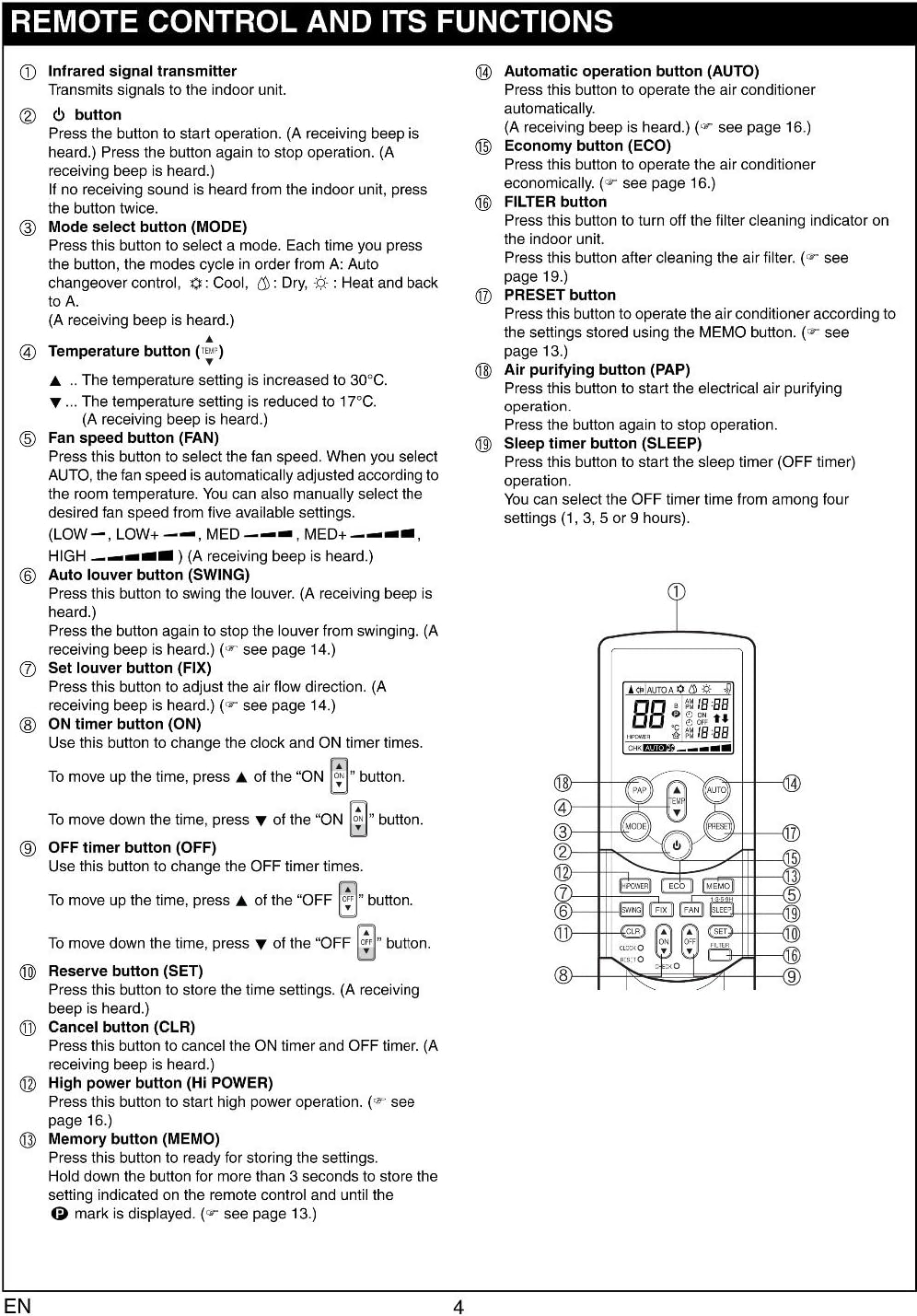
Image: A detailed diagram of the remote control, labeling each button and providing a brief description of its function.
- ON/OFF Button: Press to turn the air conditioner on or off.
- MODE Button: Selects operating mode (Cool, Heat, Dry, Fan, Auto).
- TEMP ▲/▼ Buttons: Adjusts temperature settings.
- FAN Button: Selects fan speed (Low, Med, High, Auto).
- SWING Button: Controls the vertical swing of the air conditioner louvers.
- FIX Button: Sets the louvers to a fixed position.
- ON/OFF Timer Buttons: Sets the automatic on/off time.
- SET Button: Confirms timer settings or other functions.
- CLR Button: Cancels timer settings.
- HI POWER Button: Activates high power operation for rapid cooling/heating.
- MEMO Button: Stores and recalls preferred settings.
- AUTO Button: Initiates automatic operation.
- ECO Button: Activates economy mode for energy saving.
- FILTER Button: Turns the filter cleaning indicator on/off.
- PRESET Button: Activates preset settings.
- PAP Button: Activates air purifying operation.
- SLEEP Button: Activates sleep timer operation.
Display Indicators
Image: A section from the manual detailing the various icons and indicators that appear on the remote control's LCD display, explaining their meanings.
The remote control display shows various indicators for the current operation mode, temperature, fan speed, timer settings, and special functions. Refer to the diagram for a visual representation of these indicators.
- Transmission Mark: Indicates signal transmission.
- Mode Indicator: Shows current operation mode (Auto, Cool, Dry, Heat).
- Temperature Indicator: Displays the set temperature.
- Air Purifying Indicator: Shows if air purifying is in progress.
- Fan Speed Indicator: Displays selected fan speed (LOW, MED, HIGH, AUTO).
- Timer and Clock Time Indicator: Shows the set time for timer operation or current time.
- HI POWER Indicator: Indicates when HI POWER operation is active.
- MEMORY Indicator: Flashes when MEMO button is pressed.
- ECO Indicator: Indicates when ECO is activated.
- CHECK Indicator: Used for service checks.
Automatic Operation

Image: Instructions and remote control display for initiating and stopping automatic operation modes.
In AUTO mode, the air conditioner automatically selects cooling, heating, or fan only operation depending on the room temperature. The fan speed and louver are also automatically controlled.
- Press the ON/OFF button to start the air conditioner.
- Press the AUTO button.
To stop, press the ON/OFF button.
Cooling/Heating Operation

Image: Instructions and remote control display for setting up cooling and heating operations.
- Press the ON/OFF button to start the air conditioner.
- Press the MODE button to select Cool (snowflake icon) or Heat (sun icon).
- Set the desired temperature using the TEMP ▲/▼ buttons.
- Select fan speed using the FAN button (AUTO, LOW, MED, HIGH).
To stop, press the ON/OFF button.
Dry Operation
In Dry mode, the air conditioner dehumidifies the room. The fan speed is fixed to AUTO.
- Press the ON/OFF button to start the air conditioner.
- Press the MODE button to select Dry (water drop icon).
- Set the desired temperature using the TEMP ▲/▼ buttons.
To stop, press the ON/OFF button.
Air Purifying Operation

Image: Instructions and remote control display for activating and managing the air purifying function.
The air ionizer starts in conjunction with air purifying operation.
- Press the PAP button to start air purifying operation. The PLASMA indicator (blue) on the indoor unit turns on.
To stop PAP operation, press the PAP button again. The PLASMA indicator turns off.
CAUTION:
- When the ON/OFF button is pressed during PAP operation, the operation starts with combined air conditioner and PAP operation.
- During combined air conditioner and PAP operation, air conditioner operation only cannot be stopped.
Hi Power Operation

Image: Instructions and remote control display for using the Hi Power function and setting timers.
Hi Power mode allows for rapid cooling in summer or rapid heating in winter.
- Press the HI POWER button to activate. The HI POWER mark will appear on the remote control screen.
To cancel, press the HI POWER button again.
CAUTION:
- The HI POWER mode cannot be activated during DRY operation and when the ON TIMER operation is activated.
Timer Operation
You can set the air conditioner to turn ON or OFF automatically at a specified time.
Setting the ON Timer
- Press the ON button. Set the time to the desired time using the ON button (single press for 1-minute increments, hold for 10-minute increments).
- Press the SET button. The timer time is displayed, and the timer starts.
- To cancel, press the CLR button.
Setting the OFF Timer
- Press the OFF button. Set the time to the desired time using the OFF button (single press for 1-minute increments, hold for 10-minute increments).
- Press the SET button. The timer time is displayed, and the timer starts.
- To cancel, press the CLR button.
CAUTION:
- When you select timer operation, the remote control automatically transmits the timer signal to the indoor unit at the specified time. Therefore, keep the remote control in a location where it can transmit the signal to the indoor unit properly.
- If you do not press the SET button within 30 seconds after setting the time, the setting will be cancelled.
General Usage Cautions
- The air conditioner will not operate if curtains, doors or other objects block the signals from the remote control to the indoor unit.
- Be careful that liquids do not spill onto the remote control.
- Do not expose the remote control to direct sunlight or heat.
- If the infrared signal receiver on the indoor unit is exposed to direct sunlight, the air conditioner may not function properly. Use curtains to prevent sunlight from reaching the receiver.
- Signals may not be properly received if the room using the air conditioner has fluorescent lighting with electronic starters. If you are planning on using fluorescent lamps, consult your local dealer.
- If other electrical appliances are activated by the remote control, move these appliances or consult with your local dealer.
Maintenance
Battery Replacement
Replace the batteries when the remote control's display becomes dim or the remote control becomes unresponsive. Always replace both batteries at the same time with new AAA batteries, ensuring correct polarity. Do not mix old and new batteries or different types of batteries.
If the remote control will not be used for an extended period, remove the batteries to prevent leakage and potential damage.
Troubleshooting
- Remote not responding: Check if batteries are inserted correctly and have sufficient charge. Ensure there are no obstructions between the remote and the air conditioner's receiver.
- Incorrect time display: Re-set the clock following the instructions in the Setup section.
- Limited range: Ensure the remote control is within approximately 7 meters of the indoor unit and there are no strong light sources (like fluorescent lamps) interfering with the signal.
Specifications
| Model Number | CECOMINOD034913 |
| Compatible Devices | Air Conditioner (Toshiba WC-H** series, WH-H** series) |
| Power Source | 2 x AAA Batteries (not included) |
| Dimensions | 6.3 x 2.36 x 0.79 inches |
| Item Weight | 1.98 pounds |
| Special Feature | Ergonomic design |
Warranty and Support
This product is covered by a standard manufacturer's warranty against defects in materials and workmanship. For specific warranty details, please refer to the product packaging or contact the seller directly.
For technical support or inquiries regarding your remote control, please contact the retailer or manufacturer's customer service. Keep your purchase receipt as proof of purchase for any warranty claims.