
1. Introduction
This manual provides essential instructions for the safe and effective use of your Ikelite Underwater Camera Housing Model 6243.40. This housing is designed to protect your Canon PowerShot ELPH 135 or ELPH 140 IS (also known as IXUS 145 or IXUS 150) digital camera, allowing for underwater photography up to a depth of 200 feet (60 meters). Please read this manual thoroughly before operating the housing.
2. Product Overview
The Ikelite Underwater Camera Housing Model 6243.40 is a durable, clear polycarbonate enclosure engineered for underwater use. It provides access to all important camera functions through large, ergonomic mechanical controls.
Key Features:
- Compatibility: Specifically designed for Canon PowerShot ELPH 135 and ELPH 140 IS (IXUS 145 and IXUS 150) digital cameras.
- Depth Rating: Waterproof to 200 feet (60 meters).
- Material: Constructed from corrosion-resistant clear polycarbonate, allowing visual confirmation of the camera and O-ring seal.
- Controls: Mechanical controls provide access to essential camera functions.
- Lens Port: Features a 3.0-inch diameter glass lens port, compatible with optional external wide-angle and macro add-on lenses.
- Strobe Connectivity: Equipped with two ports for Ikelite, Sea & Sea, or Olympus-type fiber optic cables for external strobe connection. Supports wireless slave triggering with optional AF35 AutoFlash strobe.
- Included Accessories: Comes with a diffuser to soften the camera's built-in flash and a deflector to redirect flash towards an external strobe.
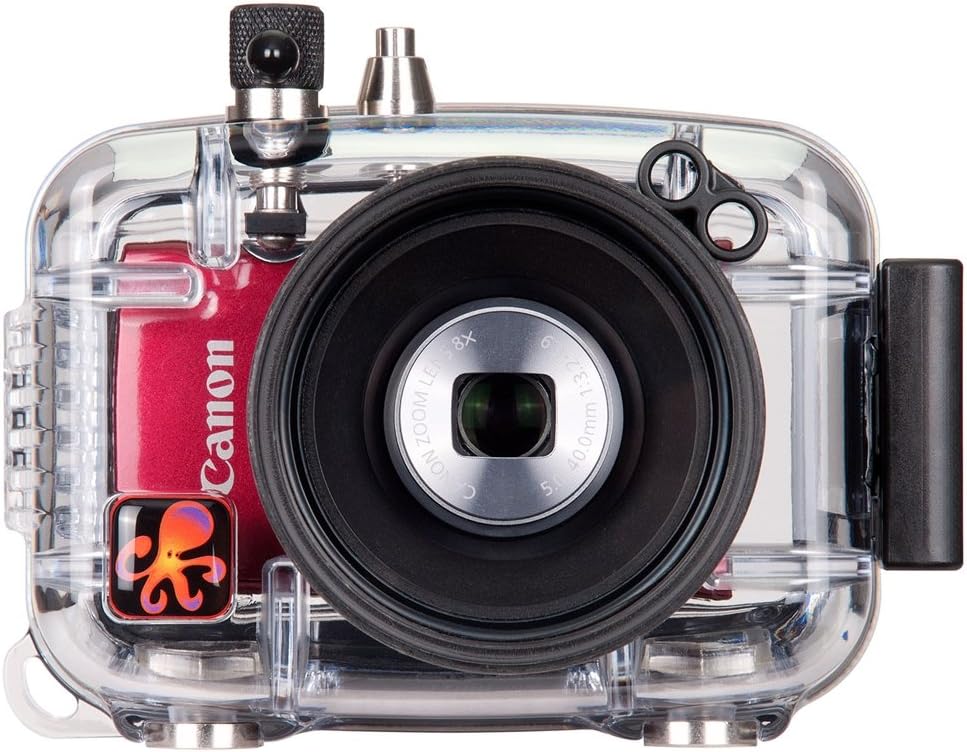
Image 1: Front view of the Ikelite Underwater Camera Housing Model 6243.40, showing the clear polycarbonate body, the integrated lens port, and a Canon digital camera housed within.

Image 2: Rear view of the Ikelite Underwater Camera Housing Model 6243.40, displaying the camera's LCD screen and the mechanical controls for camera operation, with an underwater scene on the camera display.
3. Setup
3.1 Pre-Dive Preparation
- Inspect O-Ring: Carefully inspect the main O-ring for any debris, hair, or damage. Ensure it is clean and properly seated in its groove. A clean, well-lubricated O-ring is crucial for a watertight seal.
- Lubricate O-Ring: Apply a thin, even coat of Ikelite O-ring lubricant to the O-ring. Do not over-lubricate.
- Prepare Camera: Ensure your Canon PowerShot ELPH 135 or ELPH 140 IS camera is fully charged and has sufficient memory. Set desired camera settings (e.g., flash mode, white balance) before insertion, as some controls may be limited underwater.
- Insert Camera: Gently slide the camera into the housing, ensuring it seats correctly and aligns with the internal controls.
- Close Housing: Close the housing securely, ensuring the latches engage properly. Visually inspect the O-ring seal through the clear housing to confirm no pinching or misalignment.
3.2 Initial Leak Test
Before using the housing with your camera, perform a leak test in a shallow body of water (e.g., a sink or bucket) without the camera inside. Submerge the empty housing for at least 15-20 minutes, observing for any bubbles or water ingress. If a leak is detected, re-inspect the O-ring and sealing surfaces, and repeat the test.
3.3 Attaching Optional Accessories
The housing supports various optional accessories:
- External Lenses: The 3.0" diameter glass lens port accepts optional wide-angle and macro add-on lenses. Attach these carefully to the port threads.
- External Strobes: Connect compatible external strobes (e.g., Ikelite AF35 AutoFlash, Sea & Sea, Olympus-type) using fiber optic cables to the designated ports. Ensure secure connection for reliable flash synchronization.
- Tray and Handle Systems: For enhanced stability and mounting of strobes, consider attaching the housing to an optional tray and handle system.
4. Operating the Housing
4.1 Basic Camera Control
The housing's mechanical controls are designed to align with and operate the corresponding buttons and dials on your Canon camera. Familiarize yourself with the location and function of each control before diving.
- Shutter Release: Press the lever to activate the camera's shutter.
- Zoom Control: Use the designated knob or lever to control the camera's zoom function. Note that some users may find the zoom control requires practice for smooth operation.
- Other Controls: Access menu navigation, playback, and other functions via the corresponding housing controls.
4.2 Underwater Photography Considerations
- Color Correction: Water absorbs colors, especially red, at depth. Use optional color-correction filters or external strobes to restore natural colors in your images.
- External Flash: For optimal lighting and color, an external strobe is highly recommended. The housing's fiber optic ports allow for reliable triggering.
- Buoyancy: The housing may have different buoyancy characteristics depending on the camera and accessories. Be aware of its behavior underwater.
- Depth Limit: Do not exceed the maximum operating depth of 200 feet (60 meters).
5. Maintenance
5.1 Post-Dive Care
- Rinse: Immediately after each dive, rinse the housing thoroughly in fresh water for at least 15-20 minutes while keeping it closed. Operate all controls during rinsing to flush out any trapped salt or debris.
- Dry: Dry the housing completely with a soft, lint-free cloth before opening. Pay special attention to the latches and seams.
- Open: Only open the housing in a clean, dry environment to prevent water or debris from entering.
5.2 O-Ring Care
- Inspection: Regularly inspect the main O-ring and all control O-rings for cuts, nicks, or signs of wear.
- Cleaning: Clean O-rings with a soft, lint-free cloth. Avoid using harsh chemicals or abrasive materials.
- Lubrication: Apply a very thin layer of Ikelite O-ring lubricant as needed. Over-lubrication can attract debris.
- Replacement: Replace O-rings annually or immediately if any damage is observed.
5.3 Storage
Store the housing in a cool, dry place away from direct sunlight. It is recommended to store the housing with the main O-ring slightly unseated or with the latches open to prevent compression set over long periods.
6. Troubleshooting
6.1 Water Leakage
- Cause: Debris on O-ring, damaged O-ring, improper closure, or cracked housing.
- Solution:
- Immediately bring the housing to the surface.
- Open the housing in a dry environment and remove the camera.
- Thoroughly clean and inspect the main O-ring and its groove for any foreign particles or damage.
- Re-lubricate the O-ring sparingly.
- Perform a leak test without the camera. If the leak persists, inspect the housing body for cracks or contact Ikelite support.
6.2 Controls Not Functioning
- Cause: Camera not seated correctly, control O-rings sticky, or mechanical linkage issue.
- Solution:
- Ensure the camera is properly aligned and seated within the housing.
- Check if any internal camera settings are preventing control response.
- After rinsing, operate controls repeatedly to dislodge any salt or debris.
- If a specific control consistently malfunctions, inspect its external shaft and internal mechanism for obstruction or damage. Contact Ikelite support if the issue persists.
6.3 Fogging Inside Housing
- Cause: Humidity trapped inside the housing, temperature difference between air and water.
- Solution:
- Assemble the housing in a cool, dry environment.
- Use moisture-absorbing packets (desiccants) inside the housing with the camera.
- Avoid opening the housing in humid conditions.
7. Specifications
| Model Number: | 6243.40 |
| Brand: | Ikelite |
| Compatible Cameras: | Canon PowerShot ELPH 135, ELPH 140 IS (IXUS 145, IXUS 150) |
| Depth Rating: | 200 feet (60 meters) |
| Material: | Polycarbonate (PC) |
| Color: | Clear |
| Product Dimensions: | 5.5 x 6.7 x 5.5 inches (14 x 17 x 14 cm) |
| Item Weight: | 1.2 pounds (0.54 kg) |
| Water Resistance Level: | Waterproof |
| Mounting Type: | Tray Mount (optional) |
8. Warranty and Support
For information regarding warranty coverage, technical support, or service for your Ikelite Underwater Camera Housing Model 6243.40, please contact Ikelite directly through their official website or customer service channels. Keep your purchase receipt as proof of purchase for any warranty claims.
Manufacturer: Ikelite


