
TIAMAT 24V 20VA Transformer Instruction Manual
Model: 24V20AC
1. Introduction
This manual provides essential information for the safe and effective installation, operation, and maintenance of your TIAMAT 24V 20VA Transformer. This device is designed to convert standard household AC voltage (110V/120V AC, 60Hz) to a lower, regulated 24V AC output, suitable for various low-voltage applications. Please read this manual thoroughly before using the product and retain it for future reference.
2. Safety Information
WARNING: Risk of Electric Shock. Improper installation or use can result in serious injury or death.
- Always disconnect power at the circuit breaker or fuse box before installing or servicing the transformer.
- This transformer is designed for indoor use only. Do not expose to moisture, rain, or extreme temperatures.
- Ensure the input voltage matches the transformer's rating (110V/120V AC, 60Hz).
- Do not exceed the maximum output rating of 20VA (Volt-Amperes) or 880mA at 24V AC. Overloading can cause damage to the transformer and connected devices, and may pose a fire hazard.
- All wiring must comply with local and national electrical codes. If you are unsure about installation, consult a qualified electrician.
- Do not attempt to disassemble or modify the transformer. There are no user-serviceable parts inside.
- Keep out of reach of children.
3. Product Overview
The TIAMAT 24V 20VA Transformer (Model 24V20AC) is a reliable power supply unit featuring a 110V/120V AC input and a 24V AC output. It is UL Listed, ensuring it meets recognized safety standards. The transformer is designed for wall-mount applications, providing a stable 24V AC power source for compatible devices.
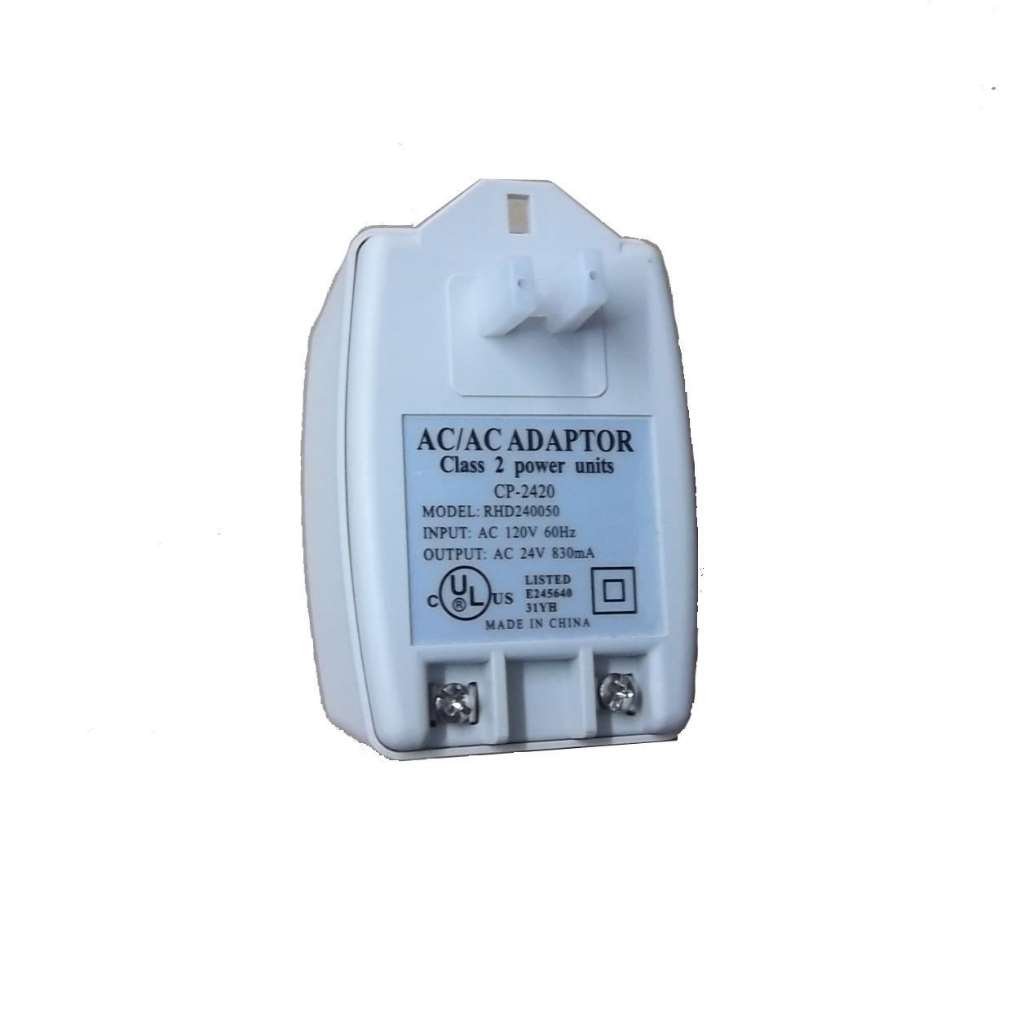
Image 1: TIAMAT 24V 20VA Transformer. This image displays the transformer unit, highlighting its compact form factor and the screw terminals for electrical connections.
4. Setup
4.1 Pre-installation Checklist
- Verify that the power requirements of your device are compatible with a 24V AC, 20VA (880mA) power supply.
- Ensure the installation location is dry, well-ventilated, and protected from physical damage.
- Gather necessary tools: screwdriver, wire strippers, voltage tester.
4.2 Installation Steps
- Disconnect Power: Before beginning any wiring, turn off the power to the circuit at the main electrical panel. Confirm power is off using a voltage tester.
- Mount the Transformer: Securely mount the transformer to a wall or junction box using appropriate fasteners. The transformer is designed for wall mount.
- Connect Input Power (110V/120V AC): Connect the 110V/120V AC input wires from your power source to the designated input terminals on the transformer. Ensure connections are tight and secure.
- Connect Output Power (24V AC): Connect the wires from your low-voltage device to the 24V AC output terminals on the transformer. Observe proper polarity if specified by your device, although AC transformers typically do not have strict polarity for output.
- Verify Connections: Double-check all wiring connections for tightness and correctness. Ensure no bare wires are exposed.
- Restore Power: Once all connections are verified, restore power at the main electrical panel.
5. Operating Instructions
The TIAMAT 24V 20VA Transformer operates automatically once connected to a power source. There are no user-adjustable settings or controls.
- Upon restoring power to the circuit, the transformer will immediately begin converting the input voltage to 24V AC.
- The connected low-voltage device should power on or receive the necessary voltage.
- The transformer may feel slightly warm to the touch during normal operation; this is typical.
6. Maintenance
The TIAMAT 24V 20VA Transformer requires minimal maintenance.
- Cleaning: Periodically wipe the exterior of the transformer with a dry, soft cloth to remove dust. Do not use liquid cleaners or solvents. Ensure power is disconnected before cleaning.
- Inspection: Annually inspect the wiring connections for any signs of loosening, corrosion, or damage. Ensure the transformer casing is intact and free from cracks or other physical damage.
- Ventilation: Ensure the area around the transformer remains clear to allow for proper heat dissipation. Do not cover the transformer.
7. Troubleshooting
| Problem | Possible Cause | Solution |
|---|---|---|
| No power to connected device |
|
|
| Connected device malfunctions or is damaged |
|
|
| Transformer is excessively hot |
|
|
If troubleshooting steps do not resolve the issue, contact customer support or a qualified electrician.
8. Specifications
| Feature | Detail |
|---|---|
| Model | 24V20AC |
| Brand | TIAMAT |
| Input Voltage | 110V / 120V AC, 60Hz |
| Output Voltage | 24V AC |
| Power Rating | 20VA |
| Output Current | 880mA (0.88 Amps) |
| Safety Certification | UL Listed |
| Mounting Type | Wall Mount |
| Power Source | Corded Electric |
| UPC | 881314846689 |
9. Warranty Information
Warranty terms and conditions for the TIAMAT 24V 20VA Transformer are typically provided at the time of purchase or can be obtained directly from the manufacturer or authorized reseller. Please refer to your purchase documentation for specific warranty details, duration, and claim procedures.
10. Customer Support
For technical assistance, questions regarding installation, or troubleshooting beyond the scope of this manual, please contact the retailer where the product was purchased or the TIAMAT customer support directly. Have your product model number (24V20AC) and purchase information ready when contacting support.


