
Panasonic EW1211A
Panasonic EW1211A Cordless Water Flosser Instruction Manual
Introduction
This manual provides detailed instructions for the safe and effective use of your Panasonic EW1211A Cordless Water Flosser. Please read this manual thoroughly before initial use and retain it for future reference. Proper use and maintenance will ensure optimal performance and longevity of your device.
Safety Information
Please observe the following safety precautions to prevent injury or damage to the device:
- Warning: Do not submerge the device in water outside of intended use. While the unit is waterproof for cleaning, prolonged submersion is not recommended.
- Consult with a dentist or healthcare professional before use if you have any medical conditions affecting the mouth or gums, or if you have recently undergone oral surgery.
- Always follow manufacturer instructions for charging and battery handling. Use only the provided AC charging stand.
- Keep out of reach of children. This device is not intended for use by children without adult supervision.
- Do not operate the device if it has a damaged cord or plug, if it is not working properly, or if it has been dropped or damaged.
- Do not direct the water jet under the tongue, into the ear, nose, or other sensitive areas.
Package Contents
Verify that all items are present in the package:
- Panasonic EW1211A Cordless Water Flosser Main Unit
- Two Flosser Nozzles
- AC Charging Stand

Image: Two replacement flosser nozzles, included with the unit.
Parts Identification
Familiarize yourself with the components of your water flosser:
- Nozzle: Directs the water jet.
- Nozzle Release Button: For detaching the nozzle.
- Power Button (0/1): Turns the device on or off.
- Select Button: Cycles through the three pressure settings (Jet, Regular, Soft).
- Water Tank: Holds water for flossing. Detachable for easy filling and cleaning.
- Charging Indicator Light: Illuminates during charging.
- AC Charging Stand: Provides power to recharge the unit and stores nozzles.

Image: Front view of the Panasonic EW1211A Cordless Water Flosser, highlighting its main components including the power button, select button, and nozzle.
Setup
Initial Charging
Before first use, fully charge the device. Place the water flosser onto the AC charging stand. The charging indicator light will illuminate. A full charge takes approximately 15 hours and provides about 15 minutes of operation.

Image: The Panasonic EW1211A water flosser placed on its AC charging stand, indicating it is ready for charging.
Attaching the Nozzle
Insert a nozzle into the opening at the top of the main unit until it clicks into place. Ensure it is securely fastened.
Filling the Water Tank
Detach the water tank from the main unit. Fill the tank with lukewarm water. Reattach the water tank securely to the main unit.

Image: The Panasonic EW1211A water flosser on its charging stand, demonstrating the convenient nozzle storage feature.
Operating Instructions
Powering On/Off
Press the Power (0/1) button to turn the device on. Press it again to turn the device off.
Selecting Pressure Settings
Press the Select button to cycle through the three available pressure settings:
- Jet Mode: Provides a strong, continuous water stream (1,500 pulses per minute) for targeted cleaning and dislodging larger food particles.
- Regular Mode: Delivers strong, aerated pulses to wash out smaller particles and help remove plaque between tooth surfaces.
- Soft Mode: Uses a lower jet pulse for gentler irrigation, suitable for sensitive gums or initial use.

Image: A close-up view of the water flosser nozzle demonstrating the powerful water jet, capable of up to 1500 pulses per minute.
Flossing Technique
- Lean over a sink to avoid splashing.
- Place the nozzle tip into your mouth, aiming it at your gum line at a 90-degree angle.
- Turn on the device using the Power (0/1) button.
- Guide the water jet along your gum line and between each tooth. Pause briefly between teeth.
- Allow the water to flow into the sink from your mouth.
- Continue until you have cleaned all areas of your mouth.
- Turn off the device before removing the nozzle from your mouth to prevent splashing.

Image: A user demonstrating the correct way to hold and position the water flosser nozzle for effective cleaning.
Maintenance and Cleaning
Regular cleaning ensures hygiene and extends the life of your water flosser.
Cleaning the Main Unit
The main unit is 100% waterproof. After each use, rinse the exterior of the unit under warm, running water. Wipe it dry with a soft cloth. Do not use abrasive cleaners or harsh chemicals.

Image: A hand rinsing the waterproof Panasonic water flosser under running water for easy cleaning.
Cleaning the Water Tank
The 4.4-ounce water reservoir is easily detachable and dishwasher safe. Remove the tank and clean it thoroughly after each use to prevent residue buildup. Allow it to air dry completely before reattaching.
Cleaning the Nozzle
Remove the nozzle from the unit. Rinse it under warm water. For deeper cleaning, you can soak the nozzle in a solution of water and white vinegar (1:1 ratio) for 15-20 minutes, then rinse thoroughly.
Troubleshooting
If you encounter any issues with your water flosser, refer to the following table:
| Problem | Possible Cause | Solution |
|---|---|---|
| Device does not turn on. | Battery is depleted. | Place the unit on the charging stand and allow it to charge for at least 15 hours. |
| Weak water pressure. | Water tank is low or empty. Nozzle is clogged. Battery is low. | Refill the water tank. Clean the nozzle. Recharge the device. |
| Water leaks from the unit. | Water tank not properly attached. Nozzle not properly attached. | Ensure the water tank is securely fastened. Ensure the nozzle is clicked into place. |
| Device stops during use. | Battery is depleted. | Recharge the device. |
Specifications
- Model Number: EW1211A
- Power Source: Battery Powered (1 Lithium Ion battery included)
- Product Dimensions: 1.9 x 2.8 x 7.6 inches
- Item Weight: 10.6 ounces
- Water Pulses: Up to 1500 pulses per minute (Jet Mode)
- Special Features: Covered Reservoir, Jet, Plaque Seeker Tips
- Product Benefits: Gum Health, Removes Plaque
- UPC: 885170201200
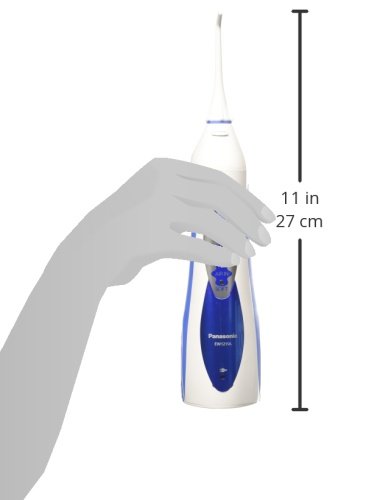
Image: A visual representation of the Panasonic water flosser's dimensions, indicating a height of approximately 11 inches (27 cm).
Warranty and Support
For warranty information or technical support, please refer to the warranty card included with your product or visit the official Panasonic website. Keep your proof of purchase for any warranty claims.
Ask a question about this manual
Ask about setup, troubleshooting, compatibility, parts, safety, or missing instructions. Manuals+ will review the question and use this page’s manual context to help answer it.