
Sandoz 8431283451920
Sandoz 81389-57 Chronograph Wristwatch User Manual
Model: 8431283451920
Introduction
Thank you for choosing the Sandoz 81389-57 Chronograph Wristwatch. This manual provides detailed instructions for the proper use, care, and maintenance of your new timepiece. Please read this manual thoroughly to ensure optimal performance and longevity of your watch.
Features
- Chronograph Function: Allows for precise timing of events.
- Date Display: Conveniently shows the current date.
- Durable Construction: Designed for everyday wear.
- Black Leather Strap: Provides comfort and classic style.
Setup
Setting the Time
- Pull the crown (B) out to position 2.
- Turn the crown clockwise or counter-clockwise to set the hour and minute hands to the desired time.
- Push the crown back to position 0.
Setting the Date
- Pull the crown (B) out to position 1.
- Turn the crown clockwise to set the date. Avoid setting the date between 9 PM and 3 AM, as this may damage the movement.
- Push the crown back to position 0.

Figure 1: Front view of the Sandoz 81389-57 Chronograph Wristwatch, showing the main dial, sub-dials, date window, and crown/pushers on the side.
Operating Instructions
Using the Chronograph

Figure 2: Side view of the Sandoz 81389-57 Chronograph Wristwatch, highlighting the two pushers (A and C) above and below the crown (B).
- To start the chronograph: Press pusher A (top button). The chronograph second hand will begin to move.
- To stop the chronograph: Press pusher A again. The chronograph second hand will stop, indicating the elapsed time.
- To reset the chronograph: After stopping, press pusher C (bottom button). All chronograph hands will return to their zero positions.
- For split time (intermediate time measurement): Press pusher C while the chronograph is running. The hands will stop to show the split time. Press C again to resume timing.
Maintenance and Care
Cleaning
To maintain the appearance of your watch, wipe the case and strap regularly with a soft, dry cloth. For the leather strap, avoid prolonged exposure to water or direct sunlight, which can cause damage or discoloration.
Water Resistance
This watch is designed with a certain level of water resistance. Refer to the specifications section for details. Always ensure the crown is fully pushed in before exposing the watch to water. Do not operate the crown or pushers when the watch is wet.
Battery Replacement
When the watch battery is depleted, it is recommended to have it replaced by a qualified watchmaker or authorized service center. Improper battery replacement can damage the movement or compromise the watch's water resistance.
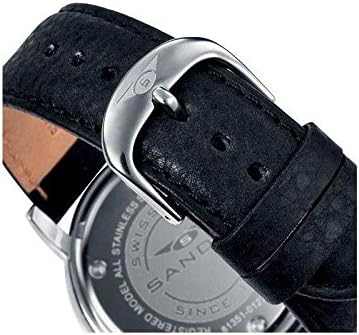
Figure 3: Back view of the Sandoz 81389-57 Chronograph Wristwatch, showing the stainless steel case back with engravings and the black leather strap with its buckle.
Troubleshooting
| Problem | Possible Cause | Solution |
|---|---|---|
| Watch stops or runs intermittently. | Low battery. | Replace the battery. |
| Date changes at noon instead of midnight. | AM/PM setting is incorrect. | Advance the time by 12 hours. |
| Chronograph hands do not reset to zero. | Needs calibration or internal issue. | Consult a qualified watchmaker for adjustment or repair. |
Specifications
| Feature | Detail |
|---|---|
| Brand | Sandoz |
| Model Number | 8431283451920 |
| ASIN | B00P689F4S |
| Movement Type | Quartz Chronograph |
| Strap Material | Black Leather |
| Case Material | Stainless Steel |
| Water Resistance | Information not explicitly available, treat as splash resistant. |
Warranty and Support
Sandoz watches are manufactured to high-quality standards. For specific warranty terms and conditions, please refer to the warranty card included with your purchase or contact your authorized Sandoz dealer. Keep your proof of purchase for any warranty claims.
For technical support or service inquiries, please contact the retailer where the watch was purchased or visit the official Sandoz website for authorized service centers.
Ask a question about this manual
Ask about setup, troubleshooting, compatibility, parts, safety, or missing instructions. Manuals+ will review the question and use this page’s manual context to help answer it.