
Cornet ED78S
Cornet ED78S EMF RF Meter User Manual
Model: ED78S
Introduction
The Cornet ED78S is a versatile ElectroMagnetic Field (EMF) and Radio Frequency (RF) meter designed to detect and measure various electromagnetic emissions. It is capable of identifying sources such as cell towers, smart meters, Wi-Fi signals, microwave ovens, power lines, transformers, home appliances, and outlet boxes. This manual provides essential information for the proper use and maintenance of your ED78S meter.
Key Features
- Magnetic, Electric, Radio/microwave & Paranormal Detection All in One Package
- Identify where EMF is penetrating your house.
- Track and find EMF sources inside your house & office.
- Measure the EMF whenever you need or want.
Setup
Before first use, ensure batteries are correctly installed. The device is designed for portability and ease of use.
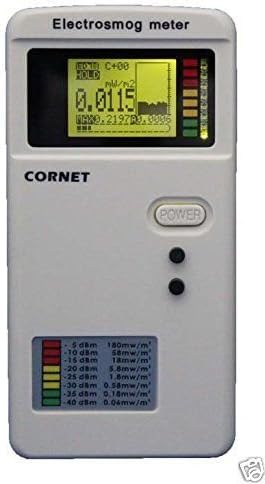
Figure 1: Front view of the Cornet ED78S EMF RF Meter, showing the display, power button, and indicator lights.
Operating Instructions
The ED78S features different operating modes for measuring various types of electromagnetic fields.
To measure RF signals, such as from a router, ensure the meter is set to RF mode. This can typically be achieved by pressing the 'Mode' button until 'RF' is indicated on the display.
The LCD backlight can be manually controlled. To adjust the backlight and sound settings, first enter Hold mode by pressing the second button. Then, toggle the first button to cycle through the available options: sound-on/light-off, sound-on/light-on, sound-off/light-off, and sound-off/light-on. After selecting your desired setting, press the second button again to exit Hold mode. Note that the LCD backlight consumes significant battery power, so it defaults to auto-off after 10 seconds to conserve battery life.
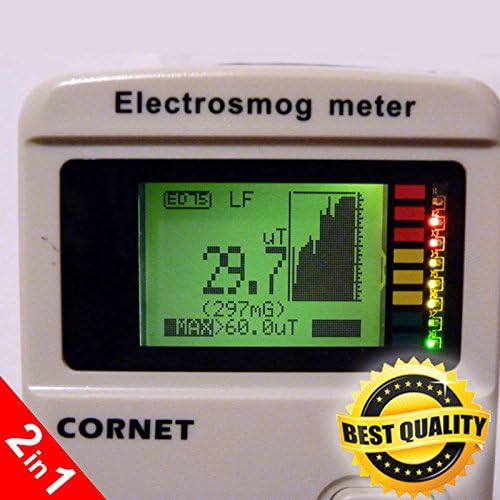
Figure 2: Close-up of the Cornet ED78S display, showing an LF (Low Frequency) measurement in uT (microtesla).
Maintenance
To ensure the longevity and accuracy of your Cornet ED78S meter, follow these maintenance guidelines:
- Cleaning: Use a soft, dry cloth to clean the exterior of the device. Do not use abrasive cleaners or solvents.
- Storage: Store the meter in a cool, dry place away from direct sunlight and extreme temperatures.
- Battery Care: Remove batteries if the device will not be used for an extended period to prevent leakage.
- Avoid Impact: Protect the device from drops and strong impacts, which can damage internal components.
Troubleshooting
If you encounter issues with your Cornet ED78S meter, consider the following common solutions:
- Device not powering on: Check battery installation and ensure batteries are fresh.
- Inaccurate readings: Ensure the meter is in the correct mode for the type of emission you are measuring (e.g., RF mode for Wi-Fi). Move away from other electronic devices that might interfere with readings.
- Display issues: If the display is dim or flickering, replace the batteries. Refer to the operating instructions for backlight control.
- No sound: Check the sound settings as described in the operating instructions.
If problems persist, contact customer support.
Specifications
| Feature | Detail |
|---|---|
| Manufacturer | Cornet microsystems |
| Brand | Cornet |
| Model number | ED78S |
| Colour | White |
| Size | pocket size |
| Manufacturer Part Number | ED78S |
| ASIN | B00P67QLA0 |
| Date First Available | Jan. 23 2015 |
Warranty and Support
The Cornet ED78S EMF RF Meter comes with a standard manufacturer's warranty. For specific warranty terms, technical support, or service inquiries, please refer to the contact information provided with your product packaging or visit the official Cornet website.
Ask a question about this manual
Ask about setup, troubleshooting, compatibility, parts, safety, or missing instructions. Manuals+ will review the question and use this page’s manual context to help answer it.