
Introduction
This manual provides essential information for the installation, maintenance, and troubleshooting of your Hotpoint Fine External Rotating Dishwasher Filter. This is a genuine Hotpoint replacement part designed to ensure optimal performance of your dishwasher by effectively filtering food particles and debris.
Compatible with various Hotpoint dishwasher models, including but not limited to: fdd914 K.r, fdd914p.r, fdd914 x .r, fdf780p, fdf780pr, fdf780 x, fdl570p, fdl570p.r, fdl570 x, fdf784p.r, fdf784 x .r, fdl570 a, fdud4812g, fdud4812 K, fdud4812p, fdud4812 x, lfs114buk, lfs114kuk, fdal28p, fdd912g, fdd912 K, fdd912p, fdd912 x, fdd914g.r, fdf780 a, fdf780g, fdf780 K, fdf784 a.r,, fdf784g.r fdf784 K.r, fdl570 x .r, fdm550p, fdm550p.r, fdm554p, fdm554p.r, fdpf481g, fdpf481 K, fdpf481p, fdpf481 x, fdl570 a.r, fdl570g, fdl570g.r.
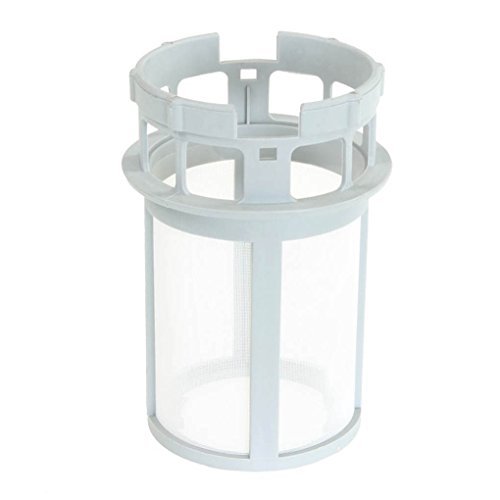
Image: A light grey, cylindrical dishwasher filter with a fine mesh screen visible through its transparent sides. The top features a cage-like structure for rotation and secure fitting. This filter is designed to capture food particles and prevent them from recirculating during the wash cycle.
Setup and Installation
Before beginning, ensure your dishwasher is turned off and disconnected from the power supply for safety. Refer to your specific dishwasher model's user manual for exact filter location and removal instructions, as designs may vary slightly.
- Locate the Filter Assembly: The filter is typically located at the bottom of the dishwasher tub, often beneath the lower spray arm.
- Remove the Old Filter: Gently twist or unclip the existing filter assembly counter-clockwise to unlock it. Carefully lift it out of the dishwasher.
- Clean the Filter Housing: Inspect the area where the filter sits for any debris or residue. Clean as necessary to ensure a proper seal for the new filter.
- Install the New Filter: Place the new Hotpoint Fine External Rotating Dishwasher Filter into the filter housing. Align the tabs or grooves and gently push down.
- Secure the Filter: Twist the filter clockwise until it locks securely into place. Ensure it is seated firmly and does not wobble. A loose filter can lead to poor wash performance.
- Test: Reconnect the dishwasher to the power supply and run a short cycle to check for proper operation and drainage.
Operating Principles
The fine external rotating filter is an integral component of your dishwasher's filtration system. Its primary function is to capture food particles and debris from the wash water, preventing them from being redeposited onto dishes during the wash and rinse cycles. The rotating design helps to ensure efficient particle collection and prevents larger debris from clogging the system.
For optimal dishwasher performance and to prevent blockages, regular cleaning of the filter is essential. The filter works continuously during operation to maintain water cleanliness within the appliance.
Maintenance and Cleaning
Regular cleaning of the dishwasher filter is crucial for maintaining wash performance and preventing odors. It is recommended to clean the filter at least once a month, or more frequently if you wash heavily soiled dishes.
- Turn Off Dishwasher: Ensure the dishwasher is turned off and unplugged before cleaning.
- Remove the Filter: Twist the filter counter-clockwise and lift it out of the dishwasher tub.
- Rinse Under Running Water: Hold the filter under warm running water to rinse away loose food particles.
- Use a Soft Brush: For stubborn debris or greasy residue, use a soft brush (like an old toothbrush) and a small amount of dish soap to gently scrub the mesh and plastic components.
- Inspect for Damage: While cleaning, inspect the filter for any signs of wear, tears in the mesh, or cracks in the plastic. Replace the filter if any damage is observed.
- Reinstall: Once clean, place the filter back into its housing and twist clockwise until it clicks securely into place. Ensure it is properly seated to avoid issues during operation.
Troubleshooting
| Problem | Possible Cause | Solution |
|---|---|---|
| Dishes are not clean / Food particles on dishes | Clogged or improperly installed filter. | Remove and thoroughly clean the filter. Ensure it is correctly seated and locked into place after cleaning. |
| Dishwasher not draining properly | Severely clogged filter. | Remove and clean the filter. If the problem persists, check the drain hose for kinks or blockages, or consult a professional. |
| Unpleasant odor from dishwasher | Food residue trapped in the filter. | Clean the filter regularly. Run a dishwasher cleaning cycle with a specialized cleaner or white vinegar. |
| Filter does not fit or is loose | Incorrect filter model or improper installation. | Verify that the filter model (HPTC00256571.) is compatible with your dishwasher. Ensure it is aligned correctly and twisted until it locks. |
Specifications
- Brand: Hotpoint
- Model Number: HPTC00256571.
- Item Weight: Approximately 9.07 grams
- ASIN: B00P2IBL4Y
- Part Type: Fine External Rotating Dishwasher Filter
- Compatibility: Designed for specific Hotpoint dishwasher models (refer to Introduction section for list).
Warranty and Support
This Hotpoint Fine External Rotating Dishwasher Filter is a genuine replacement part. For specific warranty information regarding genuine Hotpoint replacement parts, please refer to the documentation provided with your original Hotpoint appliance or contact Hotpoint customer support directly.
For further assistance or technical support, please visit the official Hotpoint website or contact their customer service department. When contacting support, please have your dishwasher model number and the filter's model number (HPTC00256571.) ready.
Hotpoint Official Website: www.hotpoint.co.uk (or your regional Hotpoint website)