
tech21 204996
Tech 21 SansAmp Para Driver DI (v2) Instruction Manual
Brand: tech21 | Model: 204996
Introduction
The Tech 21 SansAmp Para Driver DI (v2) is a versatile floor-based direct box and preamp designed to provide detailed tone shaping for various signal sources. It is particularly effective with acoustic, electric, and bass guitars, as well as upright bass, whether connected directly to a mixing console or an instrument amplifier. The SansAmp circuitry imparts a natural warmth and presence, emulating the sound of a miked tube pre-amp, while effectively eliminating harsh, unnatural harmonics often associated with piezo pickups. The Drive control allows for adding subtle to pronounced edge to your sound.
Key Features
- Versatile Tone Shaping: Provides detailed tone shaping possibilities for any signal source, including acoustic, electric, and bass guitars, and upright bass.
- Natural Warmth and Presence: SansAmp circuitry delivers a tube pre-amp like warmth and presence, while eliminating harsh harmonics from piezo pickups.
- Drive Control: Offers a tasteful edge, from subtle grit to over-the-top distortion.
- Version 2 Enhancements: Includes two new features: the Rumble Filter and Air Button.
- Rumble Filter: Removes unwanted sub-sonic frequencies that can cause boominess and audible handling noises, especially with acoustic guitars.
- Air Button: Boosts high frequencies for added clarity and sparkle to acoustic instruments.
- Multiple Outputs: Features both XLR and 1/4" outputs for flexible connectivity.
- Phantom Power Compatibility: Can be powered via phantom power through the XLR output.
Controls and Connections

Figure 1: Top view of the SansAmp Para Driver DI (v2) showing control layout.
Control Knobs:
- LEVEL: Adjusts the overall output level of the pedal.
- TREBLE: Controls the high-frequency equalization.
- MID: Controls the mid-frequency equalization.
- BASS: Controls the low-frequency equalization.
- DRIVE: Adjusts the amount of SansAmp tube amplifier emulation and overdrive.
- BLEND: Mixes the direct instrument signal with the SansAmp tube amplifier emulation.
- MID SHIFT (160Hz - 3kHz): Selects the specific mid-frequency point to be affected by the MID control.
Buttons:
- PHANTOM & GROUND CONNECT XLR: Engages phantom power for the XLR output and connects/disconnects the ground.
- -20dB XLR: Attenuates the XLR output by 20dB for hotter signals.
- RUMBLE FILTER: Activates a high-pass filter to remove unwanted low-end rumble.
- AIR: Boosts high frequencies for added clarity and sparkle.

Figure 2: Side view showing Input and Parallel Output.
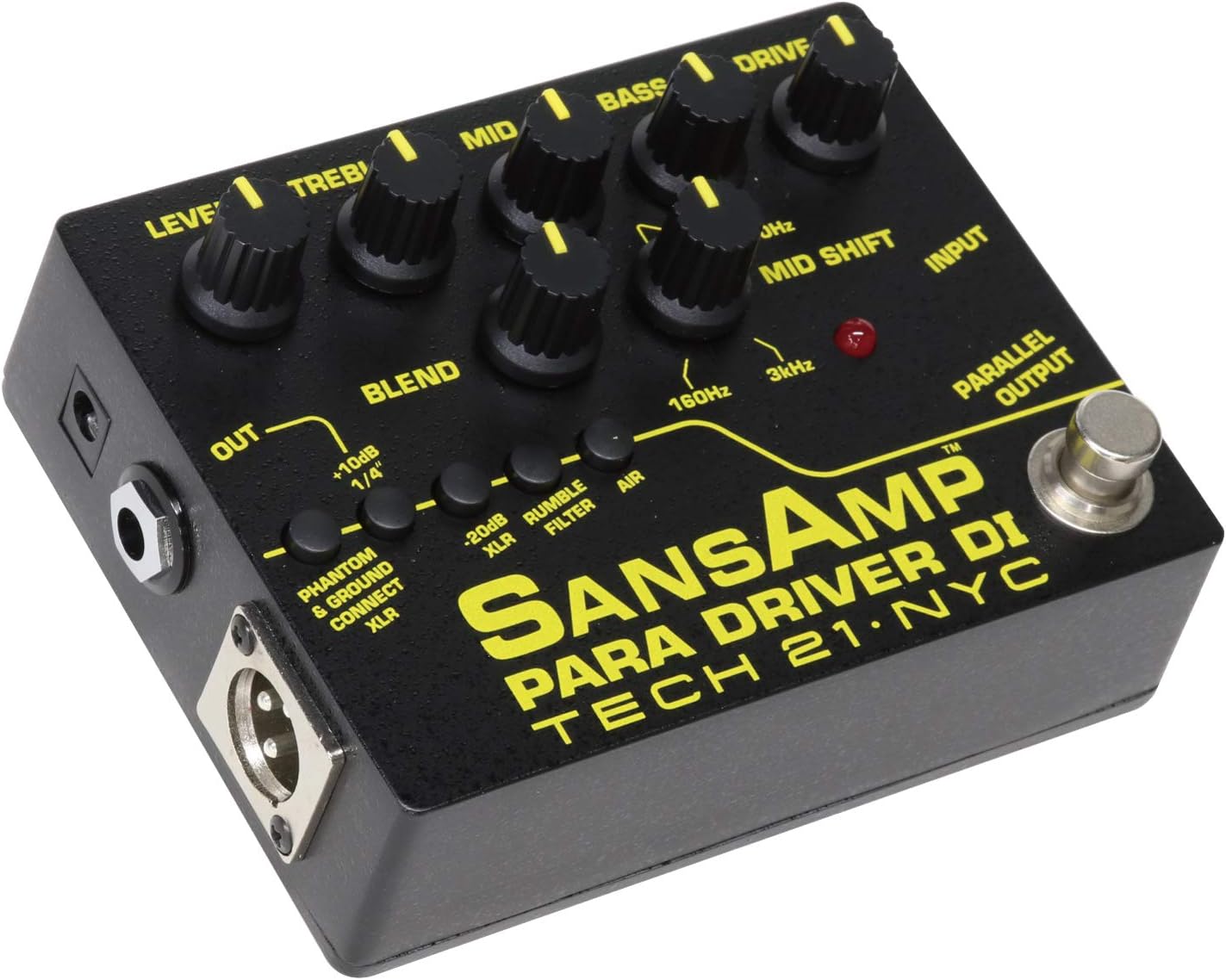
Figure 3: Side view showing XLR Output and 1/4" Output.
Connections:
- INPUT: 1/4-inch instrument input.
- PARALLEL OUTPUT: 1/4-inch output that passes the unaffected input signal. Useful for sending a clean signal to an amplifier while the processed signal goes to a mixer.
- OUT (1/4"): 1/4-inch output for connecting to an amplifier or other effects.
- XLR OUT: Balanced XLR output for direct connection to a mixing console or audio interface.
Setup Guide
- Power Connection: Connect a 9V DC power supply (not included) to the power input jack, or utilize phantom power from a mixer via the XLR output by engaging the "PHANTOM & GROUND CONNECT XLR" button.
- Instrument Connection: Connect your instrument (guitar, bass, etc.) to the INPUT jack using a standard 1/4-inch instrument cable.
- Output Connection:
- For direct connection to a mixer or audio interface, use an XLR cable from the XLR OUT to your mixer's input.
- For connection to an instrument amplifier or other pedals, use a 1/4-inch cable from the OUT (1/4") jack.
- To send an unaffected signal to another device (e.g., a tuner or a separate amplifier), use the PARALLEL OUTPUT.
- Initial Settings: Before powering on, set all control knobs (LEVEL, TREBLE, MID, BASS, DRIVE, BLEND) to their 12 o'clock (noon) position. Ensure all push-buttons are disengaged for a neutral starting point.
Operating Instructions
The SansAmp Para Driver DI (v2) offers extensive tonal flexibility. Experiment with the controls to find your desired sound.
Tone Shaping:
- EQ Controls (TREBLE, MID, BASS): Adjust these to shape the overall frequency response. The MID SHIFT knob allows you to select the specific frequency (from 160Hz to 3kHz) that the MID control will boost or cut, providing precise control over your instrument's presence.
- DRIVE: Increase this knob to add warmth, grit, or full-on overdrive. This emulates the sound of a driven tube amplifier.
- BLEND: This control is crucial for mixing your direct instrument signal with the SansAmp processed signal. A lower BLEND setting will result in a cleaner sound with less SansAmp character, while a higher setting will emphasize the SansAmp's tube emulation and drive.
- RUMBLE FILTER: Engage this button to remove unwanted low-frequency noise, particularly useful for acoustic instruments or in situations where excessive bass frequencies are problematic.
- AIR: Press this button to add a subtle high-frequency boost, enhancing the clarity and "airiness" of your tone, especially beneficial for acoustic guitars.
Output Level Management:
- LEVEL: Use this to set the overall output volume. Adjust it to match the input requirements of your amplifier or mixer.
- -20dB XLR: If the signal sent to your mixer via the XLR output is too hot and causing clipping, engage this button to reduce the output level by 20dB.
Maintenance
- Cleaning: Use a soft, dry cloth to clean the exterior of the unit. Avoid abrasive cleaners or solvents.
- Storage: Store the unit in a cool, dry place away from direct sunlight and extreme temperatures.
- Power Supply: Always use a compatible 9V DC power supply with the correct polarity (center negative).
- Cable Care: Ensure all cables are in good condition and properly connected to prevent signal loss or damage.
Troubleshooting
| Problem | Possible Cause | Solution |
|---|---|---|
| No Sound Output | No power; incorrect cable connections; volume knobs set to zero. | Check power supply/phantom power; ensure all cables are securely connected; increase LEVEL knob. |
| Distorted/Clipping Sound | Input signal too hot; DRIVE knob set too high; output level too high. | Reduce instrument output; lower DRIVE knob; engage -20dB XLR pad if using XLR output. |
| Excessive Low-End Rumble | Unwanted sub-sonic frequencies. | Engage the RUMBLE FILTER button. |
| Lack of Clarity/Sparkle | Insufficient high-frequency presence. | Engage the AIR button. |
Specifications
- Model Name: 204996
- Item Weight: Approximately 15.4 ounces (0.96 Pounds)
- Product Dimensions: 7.48 x 7.48 x 1.57 inches
- Color: Black
- Compatible Devices: Guitar (Acoustic, Electric, Bass), Upright Bass
- Connector Type: 6.35mm Jack (1/4"), XLR
- Power Source: Corded Electric (9V DC, center negative) or Phantom Power via XLR
- Date First Available: August 23, 2012
Warranty Information
For detailed warranty information, please refer to the official tech21 website or contact their customer support directly. Retain your proof of purchase for warranty claims.
Customer Support
Should you require further assistance, technical support, or have questions regarding your SansAmp Para Driver DI (v2), please visit the official tech21 website for contact details and support resources. You can also refer to the tech21 Store on Amazon for additional product information.
Ask a question about this manual
Ask about setup, troubleshooting, compatibility, parts, safety, or missing instructions. Manuals+ will review the question and use this page’s manual context to help answer it.