
1. Product Overview
The CATEYE Enduro Wired Bike Computer Bracket/Sensor is a replacement component designed to ensure optimal performance of your CATEYE Enduro (CC-ED400) cycling computer. This heavy-duty wired bracket and sensor assembly is built for durability, making it suitable for various cycling conditions, including off-road, mountain biking (MTB), and gravel riding. It facilitates the transmission of speed and distance data to your compatible Enduro cycling computer.
2. What's Included
Verify that all components are present in the package:
- Heavy-duty wired bracket/sensor unit
- 6x zip-ties for secure attachment
- Adhesive rubber pad for the bracket
- Wiring sheath for additional protection
3. Setup and Installation
Follow these steps to properly install the bracket and sensor on your bicycle:
- Mount the Bracket: Attach the bracket to your handlebar or stem using the provided zip-ties. Ensure it is positioned securely and allows for easy viewing of your cycling computer (not included). An adhesive rubber pad can be used between the bracket and the handlebar for added stability and to prevent scratching.
- Position the Sensor: Mount the sensor to your front fork. The sensor should be positioned so that it aligns with the spoke magnet (not included with this bracket/sensor kit, typically comes with the main computer unit). The gap between the sensor and the magnet should be approximately 3-5 mm.
- Route the Wire: Carefully route the sensor wire along your fork and frame towards the mounted bracket. Use the remaining zip-ties to secure the wire, preventing it from interfering with moving parts or getting snagged.
- Apply Wiring Sheath (Optional): For enhanced protection, especially in rugged conditions, slide the wiring sheath over the exposed sensor wire sections. Secure it with zip-ties if necessary.
- Connect to Computer: Plug the sensor wire into the designated port on your CATEYE Enduro (CC-ED400) cycling computer.
- Test Functionality: Spin your front wheel to verify that the sensor is transmitting data to your cycling computer. The computer should display speed readings.
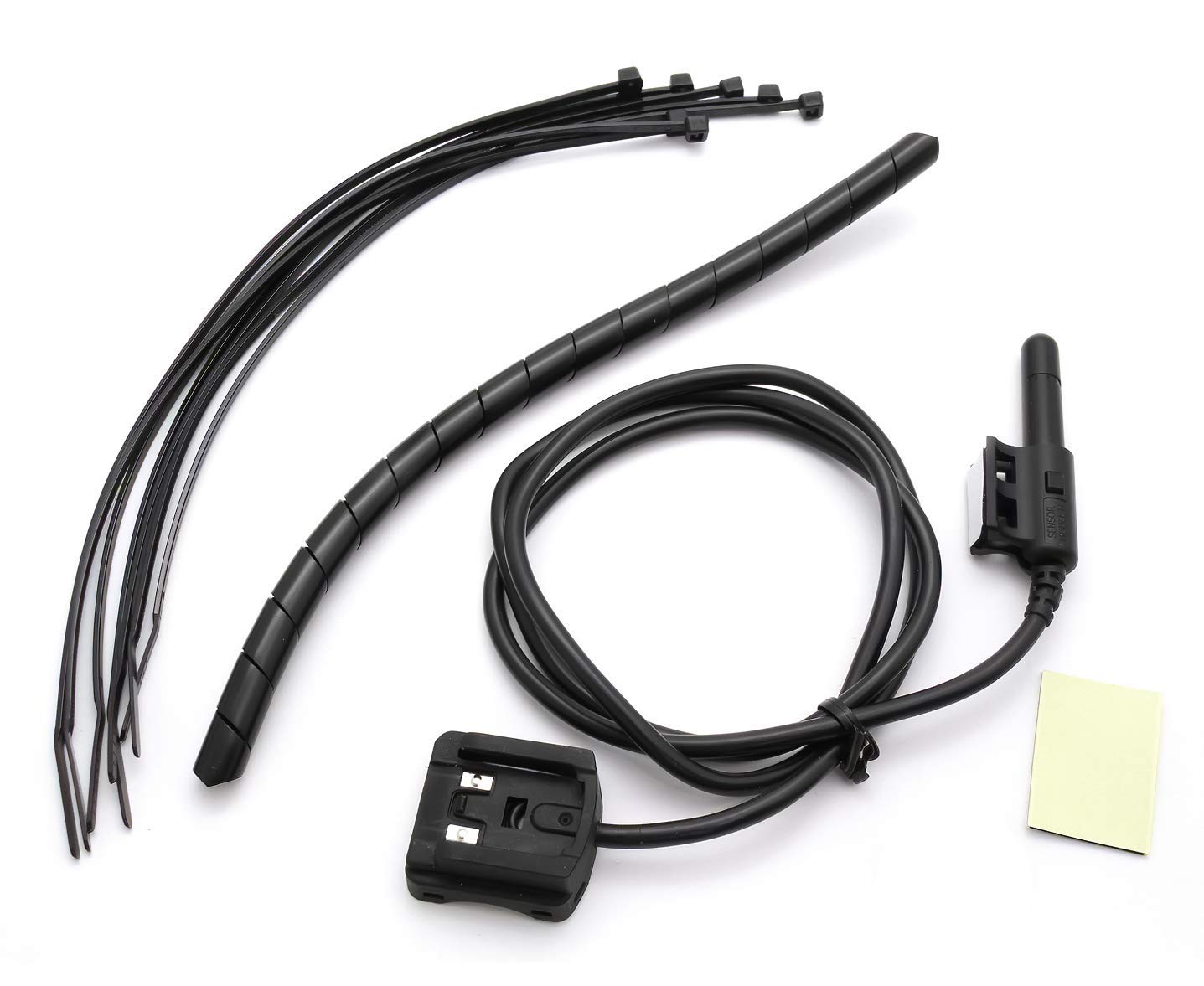
Image showing the CATEYE Enduro wired bracket/sensor, zip-ties, adhesive rubber pad, and wiring sheath. These components are essential for proper installation and secure mounting on your bicycle.
4. Operation
This bracket and sensor unit functions as the data input for your CATEYE Enduro cycling computer. Once correctly installed and connected, it continuously transmits wheel rotation data to the computer, enabling features such as:
- Speed Measurement: Provides real-time current, average, and maximum speed readings.
- Distance Tracking: Records trip distance and total odometer readings.
- Auto Start/Stop: Enables the cycling computer's automatic start and stop functions based on wheel movement.
For detailed instructions on configuring and operating your CATEYE Enduro cycling computer, please refer to the specific manual provided with the computer unit.
5. Maintenance
To ensure the longevity and accurate performance of your CATEYE Enduro Bracket/Sensor, follow these maintenance guidelines:
- Cleaning: Wipe the sensor and bracket with a soft, damp cloth to remove dirt and debris. Avoid using harsh chemicals or abrasive cleaners.
- Inspection: Regularly check the sensor wire for any signs of damage, fraying, or kinks. Ensure all zip-ties are secure and the bracket remains firmly attached.
- Sensor-Magnet Gap: Periodically verify that the gap between the sensor and the wheel magnet is within the recommended 3-5 mm range. Adjust if necessary.
- Environmental Protection: While designed for heavy-duty use, prolonged exposure to extreme weather conditions (e.g., heavy rain, direct sunlight) can affect its lifespan. Store your bike in a sheltered area when not in use.
6. Troubleshooting
If you experience issues with your CATEYE Enduro Bracket/Sensor, consider the following:
- No Speed Display:
- Check the connection of the sensor wire to the cycling computer.
- Verify the sensor-magnet alignment and gap (3-5 mm).
- Ensure the magnet is securely attached to a spoke.
- Inspect the sensor wire for any visible damage.
- Intermittent Readings:
- Re-check sensor-magnet gap and alignment.
- Ensure the sensor wire is not loose or damaged.
- Confirm the bracket is stable and not shifting during rides.
- Physical Damage: If the bracket or sensor unit is physically damaged, it may require replacement.
If troubleshooting steps do not resolve the issue, contact CATEYE customer support for further assistance.
7. Specifications
| Attribute | Detail |
|---|---|
| Brand | CATEYE |
| Model | CC-ED400 (Bracket/Sensor) |
| Material | Plastic |
| Item Weight | 0.01 Ounces |
| Style | Bracket/Sensor |
| Mounting Type | Handlebar Mount (for bracket), Fork Mount (for sensor) |
| UPC | 725012023990 |
| Included Components | Heavy-duty wired bracket/sensor, 6x zip-ties, Adhesive rubber pad, Wiring sheath |
8. Warranty and Support
Warranty: This product is covered by a 2-Year Manufacturer Warranty. Please retain your proof of purchase for warranty claims.
Customer Support: For technical assistance, warranty inquiries, or further information, please visit the official CATEYE website or contact their customer service department. You can find more information at the CATEYE Store on Amazon.


