
Imada ZTS-DPU-44
Imada Z2S-DPU-44 Digital Force Gauge with Remote Sensor Instruction Manual
Model: ZTS-DPU-44
Introduction
This instruction manual provides comprehensive guidance for the safe and effective use of the Imada Z2S-DPU-44 Digital Force Gauge, Model ZTS-DPU-44. This high-performance digital force gauge features a separate remote sensor, making it ideal for precise force measurements in confined or difficult-to-reach areas. Please read this manual thoroughly before operation to ensure proper setup, accurate measurements, and prolonged device lifespan.
1. Setup
1.1 Unpacking and Inspection
Carefully unpack all components. Verify that the package contains the Imada Z2S-DPU-44 Digital Force Gauge unit, the DPU remote sensor, and the connecting cable. Inspect all items for any signs of damage that may have occurred during shipping. If any damage is found, contact your supplier immediately.
1.2 Connecting the Remote Sensor
The DPU remote sensor is designed for both compression and tension measurements. Connect the remote sensor to the main gauge unit using the provided six-foot cable. Ensure the connection is secure to prevent measurement inaccuracies.
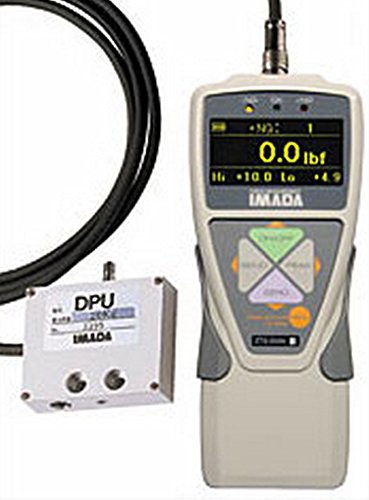
Figure 1: Imada Z2S-DPU-44 Digital Force Gauge connected to its remote DPU sensor via a cable. The main unit displays "0.0 lbf".
1.3 Powering On
Press the power button to turn on the device. Allow a few moments for the gauge to initialize. The display will show the current measurement unit and a zero reading if no force is applied.
2. Operating Instructions
2.1 Measurement Modes
- Real-Time Mode: Displays load transients, showing the force as it is applied. This mode is suitable for continuous monitoring of force changes.
- Peak Mode: Captures and holds the maximum force achieved during a test. This is useful for destructive testing or applications where only the peak force is required.
2.2 Unit Selection
The Imada Z2S-DPU-44 allows selection of measuring units from lbf (pounds-force), kgf (kilograms-force), or Newtons. Refer to the device's user interface for specific button presses to cycle through and select the desired unit.
2.3 Set Points for Go/No-Go Testing
The ZTS-DPU unit offers programmable high and low set points for efficient go/no-go testing. When a measurement is taken:
- An orange indicator lights up for measurements less than the low set point.
- A green indicator lights up for measurements between the high and low set points.
- A red indicator lights up for measurements exceeding the high set point.
Consult the device's menu for instructions on how to program these set points.
2.4 Data Storage and Transmission
The gauge can store up to 1,000 values in its internal memory. These stored values can be displayed on the unit or transmitted to an external device using the RS-232C port. For data transmission, connect the gauge to a compatible computer or data logger via the RS-232C port and use appropriate software (not included) to retrieve the data.
3. Maintenance
3.1 Cleaning
To clean the gauge and sensor, use a soft, dry cloth. For stubborn dirt, a cloth lightly dampened with water or a mild, non-abrasive cleaning solution may be used. Ensure no liquid enters the device openings. Do not use harsh chemicals or solvents.
3.2 Storage
When not in use, store the Imada Z2S-DPU-44 Digital Force Gauge and its remote sensor in a clean, dry environment, away from extreme temperatures, humidity, and direct sunlight. Protect the sensor from physical impact.
3.3 Calibration
For continued accuracy, periodic calibration by an authorized service center is recommended. Refer to the manufacturer's guidelines for recommended calibration intervals.
4. Troubleshooting
- Overload Indicator Flashing: The overload indicator flashes when the applied force exceeds 110% of the full scale (f.S.). The device has an overload capacity of 200% f.S., but continuous operation above 110% f.S. is not recommended and may affect accuracy or damage the sensor. Reduce the applied force immediately.
- No Display/Device Not Powering On: Ensure the device is adequately charged or has fresh batteries (if applicable). Check all cable connections.
- Inaccurate Readings: Verify that the sensor is correctly attached and that the measurement unit is set appropriately. Ensure the device has been calibrated according to manufacturer recommendations. Avoid applying force at an angle to the sensor.
If issues persist after attempting these troubleshooting steps, contact Imada customer support or an authorized service technician.
5. Specifications
| Model | ZTS-DPU-44 |
| Capacity | 44.00 lbf |
| Accuracy | 0.2% f.S., ±1 lsd |
| Selectable Units | lbf (ozf), kgf (gf), Newtons |
| Overload Capacity | 200% of f.S. (Overload indicator flashes beyond 110% of f.S.) |
| Data Storage | Up to 1,000 values |
| Data Output | RS-232C port |
| Sensor Type | Remote DPU sensor (compression and tension) |
| Cable Length | 6 feet (sensor to gauge) |
| Package Dimensions | 14 x 9 x 4 inches |
| Item Weight | 4.04 Pounds |
6. Warranty and Support
6.1 Warranty Information
Specific warranty terms and conditions for the Imada Z2S-DPU-44 Digital Force Gauge are provided by the manufacturer. Please refer to the warranty card included with your product or visit the official Imada website for detailed information regarding warranty coverage and claims.
6.2 Customer Support
For technical assistance, service, or inquiries regarding your Imada Z2S-DPU-44 Digital Force Gauge, please contact Imada customer support directly. Contact information can typically be found on the manufacturer's website or in the product packaging.
Related documentsZTS-DPU-44


Ask a question about this manual
Ask about setup, troubleshooting, compatibility, parts, safety, or missing instructions. Manuals+ will review the question and use this page’s manual context to help answer it.