
1. Introduction
This manual provides essential instructions for the safe and effective operation, setup, and maintenance of the Imada ZTS-DPU-4400 Digital Force Gauge with Remote Sensor. Please read this manual thoroughly before using the device to ensure proper functionality and to prevent damage or injury.
2. Product Overview
The Imada ZTS-DPU-4400 is a high-performance digital force gauge kit designed for precise force measurement. It features a separate DPU sensor, which is ideal for measurements in confined spaces or hard-to-reach areas. The system is capable of measuring both compression and tension forces.
Key Features:
- Accuracy: 0.2 percent F.S., 1 LSD.
- Selectable Units: Measures in lbf (ozf), kgf (gf), or Newtons.
- Overload Capacity: 200 percent of F.S. (An overload indicator flashes beyond 110 percent of F.S.).
- Remote Sensor: DPU sensor connected via a standard six-foot cable, suitable for challenging measurement environments.
- Programmable Set Points: High/low set points for go/no-go testing with visual indicators (orange for below low, green for within range, red for above high).
- Data Storage: Stores up to 1,000 values in memory.
- Data Output: RS-232C port for displaying or transmitting stored data.
- Measurement Modes: Real-time mode for load transients and peak mode for capturing maximum force.
Product Components:
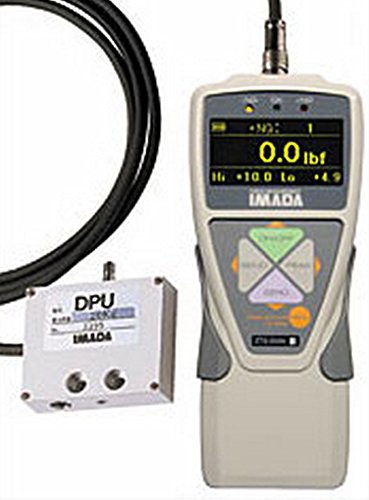
3. Setup
- Unpacking: Carefully remove all components from the packaging. Verify that all parts listed in the packing list are present and undamaged.
- Sensor Connection: Connect the DPU remote sensor to the main force gauge unit using the provided six-foot cable. Ensure the connection is secure to prevent signal loss.
- Power On: Press the power button on the force gauge unit to turn it on. The display should illuminate.
- Initial Calibration Check: Perform a quick zero adjustment if necessary, following the on-screen prompts or specific instructions in the full user manual (if available).
4. Operating Instructions
4.1 Basic Measurement
- Select Units: Use the unit selection button to choose between lbf, kgf, or Newtons as required for your measurement.
- Apply Force: Apply the force to be measured to the remote DPU sensor. The current force will be displayed on the gauge's screen.
- Read Measurement: Observe the digital display for the force reading.
4.2 Go/No-Go Testing with Set Points
- Set High/Low Limits: Access the menu to program your desired high and low force set points. Refer to the full user manual for detailed instructions on setting these values.
- Perform Test: Apply force to the sensor. The gauge will provide visual feedback:
- Orange Light: Indicates measurement is less than the low set point.
- Green Light: Indicates measurement is between the high and low set points.
- Red Light: Indicates measurement is over the high set point.
4.3 Data Storage and Transmission
- The gauge can store up to 1,000 measurement values in its internal memory.
- Stored data can be reviewed directly on the gauge's display or transmitted to an external device via the RS-232C port. Consult the full user manual for instructions on data retrieval and communication protocols.
4.4 Measurement Modes
- Real-Time Mode: Displays instantaneous load transients, useful for observing dynamic force changes.
- Peak Mode: Captures and holds the maximum force achieved during a test, ideal for destructive testing or identifying peak loads.
5. Maintenance
- Cleaning: Wipe the gauge and sensor with a soft, dry cloth. Do not use abrasive cleaners or solvents.
- Storage: Store the device in a dry, dust-free environment at moderate temperatures.
- Battery: If applicable, ensure batteries are charged or replaced as needed. Refer to the full manual for battery type and replacement procedures.
- Calibration: Regular calibration by authorized service personnel is recommended to maintain measurement accuracy.
6. Troubleshooting
If you encounter issues with your Imada ZTS-DPU-4400, consider the following basic troubleshooting steps:
- No Power: Check battery levels or power connection. Ensure the power button is fully pressed.
- Incorrect Readings: Verify the sensor is correctly connected and undamaged. Ensure the correct measurement unit is selected. Perform a zero adjustment.
- Overload Indicator: If the red overload indicator flashes, the applied force exceeds 110% of the full scale. Reduce the load immediately to prevent damage.
- Communication Issues: Ensure the RS-232C cable is securely connected to both the gauge and the external device. Verify communication settings.
For more complex issues or persistent problems, please contact Imada customer support or an authorized service center.
7. Specifications
| Feature | Detail |
|---|---|
| Model Number | ZTS-DPU-4400 |
| Capacity | 4400 lbf (approx. 2000 kgf / 19613 N) |
| Accuracy | 0.2% F.S., 1 LSD |
| Overload Capacity | 200% of F.S. |
| Selectable Units | lbf (ozf), kgf (gf), Newtons |
| Data Storage | Up to 1,000 values |
| Output | RS-232C |
| Package Dimensions | 14 x 10 x 4 inches |
| Item Weight | 7.99 Pounds |
| Manufacturer | COLE-PARMER |
| ASIN | B00OEP6H36 |
8. Warranty and Support
For information regarding product warranty, technical support, or service, please contact Imada customer service or visit their official website. Keep your purchase receipt and product serial number readily available when seeking support.
Manufacturer: COLE-PARMER
Brand: Imada

