
Introduction
This manual provides detailed instructions for the installation, operation, and maintenance of your Pioneer AVH-110BT Double DIN Car Stereo Receiver. This multimedia receiver features a 6.2" WVGA touchscreen display, built-in Bluetooth for hands-free calling and audio streaming, DVD/CD playback, AM/FM radio, and front USB input. It supports Android smartphones for music playback and includes inputs for a backup camera and RCA preouts for external amplifiers.
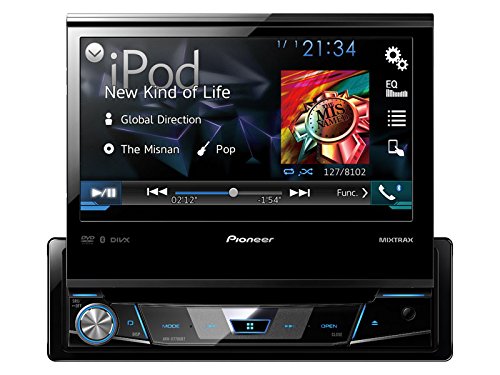
Image: Pioneer Car Stereo Receiver with Touchscreen Display. This unit features a 6.2-inch WVGA touchscreen, physical buttons, and a rotary volume knob. Note: The image may depict a similar Pioneer model; refer to the product description for exact features of the AVH-110BT.
Setup and Installation
Proper installation is crucial for optimal performance and safety. It is highly recommended that installation be performed by a qualified professional.
1. Wiring Connections
Ensure all wiring connections are secure and correctly matched to your vehicle's electrical system. Refer to the wiring diagram provided with your unit for specific connections. Key connections include:
- Power (Yellow): Constant 12V supply.
- Accessory (Red): Switched 12V supply.
- Ground (Black): Secure chassis ground.
- Speaker Outputs: Connect to vehicle speakers (Front Left, Front Right, Rear Left, Rear Right).
- Parking Brake (Light Green): Connect to the vehicle's parking brake switch for video playback safety.
- Reverse Gear Signal (Violet/White): For automatic display of the rear-view camera when shifting into reverse.
- RCA Preouts: For connecting external amplifiers (Front, Rear, Subwoofer).
- USB Input: For connecting USB devices.
- AUX Input: For connecting external audio sources.
2. Mounting the Unit
Install the receiver into the double DIN opening of your vehicle's dashboard using the supplied mounting hardware. Ensure the unit is securely fastened to prevent vibration and movement.
3. Initial Power-On and Basic Settings
After installation, turn on your vehicle's ignition. The unit should power on. Follow any on-screen prompts for initial setup, such as language selection and time setting. Adjust basic audio settings to your preference.
Operating Instructions
1. Touchscreen Interface
The 6.2" WVGA touchscreen display is the primary interface for controlling the unit. Tap icons and menus to navigate functions. Swipe gestures may be supported for certain operations.
2. Audio Source Selection
From the main menu, select your desired audio source:
- DVD/CD: Insert a disc into the slot. Playback will begin automatically or can be selected from the source menu.
- AM/FM Radio: Select the "Radio" source. Use the on-screen controls to tune stations, scan, and save presets (18 FM / 6 AM).
- USB: Connect a USB device to the front USB port. The unit supports WMA, WAV, MP3, and AAC audio files, as well as MPEG4(MP4/MOV/AVI), MPEG1, MPEG2, and DivX video files.
- AUX: Connect an external audio player to the rear AUX input using a 3.5mm cable.
3. Bluetooth Connectivity
The built-in Bluetooth allows for hands-free calling and audio streaming.
- Pairing: On your smartphone, search for Bluetooth devices and select "Pioneer AVH-110BT". Enter the PIN if prompted (usually "0000").
- Hands-Free Calling: Once paired, you can make and receive calls directly through the receiver's microphone and speakers.
- Audio Streaming: Stream music from your paired smartphone to the receiver.
4. Android Music Support
Connect your Android smartphone via the USB port to access music files using USB MTP (Media Transfer Protocol).
5. Audio Settings
Access the audio settings menu to customize your sound experience:
- 7-Band EQ: Adjust frequency bands to fine-tune the audio output.
- Bass Boost: Enhance low-frequency sounds.
- RCA Preouts: Configure settings for external amplifiers connected to the front, rear, or subwoofer preouts.
6. Display Customization
Personalize the display with selectable colors (blue, red, amber, green, mono) to match your vehicle's interior lighting or personal preference.
Maintenance
- Cleaning the Display: Use a soft, dry cloth to gently wipe the touchscreen. For stubborn smudges, slightly dampen the cloth with water or a screen-safe cleaner. Avoid abrasive materials or harsh chemicals.
- Disc Care: Handle DVDs and CDs by their edges. Keep them clean and free of scratches to ensure proper playback.
- USB Port: Keep the USB port free of dust and debris.
Troubleshooting
If you encounter issues with your AVH-110BT, refer to the following common problems and solutions:
| Problem | Possible Cause | Solution |
|---|---|---|
| No power | Incorrect wiring, blown fuse, vehicle ignition off. | Check power and ground connections. Inspect vehicle and unit fuses. Ensure ignition is on. |
| No sound | Volume too low, mute active, incorrect speaker wiring, amplifier issues. | Increase volume. Check mute status. Verify speaker connections. Check external amplifier power/settings if used. |
| Bluetooth not connecting | Device not in pairing mode, incorrect PIN, interference. | Ensure both devices are in pairing mode. Re-enter PIN. Move devices closer. Reset Bluetooth on both devices. |
| Video not playing | Parking brake not engaged, incorrect video format, damaged disc/file. | Ensure parking brake is fully engaged. Verify video file compatibility (MPEG4, MPEG1, MPEG2, DivX). Check disc condition. |
| USB device not recognized | Incompatible format, damaged USB device, excessive power draw. | Ensure USB device is formatted correctly (FAT16/FAT32). Try a different USB device. Ensure files are supported. |
If the problem persists after trying these solutions, contact Pioneer customer support or a qualified service technician.
Specifications
- Model Number: AVH-110BT
- Display: 6.2" WVGA Touchscreen
- Connectivity: Bluetooth, USB, 3.5mm Jack
- Supported Media: DVD, CD, USB (WMA, WAV, MP3, AAC, MPEG4, MPEG1, MPEG2, DivX)
- Radio: AM/FM Tuner (18 FM / 6 AM presets)
- Audio Output: 4-channel, MOSFET 50W x 4 amplifier
- Preouts: 2 pairs RCA (Front/Rear or Front/Subwoofer)
- Equalizer: 7-band EQ
- Special Features: Bass Boost, Selectable Display Colors, Android Music Support (via USB MTP), Rear Camera Input
- Control Method: Touch
- Supported Internet Services: Pandora, Spotify
- Item Weight: 3.8 Pounds
- Color: Black
Warranty Information
This Pioneer AVH-110BT unit comes with a 1-year warranty from the date of purchase. Please retain your proof of purchase for warranty claims. The warranty covers defects in materials and workmanship under normal use. It does not cover damage caused by improper installation, accident, misuse, abuse, neglect, or unauthorized modification.
For detailed warranty terms and conditions, please refer to the warranty card included with your product or visit the official Pioneer website.
Support
For further assistance, technical support, or service inquiries regarding your Pioneer AVH-110BT, please contact Pioneer customer support through their official website or the contact information provided in your product packaging.
You can often find FAQs, software updates, and additional resources on the official Pioneer support website.