1. Introduction
This manual provides essential instructions for the safe and efficient use of your Sony Walkman NW-A16/P High-Resolution Audio Player. Please read this manual thoroughly before operating the device and retain it for future reference. The NW-A16/P is designed to deliver superior audio quality, supporting high-resolution audio formats and enhancing compressed audio with DSEE HX technology.
2. Product Overview
Familiarize yourself with the components and controls of your Walkman NW-A16/P.
Front View

Image Description: This image displays the front of the Sony Walkman NW-A16/P. The device features a rectangular LCD screen at the top, below which are three function buttons: 'HOME', 'BACK', and 'PWR OFF / OPTION'. A circular navigation pad with a central 'Play/Pause' button is located at the bottom, surrounded by directional controls. The device is rose pink in color.
Rear View
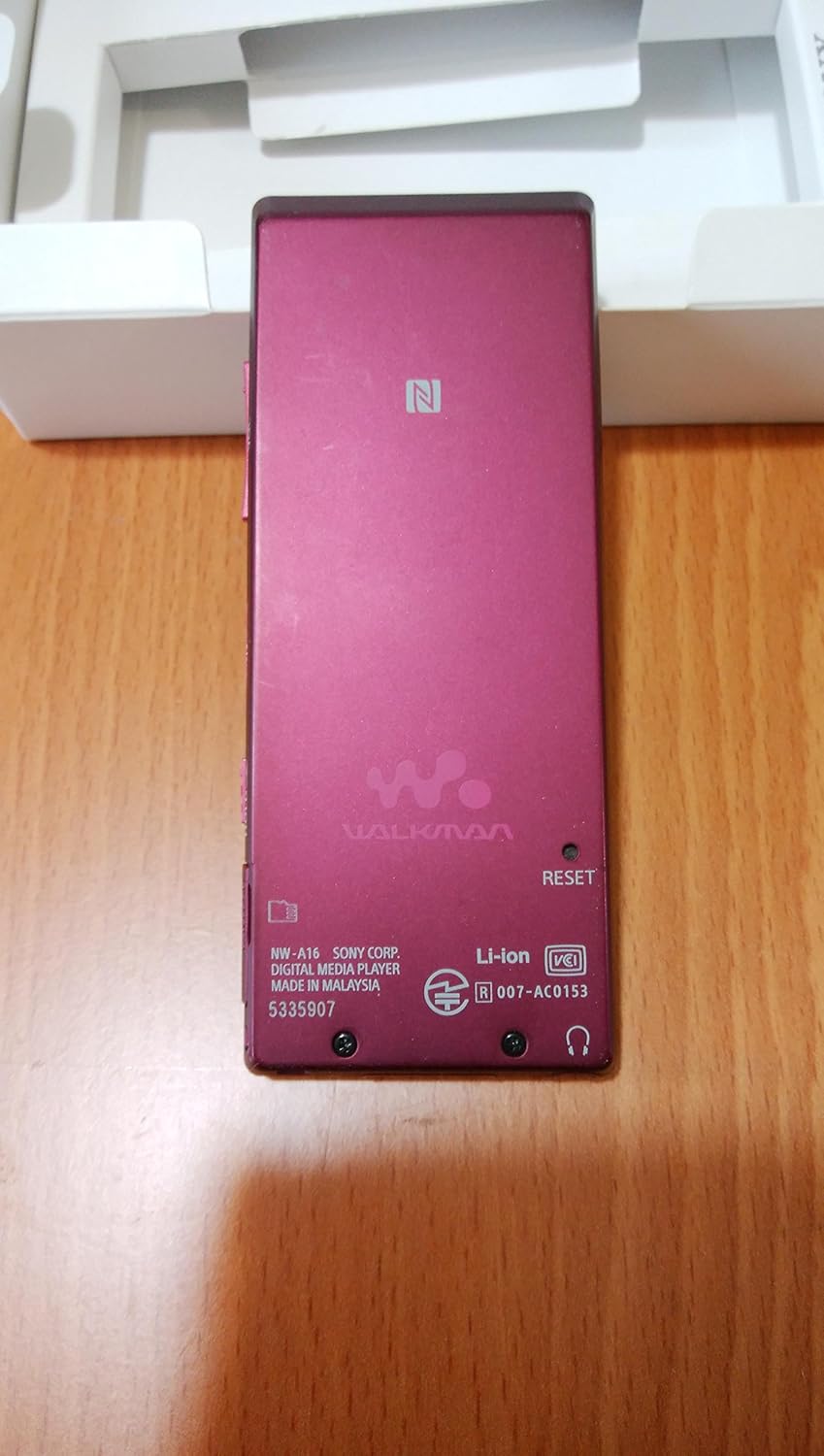
Image Description: This image shows the back of the Sony Walkman NW-A16/P. The rose pink casing features the 'WALKMAN' logo prominently in the center. A small 'RESET' button is visible on the right side. Regulatory markings and model information ('NW-A16 SONY CORP. DIGITAL MUSIC PLAYER MADE IN MALAYSIA') are printed at the bottom. A small NFC logo is visible near the top.
Key Controls:
- HOME Button: Returns to the main menu.
- BACK Button: Navigates back to the previous screen.
- PWR OFF / OPTION Button: Powers the device on/off or accesses context-sensitive options.
- Navigation Pad (Up/Down/Left/Right): Used for menu navigation and track skipping.
- Play/Pause Button (Center of Navigation Pad): Controls audio playback.
3. Setup
3.1. Charging the Battery
Before initial use, fully charge the Walkman. Connect the supplied USB cable to the Walkman's USB port and then to a powered USB port on a computer or a compatible USB AC adapter (not supplied). The charging indicator will illuminate during charging and turn off when complete. A full charge takes approximately 4 hours.
3.2. Powering On/Off
- To Power On: Press and hold the PWR OFF / OPTION button until the screen lights up.
- To Power Off: Press and hold the PWR OFF / OPTION button until the power off confirmation appears, then select 'Power Off'.
3.3. Inserting a microSDXC Card
The Walkman supports microSDXC cards for expanded storage. Locate the microSD card slot (usually on the side) and gently insert the card until it clicks into place. Ensure the card is inserted in the correct orientation.
4. Operating Instructions
4.1. Connecting to a Computer and Transferring Music
Connect your Walkman to a computer using the supplied USB cable. The Walkman is compatible with Windows and Mac operating systems.
- For Windows: Use Sony's Media Go software (available for download) to manage and transfer music files, including high-resolution audio.
- For Mac/Other OS: The Walkman may appear as a removable storage device. You can drag and drop music files directly into the 'MUSIC' folder on the Walkman's internal storage or microSD card.
Supported audio formats include MP3, WMA, AAC, AIFF, ALAC, ATRAC3, and FLAC.
4.2. Audio Playback
Navigate through your music library using the navigation pad. Select a track to begin playback. Use the center Play/Pause button to control playback. The navigation pad's left/right buttons can skip tracks, and up/down buttons can adjust volume.
4.3. High-Resolution Audio
The NW-A16/P is designed to play high-resolution audio files, offering a superior listening experience with greater detail and clarity than standard audio formats.
4.4. DSEE HX Technology
The Digital Sound Enhancement Engine HX (DSEE HX) upscales existing compressed audio files (like MP3s) to near high-resolution sound quality, restoring subtle high-frequency sounds lost during compression.
4.5. Bluetooth Connectivity
To connect to Bluetooth headphones or speakers:
- Enable Bluetooth on your Walkman via the settings menu.
- Put your Bluetooth audio device into pairing mode.
- On your Walkman, search for available devices and select your audio device from the list to pair.
5. Maintenance
5.1. Cleaning
Wipe the Walkman's surface with a soft, dry cloth. Avoid using abrasive cleaners, solvents, or alcohol, as these can damage the finish. Keep the screen clean to maintain optimal visibility.
5.2. Battery Care
To prolong battery life, avoid exposing the device to extreme temperatures. If the device will not be used for an extended period, charge it to about 50% before storing. Fully discharging the battery frequently can reduce its overall lifespan.
6. Troubleshooting
If you encounter issues with your Walkman, refer to the following common problems and solutions:
| Problem | Solution |
|---|---|
| Device does not power on. | Ensure the battery is charged. Press and hold the PWR OFF / OPTION button for several seconds. If unresponsive, locate the small 'RESET' hole on the back of the device and gently press it with a thin object (e.g., a straightened paper clip). |
| No sound during playback. | Check the volume level. Ensure headphones are properly connected or Bluetooth device is paired and connected. Test with different headphones. |
| Cannot transfer files from computer. | Ensure the USB cable is securely connected to both the Walkman and the computer. Try a different USB port or cable. Verify that the Walkman is recognized by your computer as a storage device. Restart both the Walkman and the computer. |
| Battery drains quickly. | Reduce screen brightness. Turn off Bluetooth when not in use. Avoid playing very high-resolution files continuously for extended periods. Ensure no background processes are running unnecessarily. |
7. Specifications
| Feature | Detail |
|---|---|
| Model Name | NW-A16/P |
| Internal Storage | 32 GB (Flash Memory) |
| External Storage | microSDXC memory card, microSD card |
| Supported Audio Formats | MP3, WMA, AAC, AIFF, ALAC, ATRAC3, FLAC |
| Battery Type | Built-in Lithium-ion |
| Charging Time | Approx. 4 hours |
| Continuous Playback Time | Approx. 50 hours |
| Display Size | 1.77 inches |
| Display Technology | LCD |
| Connectivity | USB, Bluetooth |
| Compatible OS | Windows, Mac |
| Features | High-Resolution Audio, DSEE HX |
| Color | Rose Pink |
8. Safety Information
- Do not expose the device to extreme temperatures, direct sunlight, or high humidity.
- Avoid dropping or subjecting the device to strong impacts.
- Do not attempt to disassemble or modify the device. This may result in electric shock or damage.
- Use only approved accessories and power sources.
- Listen at moderate volume levels to prevent hearing damage.
9. Warranty and Support
For warranty information, technical support, or service inquiries, please refer to the official Sony support website or contact your local Sony customer service center. Keep your proof of purchase for warranty claims.


