
Victron Energy QUA485021100
Victron Energy Quattro 5000VA 48-Volt Pure Sine Wave Inverter and 70 amp Battery Charger User Manual
Model: QUA485021100
1. Introduction
The Victron Energy Quattro 5000VA 48-Volt Pure Sine Wave Inverter and 70 amp Battery Charger is a sophisticated power management device designed for various applications, including off-grid systems, marine, and RV installations. This combined inverter and charger unit provides reliable pure sine wave power and efficient battery charging capabilities.
Key features include the ability to connect to two independent AC sources, a rapid transfer switch for uninterrupted power during grid failures, and the unique Power Assist function to prevent overload of limited AC sources. The Quattro also supports parallel operation for increased power output and can be remotely monitored and controlled via a Victron Energy GX device.
2. Safety Information
Please read and understand all safety instructions before installing, operating, or maintaining the Victron Energy Quattro. Failure to follow these instructions may result in electric shock, fire, serious injury, or death.
- Qualified Personnel Only: Installation, maintenance, and troubleshooting should only be performed by qualified and trained personnel.
- Disconnect Power: Always disconnect all AC and DC power sources before performing any installation, wiring, or maintenance on the unit. Verify that no voltage is present.
- Proper Ventilation: Ensure the installation location provides adequate ventilation to prevent overheating. Do not block ventilation openings.
- Environmental Conditions: Do not expose the unit to water, excessive moisture, or corrosive environments. Install in a dry, protected area.
- Correct Wiring: Use appropriate wire gauges and ensure all connections are secure and properly torqued according to local electrical codes and manufacturer specifications.
- Grounding: The unit must be properly grounded.
3. Product Overview
The Victron Energy Quattro integrates a powerful pure sine wave inverter, an advanced battery charger, and a high-speed AC transfer switch into a single compact enclosure. It is designed to provide reliable AC power from batteries and efficiently charge them from various AC sources.
3.1. Main Components
- Inverter: Converts DC battery power to AC power for connected loads.
- Charger: Charges batteries from an AC source (grid, generator, shore power).
- Transfer Switch: Automatically switches between connected AC sources and inverter output.
- Dual AC Inputs: Allows connection of two independent AC sources.
- Power Assist: Boosts the capacity of the AC source by taking power from the battery when needed.
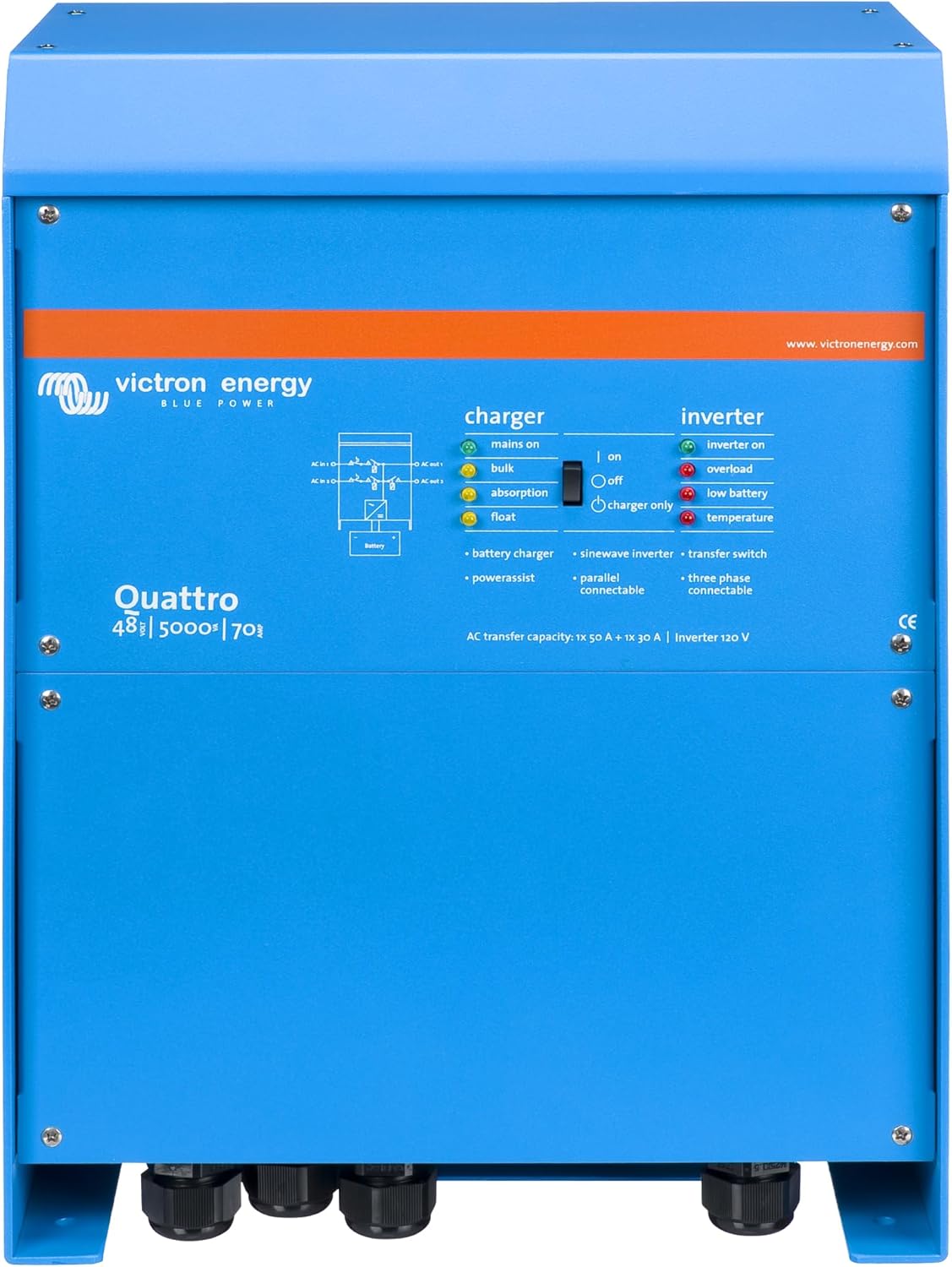
Figure 3.1: Front view of the Victron Energy Quattro 5000VA inverter/charger, showing the control panel and connection points.
3.2. Key Features
- Combined Inverter and Charger: A single unit provides both pure sine wave inversion and multi-stage battery charging.
- Dual AC Inputs: Connects to two independent AC sources (e.g., shore power and generator) and automatically selects the active one.
- Fast Transfer Switch: Ensures uninterrupted power supply to connected loads, even during grid failures, with a transfer time of less than 20 milliseconds.
- Power Assist: Prevents overload of a limited AC source by supplementing with power from the battery.
- Parallel and Three-Phase Capability: Up to six Quattro units can operate in parallel for increased power output, and three-phase or split-phase configurations are possible.
- Remote Monitoring and Control: Compatible with Victron Energy GX devices for remote monitoring and configuration via the internet.

Figure 3.2: Overview of the Quattro's core functionalities, including Energy Storage Systems integration and PowerAssist.

Figure 3.3: Illustration of parallel operation, demonstrating how multiple Quattro units can be combined for higher power output.
4. Setup and Installation
Proper installation is critical for the safe and efficient operation of the Quattro. It is highly recommended that installation be performed by a certified electrician or qualified professional.
4.1. Mounting Location
Choose a dry, well-ventilated location that is protected from direct sunlight, rain, and excessive dust. Ensure sufficient clearance around the unit for airflow and access to connections. The unit can be mounted vertically.

Figure 4.1: Physical dimensions of the Quattro unit, important for planning installation space.
4.2. Electrical Connections
All wiring must comply with local electrical codes and standards. Refer to the detailed wiring diagrams in the full product manual for specific connection instructions.
- Battery Connection: Connect the 48V battery bank to the DC terminals. Ensure correct polarity and use appropriately sized cables.
- AC Input 1 & 2: Connect your primary and secondary AC sources (e.g., grid/shore power and generator) to the designated AC input terminals.
- AC Output: Connect your AC loads to the AC output terminals. The Quattro features two AC outputs; the second output is for loads that should not be discharged by the battery (e.g., air conditioning).
- Grounding: Ensure the unit is properly grounded to a reliable earth ground.

Figure 4.2: Schematic representation of the Quattro's dual AC inputs and outputs.
5. Operating Instructions
Once installed and all connections are verified, the Quattro is ready for operation. The unit operates largely automatically, managing power flow between AC sources, batteries, and loads.
5.1. Powering On/Off
To power on the unit, ensure all connections are secure and then apply DC power from the battery bank. The unit will perform a self-test. To power off, disconnect all AC inputs and then disconnect the DC battery supply.
5.2. Status Indicators
The front panel of the Quattro features LED indicators that provide real-time status information regarding charger operation, inverter status, and warnings. Refer to the main product image (Figure 3.1) for indicator locations.
- Charger Status: LEDs indicate Bulk, Absorption, and Float charging stages.
- Inverter Status: LEDs indicate Inverter On, Overload, Low Battery, and Temperature warnings.
- AC Input Status: LEDs indicate which AC input is active (Mains On).
5.3. Power Assist Functionality
The Power Assist feature automatically detects when the incoming AC power from a generator or shore connection is insufficient for the connected loads. It then supplements the AC supply by drawing power from the battery, preventing the AC source from being overloaded. When the load decreases, the excess power is used to recharge the batteries.

Figure 5.1: Visual representation of the Power Assist feature.
5.4. Remote Monitoring and Configuration
For advanced monitoring, control, and configuration, the Quattro can be connected to a Victron Energy GX device (sold separately). This allows users to access system data and adjust settings remotely via the VictronConnect app or the Victron Remote Monitoring (VRM) portal.

Figure 5.2: The VictronConnect app provides comprehensive monitoring and configuration capabilities.
6. Maintenance
The Victron Energy Quattro is designed for long-term reliability with minimal maintenance. However, periodic checks can help ensure optimal performance and longevity.
- Cleanliness: Keep the unit clean and free from dust and debris. Use a dry cloth to wipe down the exterior. Do not use liquid cleaners.
- Ventilation: Regularly check that ventilation openings are not obstructed. Ensure proper airflow around the unit.
- Connections: Periodically inspect all electrical connections (AC and DC) for tightness and signs of corrosion. Tighten any loose connections.
- Battery Health: Monitor the health of your battery bank as per the battery manufacturer's recommendations. A healthy battery bank is crucial for the Quattro's performance.
7. Troubleshooting
This section provides general guidance for common issues. For detailed troubleshooting, refer to the comprehensive Victron Energy Quattro manual or contact technical support.
| Problem | Possible Cause | Solution |
|---|---|---|
| No AC Output | No DC input (battery disconnected/low), Overload, High temperature, AC input not present. | Check battery connections and voltage. Reduce load. Allow unit to cool. Verify AC input sources. |
| Batteries Not Charging | No AC input, Charger disabled, Battery temperature too high/low, Faulty battery. | Check AC input connection. Ensure charger is enabled. Check battery temperature. Inspect battery condition. |
| Overload Warning | Connected loads exceed inverter capacity. | Reduce the number or power consumption of connected AC loads. |
| High Temperature Warning | Insufficient ventilation, High ambient temperature, Overload. | Ensure clear airflow around the unit. Reduce ambient temperature if possible. Reduce load. |
If issues persist after attempting these solutions, contact Victron Energy technical support.
8. Specifications
| Attribute | Detail |
|---|---|
| Model Name | Victron Energy Quattro 5000VA 48V |
| Item Model Number | QUA485021100 |
| Product Dimensions | 9.6 x 13 x 17.5 inches |
| Item Weight | 77.8 pounds |
| Brand | Victron Energy |
| Manufacturer | Victron Energy |
| Power Source | Battery Powered |
| Battery Capacity | 70 Amp Hours |
| Recommended Uses | Home |
9. Warranty and Support
For detailed warranty information, terms, and conditions, please refer to the official Victron Energy website or the documentation included with your product. Victron Energy provides comprehensive support for its products.
If you require technical assistance, have questions about installation, or need to report an issue, please contact Victron Energy customer support or an authorized Victron Energy dealer. You can often find support resources, FAQs, and contact information on the official Victron Energy website: www.victronenergy.com.
Related Documents - QUA485021100
 |
CCGX Remote VEConfigure and Firmware Updates Guide | Victron Energy Comprehensive guide from Victron Energy on using CCGX and VE Power Setup for remote configuration of VE.Bus devices and firmware updates for VE.Can products. Learn about Remote VEConfigure and firmware update procedures. |
 |
Victron Energy Quattro Inverter Charger Manual: Safety, Installation, Operation Comprehensive user manual for Victron Energy Quattro inverter/charger models (firmware xxxx400+). Covers safety, installation, operation, configuration, troubleshooting, and technical specifications for marine, solar, and backup power systems. |
 |
ESS Application Guide: Victron Quattro 48V/8-10-15kVA with Ziehl UFR1001E Technical guide for implementing single fault-tolerant grid disconnection in Victron Quattro 48V ESS systems using the Ziehl UFR1001E anti-islanding device. |
 |
Victron Energy Quattro Inverter/Charger User Manual Comprehensive user manual for the Victron Energy Quattro inverter/charger, covering installation, configuration, operation, and troubleshooting for models 12/3000, 24/3000, and 48/3000. |
 |
Manuel Victron Energy Quattro 48/15000/200-100/100 : Installation, Configuration et Spécifications Manuel complet pour le Victron Energy Quattro 48/15000/200-100/100. Ce guide détaille l'installation, la configuration, le fonctionnement, les spécifications techniques et le dépannagede cet onduleur/chargeur puissant, idéal pour les systèmes d'alimentation autonomes, connectés au réseau et de secours. |
 |
Victron Energy Quattro 120V Inverter/Charger - Features, Specifications, and Control Comprehensive details on the Victron Energy Quattro 120V inverter/charger series, covering advanced features such as PowerControl, PowerAssist, integrated transfer switch, seamless power backup, three-phase/split-phase capability, and remote monitoring options via the VRM portal. Includes detailed technical specifications and accessory information. |
Ask a question about this manual
Ask about setup, troubleshooting, compatibility, parts, safety, or missing instructions. Manuals+ will review the question and use this page’s manual context to help answer it.