
1. Introduction
This manual provides essential instructions for the safe and effective use of On Call Express Blood Glucose Test Strips. Please read this manual thoroughly before using the test strips to ensure accurate results and proper operation. Keep this manual for future reference.
2. Product Overview
On Call Express Blood Glucose Test Strips are designed for quantitative measurement of glucose in fresh capillary whole blood samples. These strips are intended for in vitro diagnostic use only (for self-testing outside the body) by people with diabetes at home and by healthcare professionals in clinical settings as an aid in monitoring the effectiveness of diabetes control.
The test strips feature no-coding technology, requiring a small blood sample (0.4 µL) and providing results in approximately 4-5 seconds. They are compatible exclusively with On Call family blood glucose meters.

Image: On Call Express Blood Glucose Test Strips, showing the box, vial, and a single test strip. This illustrates the product components.
3. Setup
3.1 Unpacking and Inspection
Upon receiving your On Call Express Blood Glucose Test Strips, carefully inspect the packaging for any signs of damage. Ensure the vial cap is securely closed. Do not use strips from a damaged or opened vial.
3.2 Storage
- Store test strips in their original vial with the cap tightly closed.
- Keep the vial in a cool, dry place between 2-30°C (36-86°F).
- Do not store in direct sunlight or refrigerate.
- Use test strips within 6 months after opening the vial, or before the expiration date printed on the vial, whichever comes first. Write the opening date on the vial label.
3.3 Required Materials (Not Included)
- On Call Express Blood Glucose Meter
- Lancing device
- Sterile lancets
- Alcohol wipes (optional)
Video: A short demonstration of opening the On Call Express test strip vial. This shows how to access the strips safely.
4. Operating Instructions
4.1 Preparing for a Test
- Wash your hands with warm, soapy water and dry them thoroughly.
- Gather all necessary items: meter, test strip vial, lancing device, and lancet.
- Ensure the meter is clean and functioning correctly.
4.2 Performing a Blood Glucose Test (3-Step Process)
- Insert Test Strip: Remove one test strip from the vial and immediately close the cap tightly. Insert the test strip into the meter's test strip port. The meter will turn on automatically.
- Prepare for Blood Sample: The meter will display a blinking blood drop symbol, indicating it is ready for a blood sample.
- Apply Blood Sample: Use your lancing device to obtain a blood sample from your fingertip. Touch the tip of the test strip to the blood drop. The blood will be drawn into the strip automatically. Hold the strip to the blood drop until the meter beeps and begins counting down.

Image: A visual guide to the 3-step testing process: 1. Insert strip, 2. Wait for blinking drop, 3. Apply blood sample.
4.3 Reading Results
After the countdown, your blood glucose result will appear on the meter's display. The result will be stored in the meter's memory. Refer to your meter's instruction manual for details on interpreting results and memory functions.
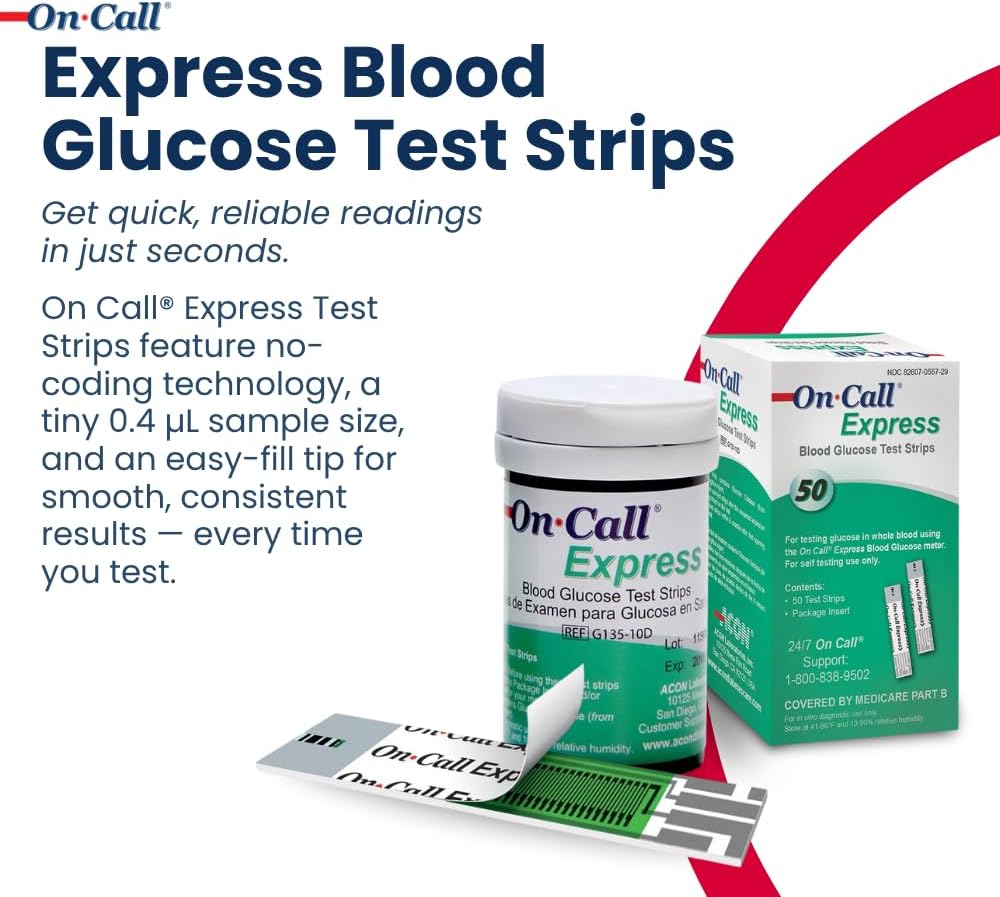
Image: A person's hand holding the On Call Express meter with a test strip inserted, showing a blood sample being applied and a reading displayed.
5. Maintenance
5.1 Test Strip Handling
- Always handle test strips with clean, dry hands.
- Do not bend, cut, or alter test strips.
- Do not reuse test strips. Dispose of used strips in a sharps container or according to local regulations.
5.2 Meter Cleaning
Regularly clean your blood glucose meter according to its specific instruction manual. Ensure no blood or debris enters the test strip port.
6. Troubleshooting
If you encounter issues, refer to your On Call Express Blood Glucose Meter's instruction manual for detailed troubleshooting steps. Common issues related to test strips include:
- Error Message: Ensure the test strip is inserted correctly and that it is not expired.
- Inaccurate Results: Verify the test strip vial cap was closed tightly, the strips were stored properly, and the blood sample size was adequate. Perform a control solution test if available.
- No Blood Drawn: Ensure the test strip tip is properly touching the blood drop and that enough blood is available.
If problems persist, contact On Call customer support.
7. Specifications
| Feature | Detail |
|---|---|
| Product Name | On Call Express Blood Glucose Test Strips |
| Model Number | G135-10D |
| Sample Volume | 0.4 µL |
| Test Time | Approximately 4-5 seconds |
| Storage Temperature | 2-30°C (36-86°F) |
| Compatibility | Exclusively with On Call family blood glucose meters |
| Shelf Life (Opened Vial) | 6 months |
8. Warranty and Support
8.1 Warranty Information
For specific warranty details regarding On Call Express Blood Glucose Test Strips, please refer to the documentation included with your On Call Blood Glucose Meter or contact On Call customer support directly. Test strips are consumable items and typically do not carry a separate warranty beyond ensuring they are free from manufacturing defects upon purchase and within their stated shelf life.
8.2 Customer Support
If you have any questions, concerns, or require assistance with your On Call Express Blood Glucose Test Strips or meter, please contact On Call customer support:
- Manufacturer: ACON Laboratories, Inc.
- Support Phone: 1-800-838-9502
- Website: www.aconlabs.com
Please have your product model number (G135-10D) and lot number ready when contacting support.


